



In Microsoft Entra ID, applications access data alongside people, so like people, they need an identity of their own. Four terms cluster around that idea and get mixed up constantly: App Registration, Service Principal, Enterprise Application, and Managed Identity.
In this article, I'll walk through what each one is, what it's used for, and how they differentiate.
When a company builds an application, the goal is almost always to enable some functionality: Accessing data, reading email, writing to SharePoint, or perhaps automation flows. The four terms discussed in this article define the application and its identity.
App Registration
An app registration in Microsoft Entra ID is how you tell Microsoft that an application exists inside your tenant. It's where you define the app's identity and what it's allowed to do. Before an application can authenticate or take any action, Entra ID must know about it, so it must be defined first.
When you register the app, Entra ID generates an application object that lives in the tenant where you registered it, along with a unique identifier called the Application (client) ID. On this object you set the credentials the app will use to prove it's really itself, the permissions it needs to perform its purpose, and, importantly, whether it's meant to stay inside your own tenant or be usable by other companies too.
The application object works like a blueprint. From it, one or more service principals get created.
Example: Say, the imaginary company, Contoso, needs an app that reads events from the corporate calendar every morning and posts them to an internal board. This will be done by an app running on its own, and subsequently, it will need its own identity to read the calendar data.
Service Principal
If the app registration defines that the app exists, the service principal is the app's concrete identity within a company. It's what lets the app operate inside a tenant, more precise, the local identity holding the permissions and roles the application needs to carry out whatever it's been asked to do.
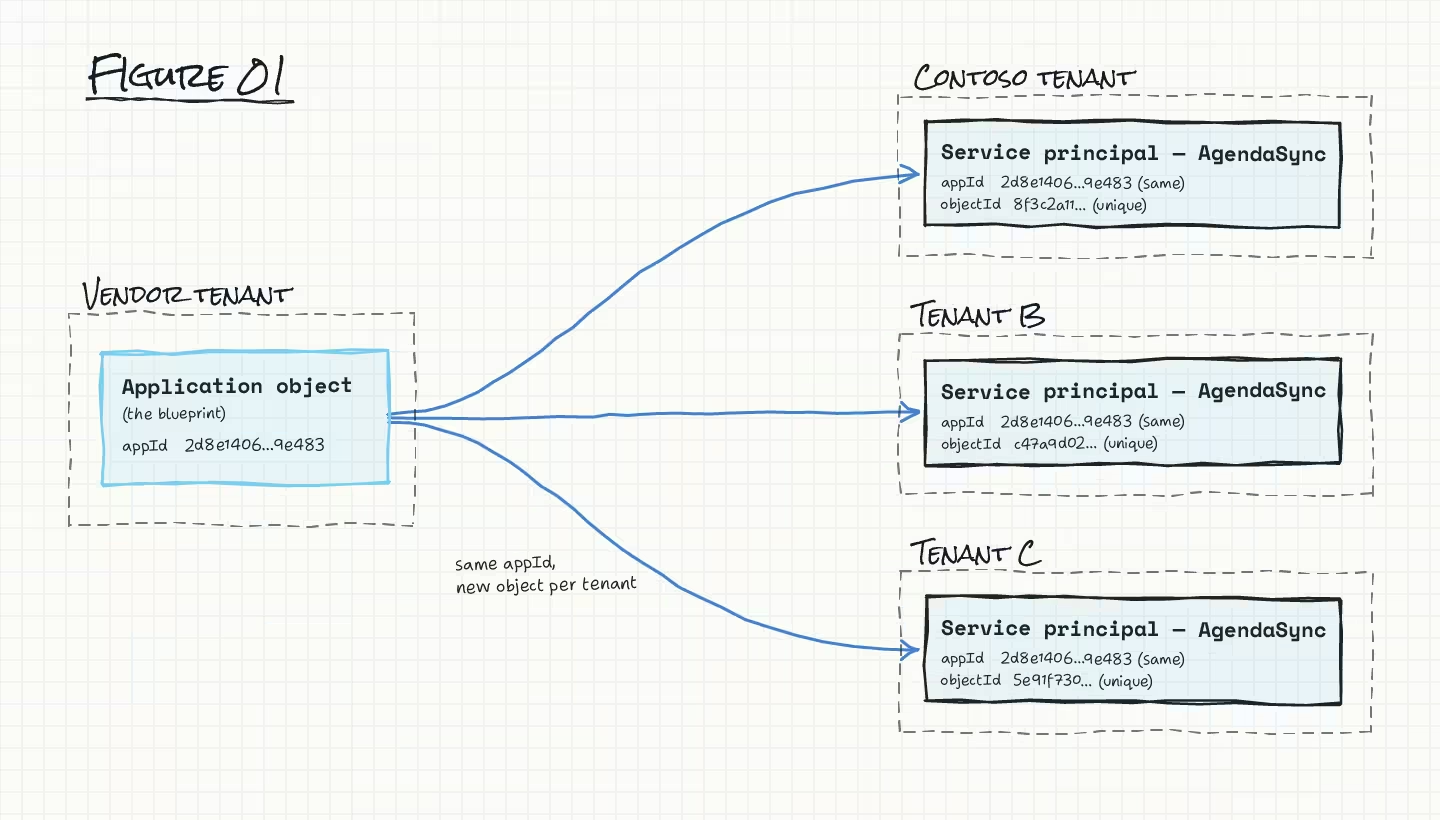
The mechanism: The application object is the blueprint, and from it a local identity, the service principal, is generated in every tenant where the app is used. There's a single application upstream and, potentially, many separate service principals downstream – one per company that adopts it [Fig 01]. For the tenant where the app was originally registered, that first service principal is created automatically at the moment of registration. Every other tenant gets its own service principal later, through a separate mechanism I'll walk through below.
Example: Instead of building the calendar app in-house, Contoso decides to adopt a solution already on the market called AgendaSync. AgendaSync isn't a new application. It was registered once by its own vendor, in the vendor's tenant. But inside Contoso's tenant, a service principal representing AgendaSync appears, generated automatically the first time Contoso connects it. Every other company using AgendaSync follows the same approach: its own dedicated service principal within their own tenant, distinct from Contoso's.
Enterprise Application
While the app registration defines the application blueprint and the service principal defines the identity, the enterprise application is the management portal for its configuration. It's the place where you manage and govern the individual application inside your tenant. This is also where you view or configure single sign-on, Conditional Access policies, and the permissions your tenant has granted the app.
It should be noted that the enterprise application isn't a new object in the tenant. Object wise, it is the service principal object described in the previous section, just viewed from an administrative angle.
Example: Once AgendaSync is connected, Contoso's administrator finds it listed under Enterprise Applications. From there, they can decide who's allowed to use the application, and review which permissions AgendaSync was assigned, for instance, making sure it can read calendars and nothing more.
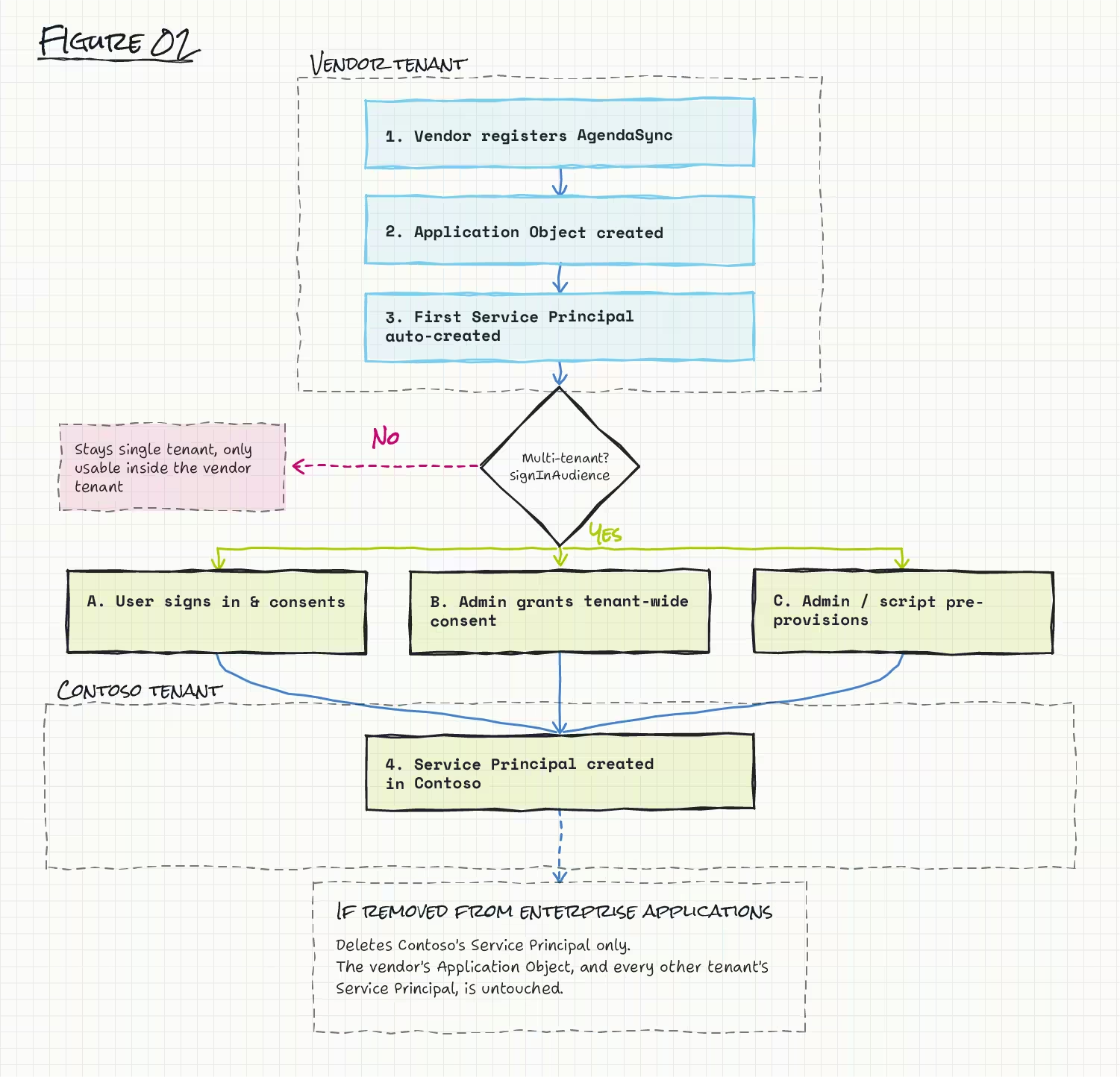
How Contoso's copy of AgendaSync gets there. For AgendaSync to be usable outside its vendor's own tenant, the vendor has to have registered it as a multi-tenant app by having signInAudience set to allow other organizations.
Once that's true, Microsoft documents three separate ways Contoso ends up with its own service principal for it:
- A Contoso user signs in and consents. The first person at Contoso to accept AgendaSync's permission request causes Entra ID to create the service principal on the spot. If AgendaSync is asking for permissions that require administrator approval, ordinary employee consent isn't enough; approval has to be granted by a Contoso admin.
- A Contoso admin grants consent for the whole tenant at once, by visiting a specific admin-consent URL built from AgendaSync's Application (client) ID. This creates the service principal and grants the requested permissions tenant-wide in a single step, and it requires an administrator with the appropriate permissions.
- A Contoso admin (or an automation script) pre-provisions the service principal directly, before anyone at Contoso has signed in, using AgendaSync's client ID. This can be done e.g. via PowerShell or Microsoft Graph:
1# PowerShell
2New-MgServicePrincipal -AppId <AgendaSync-client-id>
# Microsoft Graph
POST https://graph.microsoft.com/v1.0/servicePrincipals
Content-type: application/json
{ "appId": "<AgendaSync-client-id>" }Once the service principal, and hence the enterprise application exists for Contoso's AgendaSync, Contoso can assign users and groups, scope Conditional Access, configure SSO, or remove the app entirely, because this configuration is tenant-specific and stored on the tenant service principal. Removing AgendaSync from Contoso's tenant deletes only Contoso's copy of the service principal. The vendor's application object, and every other customer's service principal pointing at it, is untouched.
Managed Identity
A managed identity is used in Azure. It is an identity, but has no credentials for you to manage. Azure handles that behind the scenes.
Two types of managed identities exist.
- A system-assigned managed identity, which is tied to a single Azure resource, a VM, an Automation Account, whatever needs it, and is deleted automatically the moment that resource is deleted.
- A user-assigned managed identity is its own standalone Azure resource. It is created independently and can be attached to several resources at once.
Technically, a managed identity is a service principal, the same underlying object type as an enterprise application, but is not "tied" to an app registration. Permissions go straight onto the service principal, since there's no app registration object to hold them. And unlike AgendaSync, a managed identity can't cross a tenant boundary: it doesn't support cross-directory scenarios, and moving its subscription to another tenant breaks it.
Example: So far, AgendaSync has been an outside SaaS product Contoso connected to. Suppose instead Contoso builds the same calendar-to-board job itself, as a scheduled runbook in an Azure Automation Account. It's the Automation Account, the actual Azure resource, that Contoso enables a system-assigned managed identity on. Contoso grants that service principal a Microsoft Graph permission to read the calendar directly, since there's no app registration object to attach it to, and an Azure role on the storage account to write there. Once that's done, the runbook authenticates as the Automation Account's managed identity, gets a token, reads the calendar through Microsoft Graph, and writes the results to the storage account.
From a Graph API perspective
In Microsoft Graph, everything we've covered so far, is reduced to two object types.
- App Registrations are application objects.
- Service Principals, which are represented by enterprise applications and managed identities are all servicePrincipal objects.
- A servicePrincipal object sets the
servicePrincipalTypeto either "Application", "ManagedIdentity", "ServiceIdentity", or "Legacy". (The latter two, will be covered in another article.)
- A servicePrincipal object sets the
Every application object and every service principal of type "Application" share the same Application (client) ID, even though each also has its own object ID. That shared appId together with appOwnerOrganizationId is what ties the blueprint to its service principal instance:
# APP REGISTRATION (the blueprint)
GET https://graph.microsoft.com/v1.0/applications?$filter=appId eq '<AgendaSync-client-id>'

# SERVICE PRINCIPAL
GET https://graph.microsoft.com/v1.0/servicePrincipals?$filter=appId eq '<AgendaSync-client-id>'
Here is an example of how a request and response to the Graph API for service principals could look:
https://graph.microsoft.com/v1.0/servicePrincipals?$select=displayName,appId,servicePrincipalType,accountEnabled,appOwnerOrganizationId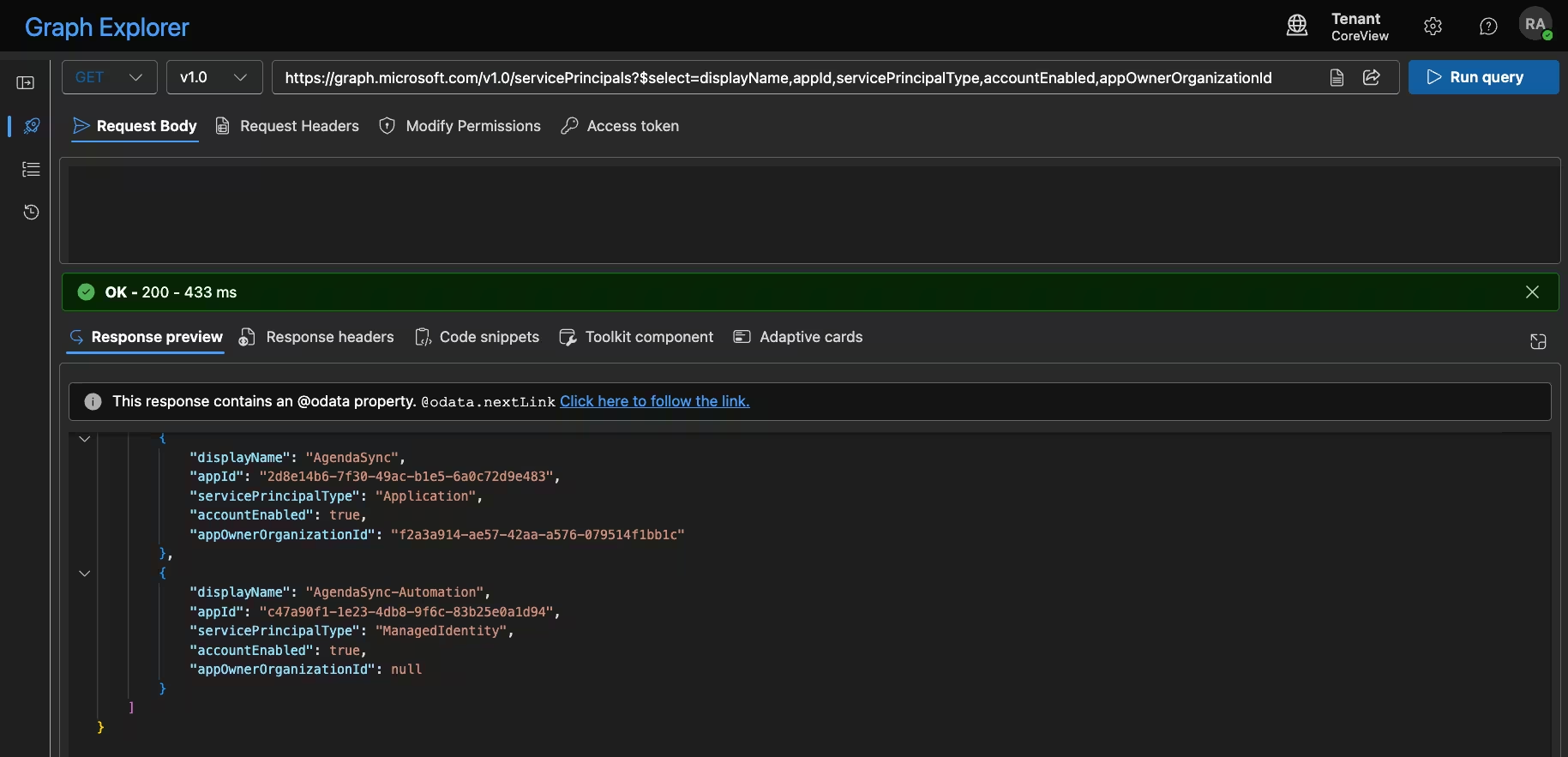
As we can observe for these service principals, then "AgendaSync" has an appId and an appOwnerOrganizationId linking it to the App Registration on the owner tenant.
While the managed identity "AgendaSync-Automation" does have an appId set, it is not linking to an app registration; which we would also see, if we queried the Graph API for applications with that specific appId .
Summary
So, the terms app registration, service principal, enterprise application, and managed identity, have been discussed and defined within this article. Below is a small table to summarize the definitions.
Further reading (Microsoft Learn):
- Apps & service principals in Microsoft Entra ID
- How and why apps are added to Microsoft Entra ID
- Create an enterprise application from a multitenant application
- Grant tenant-wide admin consent to an application
- Roles and permissions to manage app registrations and enterprise applications
- What is application management?
- Managed identities for Azure resources: overview
- Managed identities FAQ
- application resource type (Microsoft Graph API reference)
- servicePrincipal resource type (Microsoft Graph API reference)
- Create servicePrincipal (Microsoft Graph API reference)