




From September 2026, passkeys will become the default method of authentication for Entra ID. Although this represents a positive step for organizations looking to protect themselves from phishing attacks, it raises some practical questions for IT teams. This article examines what passkeys are, how they work, key distinctions between the different types of passkeys, and how all this impacts the way admins need to think about authentication moving forward.
Why Microsoft is moving to passkeys for Entra ID
Microsoft has announced that Passkeys will be rolled out as the default authentication method in Entra ID from September 1st, 2026. In this article I’m going to look at what passkey are, how they function, and what this move means for IT admins.
First, let’s address the elephant in the room: why is this change needed? Identities are front and center when it comes to security. We’ve all heard, understood, and repeated the mantra: “Hackers don’t break in, they log in.” According to this Microsoft blog post from April 2026 – Threat actor abuse of AI accelerates from tool to cyberattack surface – “Email remains the fastest and cheapest path to initial access... When AI is embedded into phishing operations, we are seeing click-through rates reach 54%, compared to roughly 12% for more traditional campaigns.”
Phishing works best when the authentication method used is a password, something you know, a string of characters, and something that can be stolen by threat actors. Passkeys are designed to remove that final phishable element from the login process.
What is a passkey and how does it differ from a password?
A passkey is built on the FIDO2 standard (Fast IDentity Online 2). It differs from a password, in that it is ‘something you have’ combined with ‘something you are’ or ‘something you know’.
It is a public-private key pair where the private element is saved to your device when it is first created, and the public key is registered to the specific service you created the passkey for.
In phishing attacks, victims can unwittingly disclose their password to threat actors. Because a passkey is bound to an individual device, such as a smartphone or a laptop, or a credential store, and cannot be written down or stolen in the same way as a password, it is harder to compromise.
Example: Bob, who manages the company calendar-board (AgendaSync), receives an email that looks like it’s coming from the AgendaSync system, specifying that he needs to enter his credentials to keep getting updates. However, it is a phishing email, and when Bob clicks the link in the email, he gets redirected to a false login page, where the threat actors are ready to steal his credentials.
However, if Bob is using a passkey as his authentication method, this phishing scenario is not possible anymore as the passkey is bound to the login page for the service it was registered with. As the credential only activates for that specific page, there is no way for the threat actors to trigger it from a fake phishing page.
How passkeys work
As stated above, when a passkey is created, a private key is generated that is either stored on a device or synced to a ‘credential store’, such as a password manager. The public key is registered with the service the user has created the passkey for.
When a user now starts the authentication process from a sign-in page, the service sends a challenge to the user’s device. The device signs that challenge with the private key and the service then verifies the signature using the public key.
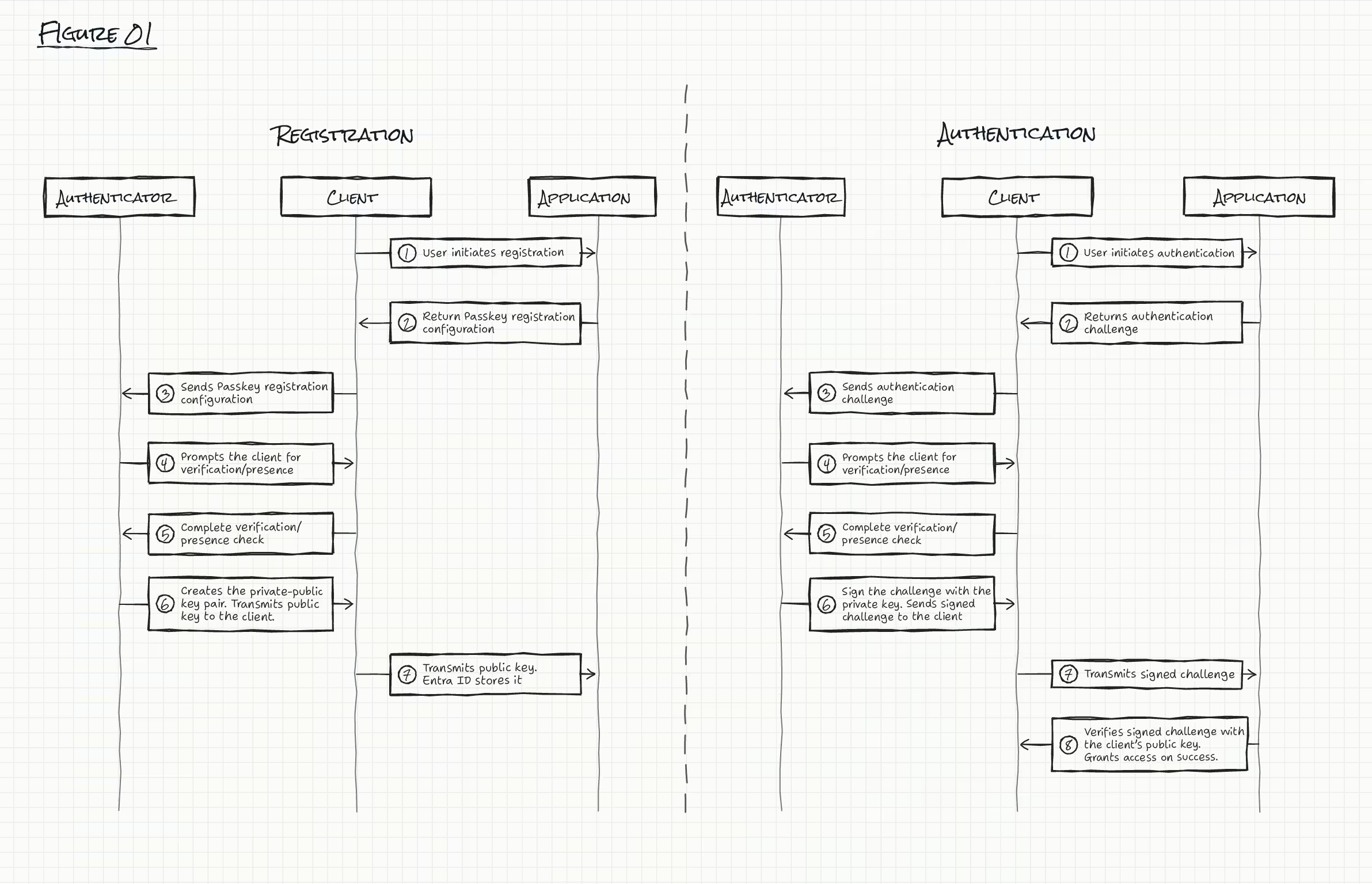
In this way, passkeys improve security over passwords, as they require possession of the device (or password manager) where the private key is stored, and a verification step, which could for example be fingerprint, face scan, or a PIN.
Device-bound and synced passkeys: what’s the difference?
There are two types of passkeys: “Device-bound” and “Synced”. Here’s how they differ from each other:
Device-bound passkeys
To no-one’s surprise, a device-bound passkey is constrained to a specific physical device. The key cannot be copied or moved. It lives and dies with the device. Examples of device-bound passkeys, include YubiKeys, Microsoft Authenticator app on iOS/Android, and even ‘Windows Hello’ on Windows 11.
Because the private key only exists on the specific device it was created on, it has what the FIDO specification calls “device provenance”. This means, that the service the user is trying to sign in to – for example Entra ID – can use attestation to verify that a specific make and model of a device was used in the creation of the device-bound passkey.
Synced passkeys
A synced passkey allows for the private key to be created on one device and then be encrypted and distributed to the user’s other devices using a cloud-based credential provider, such as Apple’s iCloud Keychain, Google Password Manager, or third-party password managers.
The authentication process is similar to the process described above. The difference is that with a synced passkey the device will first download and decrypt the private key on the device you are using, before the authentication process can start.
Given that the devices you can sign-in from can now differ, synced passkeys do not support attestation.
From a security perspective, this also means that if a user’s credential store gets compromised a threat actor could theoretically access the synced passkeys.
Choosing the right passkeys model for your users
When it comes to choosing the right passkey for your users, there is no universal correct answer, it depends on the organization’s appetite for risk and any operational constraints within Entra ID and M365. We can, however, give a general recommendation.
We’ve already established how the two different types of passkeys differ. So, with this in mind, we can generally say that device-bound passkeys carry fewer risks due to passkeys only being present on one device and the ability for attestation to be enforced. However, this comes at a price: increased friction. The user has to be in possession of the device whenever they need to sign in. If they lose the device, and therefore the device-bound passkey, they will not be able to login until an administrator assists them in regaining access.
As a side note, this is also the reason that it is generally recommended that you should backup a device-bound passkey on a different device.
In general, this makes device-bound passkeys an excellent choice for accounts with privileged roles within M365/Azure environments, as well as those that require access to key risk systems such as financial systems or other systems where a compromise would outweigh the risk appetite.
Synced passkeys, on the other hand, offer less friction and support better mobility. This makes them a more obvious choice for general employees in their day-to-day work, where we can exchange a password with MFA via SMS/Voice for a synced passkey. This is exactly why Microsoft is pushing with the passkey roll out and the deprecation of SMS/Voice MFA, which will be unsupported from the 1st February, 2027.
Managing passkeys within Entra ID
In Entra ID you manage passkeys via Passkey Profiles. Each profile you create determines if attestation is enforced, which passkey types are allowed, and which authenticator models you want to support. Supported authenticator models are identified by their AAGUID, or Authenticator Attestation GUID. This is a 128-bit identifier that tells the service which make and model of authenticator is being used.
Be aware that restricting supported authenticators by AAGUID requires that attestation is enabled on the passkey policy. Since that is not supported on synced passkeys, then this is only possible on passkey profiles that target device-bound passkeys.
Managing passkeys with Microsoft Graph API
As an IT admin, you also have the ability to get an overview of your environment using Graph API. You can see current passkey policies by calling:
GET /v1.0/authenticationMethodsPolicy/authenticationMethodConfigurations/fido2 This returns the fido2AuthenticationMethodConfiguration object that represents the FIDO2 authentication method policy, as well as a collection of passkeyProfile objects that are specific configuration profiles for registration and authentication with passkeys.
{
  "passkeyProfiles": [
    {
      "id": "00000000-0000-0000-0000-000000000001",
      "name": "Default passkey profile",
      "passkeyTypes": "deviceBound, synced",
      "attestationEnforcement": "disabled",
      "keyRestrictions": {
        "isEnforced": false,
        "enforcementType": "block",
        "aaGuids": []
      }
    },
    {
      "id": "<id>",
      "name": "Synced Passkeys Allowed",
      "passkeyTypes": "synced",
      "attestationEnforcement": "disabled",
      "keyRestrictions": {
        "isEnforced": false,
        "enforcementType": "block",
        "aaGuids": []
      }
    }
  ]
}
It is also possible to list a specific user’s registered passkeys using:
GET /v1.0/users/{userId}/authentication/fido2Methods {
"value": [
{
"id": "<id>",
"displayName": "Kasper - Intelligence Lab",
"createdDateTime": "2026-08-21T20:55:32Z",
"aaGuid": "<aaGuid>",
"model": null,
"attestationCertificates": [],
"attestationLevel": "notAttested",
"passkeyType": "synced"
}
]
}And to subsequently delete them using:
DELETE /v1.0/users/{userId}/authentication/fido2Methods/{methodId} Summary: ensuring you’re prepared for passkeys
Making passkeys the standard authentication method in Entra ID is a good change. The overall approach to authentication, which removes the phishable secret from the authentication process, will help ensure that phishing attacks as we know them become far less effective over time, as the AgendaSync example above shows.
The flip side is that it leaves organizations with some new questions to answer:
- Who gets device-bound passkeys?
- Do we allow the use of synced passkeys where attestation does not exist?
- Which identities are in scope?
- How do we ensure our resilience to device-bound keys, where the device is lost or for some reason unavailable?
Answering these questions within your own organization should be a relatively straightforward process. However, with the September 2026 rollout happening and the SMS/Voice MFA retirement just around the corner in February 2027, I encourage you to focus on this sooner rather than later.