



In a previous article – App Registration Permissions: Delegated vs Application – we looked at the different types of permissions and what applications can do. In this article, we will focus on app creation, consent, and permissions as well as a smart way to monitor and audit them.
There can be thousands of different applications inside a tenant, including app registrations created by users, and service principals that arrive whenever someone consents to a third-party app. This means administrators can easily lose control of their environment without knowing exactly what users are really creating.
In the previous article about App Registration, we stressed the importance of reviewing your service principals and their granted permissions, but here I want to take things a step further!
To truly govern a tenant, we need continuous monitoring.
How to establish continuous application permission management and monitoring in your tenant
In the following section, I’m going to walk through the different elements that can help you manage and monitor application permissions in your tenant.
Setting “Users can register applications” to “No”
A useful tenant setting to stop the possibility of users creating applications inside Entra ID, is “Users can register applications”. In your Microsoft Entra admin center this is accessed via:
Microsoft Entra admin center-> Users -> User settings -> "Users can register applications"
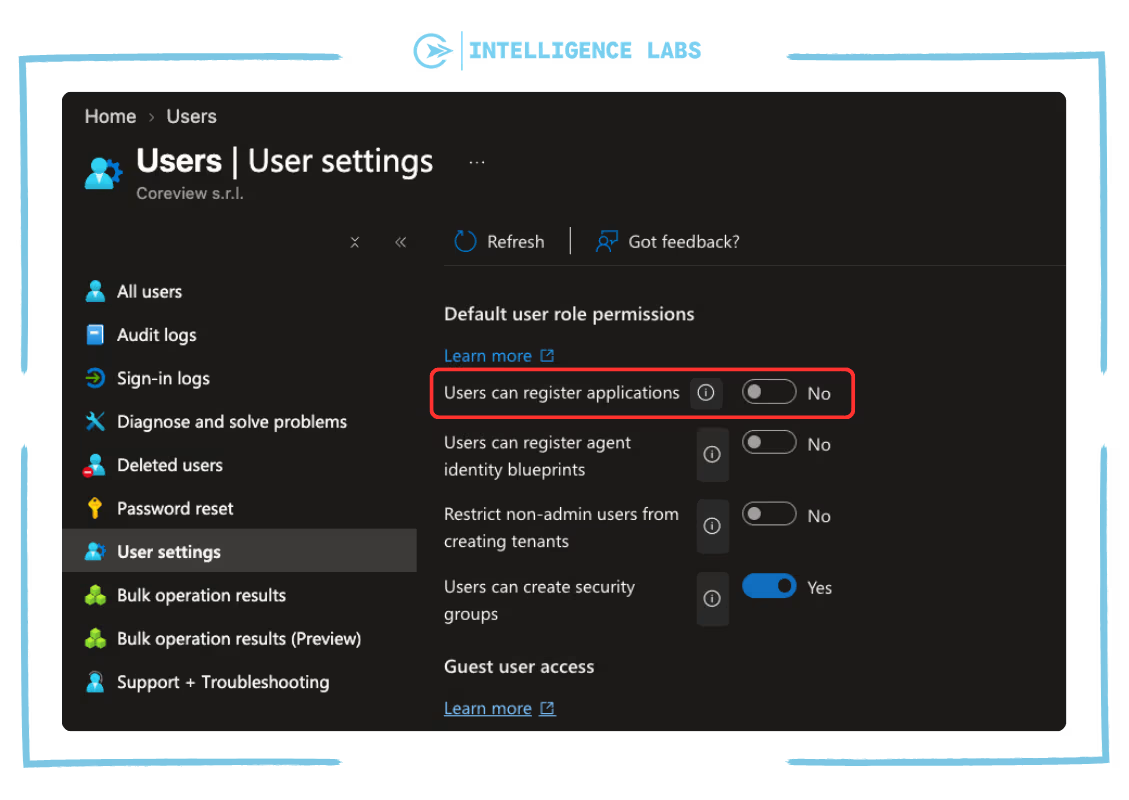
Switching “Users can register applications” settings to “No” means that users can not create app registrations inside a tenant. However, users assigned roles such as Application Developer, Application Administrator, Cloud Application Administrator, or Global Administrator can still register applications.
Setting “User consent for applications” to “Do not allow user consent”
It’s important to note that the above only covers app registrations.
An application can also appear in a tenant without anyone registering it. For example, when a user clicks “Accept” on a consent screen for a multi-tenant app that is registered in another tenant. When this happens Entra automatically creates an associated service principal.
Changing “Users can register applications” to “No” doesn’t stop users from consenting to applications. If we want to stop that as well, we need to set “User consent settings” to “Do not allow user consent”. However, keep in mind that administrators with applicable roles can still register applications and grant consent, so while these settings can reduce the risk they do not remove the need for monitoring.
Go to your Microsoft Entra admin center. Select Enterprise apps, then “Consent and permissions”, then “User consent settings”.
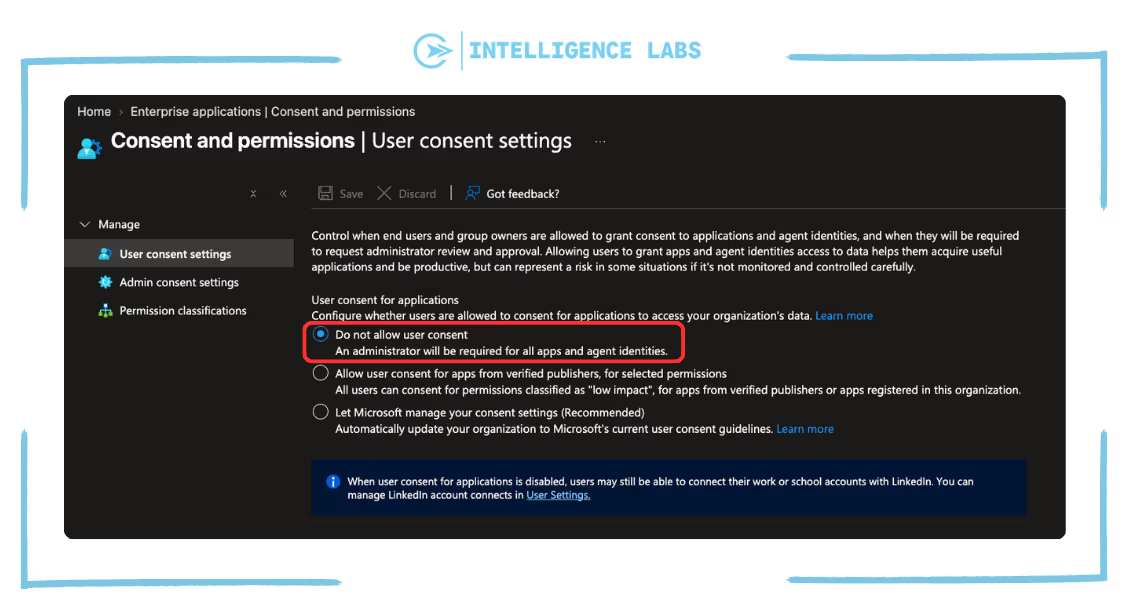
Here’s a practical example of why this is important: If a user signs in to a multi-tenant application using the “Sign in with Microsoft” button, the app registration of that service exists inside the vendor’s tenant, not inside the user’s. If the user clicks on accept, Entra ID automatically creates an enterprise application service principal inside the user’s tenant, related to that app, with the delegated permissions that the user approved. Remember that permissions that require admin consent still need an administrator.
NOTE: Those settings can have a significant impact on both the company and the developer team. Not all organizations are able to lock those settings without giving users the ability to create applications. This means we need to be able to see what applications are created, alongside when and how, as part of our tenant monitoring.
Enabling “Diagnostic settings” in Entra ID
In order to monitor what applications are created as well as when and how, we need to enable the “Diagnostic settings” in Entra ID to collect AuditLogs inside a Log Analytics Workspace.
Go to your Microsoft Entra admin center. Inside the Monitoring section, select Diagnostic Settings then General.
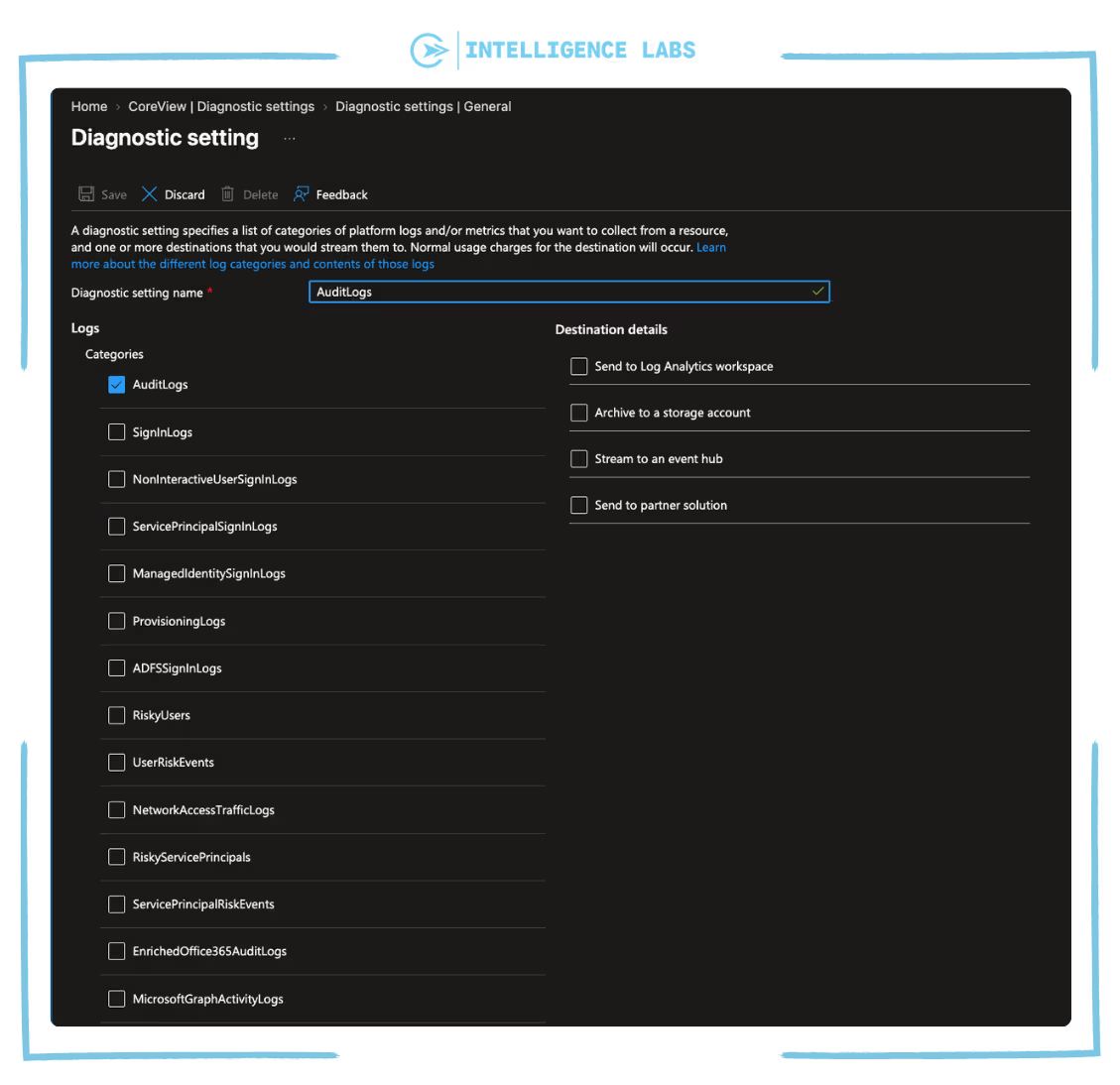
NOTE: It’s really important to know that logs are not retroactive. Logs are only stored once you enable the Diagnostic settings. So, this action is needed on day 0 to ensure you have visibility on any actions performed.
Remember that Entra ID stores logs for only 7 days without a premium license, and 30 days with Entra ID P1 or P2.
If you need to keep them longer, you need to send those logs to a Log Analytics Workspace, where you have greater control on the retention period that you require. Keep in mind that a longer retention period can have a cost depending on log volume – this calculator can help provide you with a clearer picture of cost.
Establishing monitoring actions within your Microsoft 365 tenant
To help us improve detection, we will use KQL query. However, before doing that we need to look at 3 different elements of the application process that are stored on the AuditLogs table.
App permissions are the hardest because the same permission can come from two paths:
Consent request: Permissions are requested on the app registration and stay “Not granted” until someone with applicable permissions consents.
Direct grant: Permission are added directly on the service principal.
This is why monitoring consent is not enough. We also need to look at the permissions that have been assigned to applications.
Using KQL query to monitor application creation, consent, and permissions
In this section we’ll look at how we can use KQL query to monitor App creation, App consent, and App permission:
KQL query – Monitor app creation
AuditLogs
// Look at the last 7 days
| where TimeGenerated > ago(7d)
// Filter on app/service principal creation
| where OperationName in ("Add application", "Add service principal")
// Filter only successful action
| where Result == "success"
// Filter only useful information
| project TimeGenerated, OperationName, Actor = coalesce(tostring(InitiatedBy.user.userPrincipalName), tostring(InitiatedBy.app.displayName)), AppName = tostring(TargetResources[0].displayName), AppObjectId = tostring(TargetResources[0].id)
// Sort by most recent
| sort by TimeGenerated desc
This query checks the AuditLogs table for the past 7 days to see all operations on which a new app has been created, using Add application for app registration and Add service principal for enterprise application. Only the successful actions are kept.
For each event log it shows a timestamp for the action, the type of operation (Add application or Add service principal), the actor that did it (a user or an app), the name of the app, and its object ID. Results are sorted in order of the most recent.
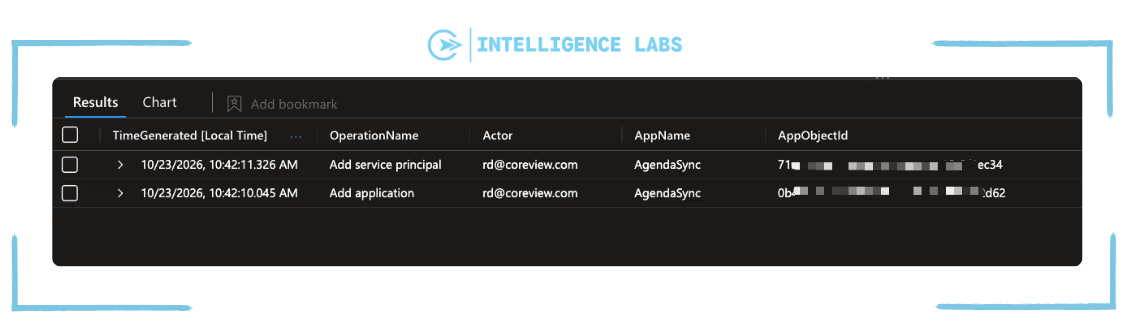
Add application and Add service principal must be considered together. As we explained before registering an app also creates its first service principal in your tenant, so one registration produces both events. An Add service principal without an Add application means that there is no app registration for it in our tenant.
KQL query – Track who granted which permissions
let consents = AuditLogs
// Look at the last 7 days
| where TimeGenerated > ago(7d)
// Filter only application consent
| where OperationName == "Consent to application"
// Filter only succesful action
| where Result == "success"
// Keep only consent app name
| summarize ConsentApp = take_any(tostring(TargetResources[0].displayName)) by CorrelationId;
AuditLogs
// Look at the last 7 days
| where TimeGenerated > ago(7d)
// Filter on app/service principal role assignment/delegated permission
| where OperationName in("Add app role assignment to service principal", "Add delegated permission grant")
// Filter only successful action
| where Result == "success"
// Take properties event details
| extend Mods = TargetResources[0].modifiedProperties
// Turn list into dictionary, so each field can be read by name
| mv-apply d = Mods on (
summarize Props = make_bag(bag_pack(tostring(d.displayName), trim('"', tostring(d.newValue))))
)
// Add the app name from the consent event (delegated only)
| join kind = leftouter consents on CorrelationId
// Filter only useful information
| project
TimeGenerated,
Type = iff(OperationName has "delegated", "Delegated", "Application"),
Users = coalesce(tostring(InitiatedBy.user.userPrincipalName), tostring(InitiatedBy.app.displayName)),
Resource = tostring(TargetResources[0].displayName),
App = coalesce(tostring(Props["ServicePrincipal.DisplayName"]), ConsentApp),
Permission = coalesce(tostring(Props["AppRole.Value"]), tostring(Props["DelegatedPermissionGrant.Scope"]))
// Remove exact duplicates
| distinct *
// Sort by most recent first
| sort by TimeGenerated desc
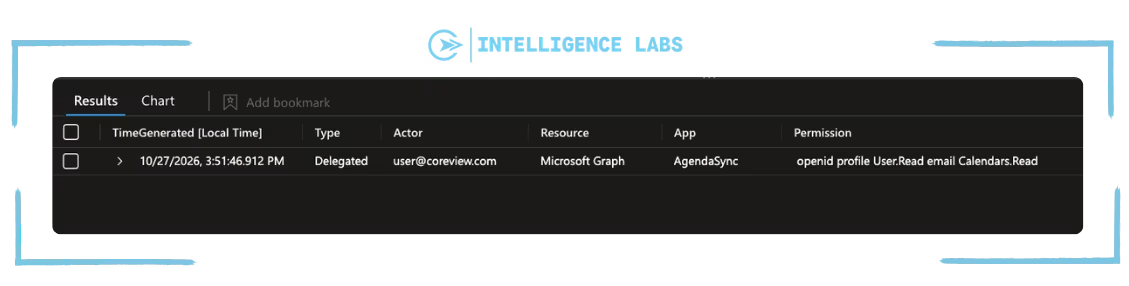
This query searches inside the AuditLogs table for the past 7 days, looking for the operations matching ‘Add app role assignment to service principal’ and ‘Add delegated permission grant’.
For each event log the following is displayed: a timestamp of the action, the type of permission (Delegated or Application), the user that granted access, the resource the permissions is given on (such as Microsoft Graph), name of the app that obtained it, and the permission name.
KQL query – Monitor High-Risk Application permissions
Since not all Graph API permissions have the same impact, we need to filter for only the ones with a high-risk scope, for example with risky actions like the permissions that write data, send emails, read data from the whole tenant, or change roles and permissions.
WARNING: The list inside the below KQL query is only an example. You should filter for the permissions that you think are riskiest ones for your tenant.
See a list of all permissions here
// Define subset of high-risk permissions (adapt it to your tenant)
let highRisk = dynamic([
"RoleManagement.ReadWrite.Directory", "AppRoleAssignment.ReadWrite.All",
"Application.ReadWrite.All", "Directory.ReadWrite.All", "User.ReadWrite.All", "Mail.ReadWrite", "Mail.Send", "Files.ReadWrite.All", "Sites.FullControl.All"
]);
AuditLogs
// Look at the last 7 days
| where TimeGenerated > ago(7d)
// Keep only application permission grants (app roles): delegated permissions are not covered here
| where OperationName == "Add app role assignment to service principal"
// Keep only successful operations
| where Result == "success"
// Take the event details, stored as a list of name/value pairs
| extend Mods = TargetResources[0].modifiedProperties
// Turn that list into a dictionary, so each field can be read by name instead of by position
| mv-apply d = Mods on (
summarize Props = make_bag(bag_pack(tostring(d.displayName), trim('"', tostring(d.newValue))))
)
// Take the permission name from the dictionary
| extend Permission = tostring(Props["AppRole.Value"])
// Keep only the permissions that are in the high risk list
| where Permission has_any (highRisk)
// Select the relevant fields (the initiator can be a user or an app)
| project TimeGenerated, Users = coalesce(tostring(InitiatedBy.user.userPrincipalName), tostring(InitiatedBy.app.displayName)), App = tostring(Props["ServicePrincipal.DisplayName"]), Permission
// Sort by most recent first
| sort by TimeGenerated desc
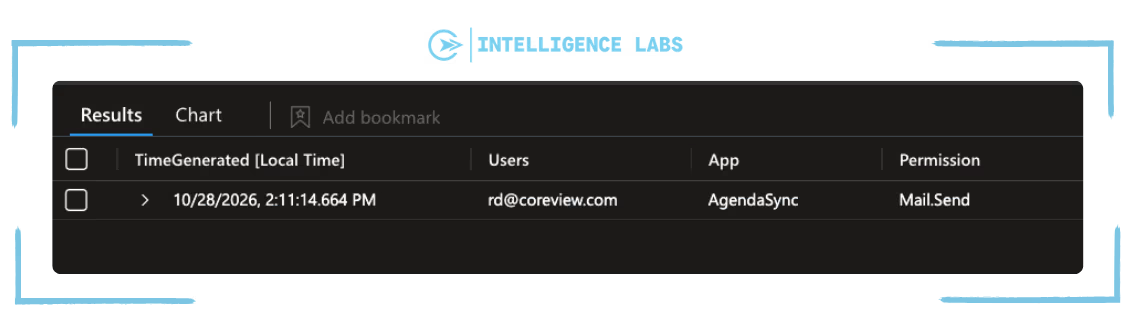
This query searches inside the AuditLogs table from the past 7 days to look for all operations on which apps obtained application permissions. It keeps only those that were successful.
For each event the query returns: the operation timestamp, the user who granted the permission, the name of the app that received it, and the permissions.
KQL query – Filter High-Risk Delegated permissions
Delegated permissions work differently from application permissions: the app doesn’t act on its own, but on behalf of the signed-in user. So, it can only reach what the user can reach. This means that the impact depends on two things: the permission itself and who granted it. Here too, we will filter only for the ones with a High-Risk permissions, such as writing data, sending emails, or changing roles and permissions.
// List of delegated permissions considered High-Risk (shorter than the application one: Mail.Read is normal when a user reads their own mailbox)
let highRisk = dynamic([
"RoleManagement.ReadWrite.Directory", "AppRoleAssignment.ReadWrite.All",
"Application.ReadWrite.All", "Directory.ReadWrite.All", "User.ReadWrite.All",
"Mail.ReadWrite", "Mail.Send", "Files.ReadWrite.All", "Sites.FullControl.All"
]);
// Get the app name from the consent events, linked by CorrelationId
let consents = AuditLogs
// Look at the last 7 days
| where TimeGenerated > ago(7d)
//Keep only consent permission grants
| where OperationName == "Consent to application"
//Keep only successful operation
| where Result == "success"
//Keep one app name per consent, linked by CorrelationId
| summarize ConsentApp = take_any(tostring(TargetResources[0].displayName)) by CorrelationId;
AuditLogs
// Look at the last 7 days
| where TimeGenerated > ago(7d)
// Keep only delegated permission grants
| where OperationName == "Add delegated permission grant"
// Keep only successful operations
| where Result == "success"
// Take the event details, stored as a list of name/value pairs
| extend Mods = TargetResources[0].modifiedProperties
// Turn that list into a dictionary, so each field can be read by name instead of by position
| mv-apply p = Mods on (
summarize Props = make_bag(bag_pack(tostring(p.displayName), trim('"', tostring(p.newValue))))
)
// Take the granted permissions: one event can contain many, separated by a space
| extend Scope = tostring(Props["DelegatedPermissionGrant.Scope"])
// Split the list so that each permission becomes its own row
| mv-expand Permission = split(trim(" ", Scope), " ") to typeof(string)
// Keep only the permissions that are in the high risk list
| where Permission has_any (highRisk)
// Add the app name from the consent event
| join kind=leftouter consents on CorrelationId
// Select the relevant fields (the initiator can be a user or an app)
| project TimeGenerated,
// Who granted the permission
User = coalesce(tostring(InitiatedBy.user.userPrincipalName),
tostring(InitiatedBy.app.displayName)),
// The API the permission refers to (for example Microsoft Graph)
Resource = tostring(TargetResources[0].displayName),
// The app that received the permission
App = ConsentApp,
// The high risk permission that was granted
Permission
// Remove exact duplicates
| distinct *
// Sort by most recent first
| sort by TimeGenerated desc
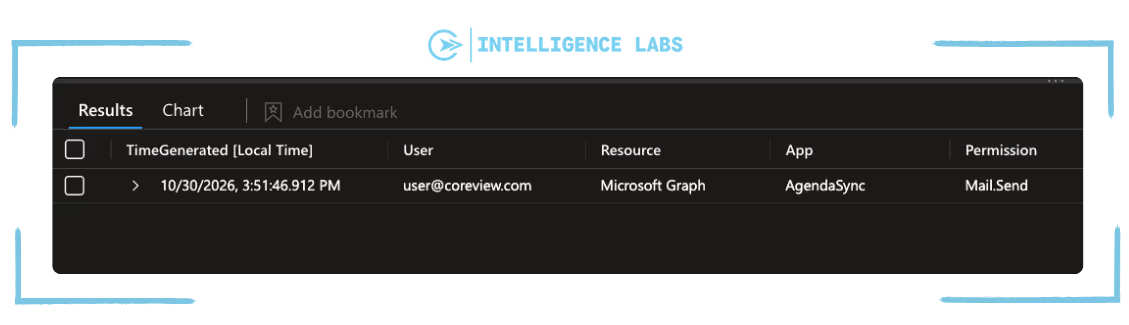
This query searches the AuditLogs table for the past 7 days, to look for all operations on which an app obtained Delegated permissions via the “Add delegated permission grant”. It returns only those that were successful.
For each event the query returns: the operation timestamp, the user who granted the permission, the API it refers to, the name of the app received, and the name of the permission.
Creating a Logic App with email/Teams message notification
To monitor the creation of those applications and ensure that the KQL query above can be run automatically, and not be another time-consuming manual process for tenant admins, we need a Logic App that automatically notifies the team/specific admin about creation of a new application.
In this section, we will build a Logic App that – every 15 minutes – checks if a permission has been granted/consented to an app and then sends a message via Teams and email.
Before we do that there is one thing must be in place:
A managed identity with the Mail.Send permission
The email is sent by the Logic App itself, using a managed identity. A managed identity has no credentials for you to manage, so there is no secret to store, rotate, or leak. This follow also our recommendation that client secrets are best kept for testing and development, not for production flows.
The managed identity needs the Mail.Send application permission on Microsoft Graph. This can’t be granted from the Microsoft Entra admin center: an administrator with the Privileged Role Administrator or Global Administrator role has to assign it through Microsoft Graph or PowerShell.
Moreover, Mail.Send permission can send as any mailbox in the tenant, which is why it is on our High-Risk list.
In production, consider scoping it to the dedicated alert mailbox with Exchange Online RBAC for Applications instead.
Creating the Logic App high-level flow
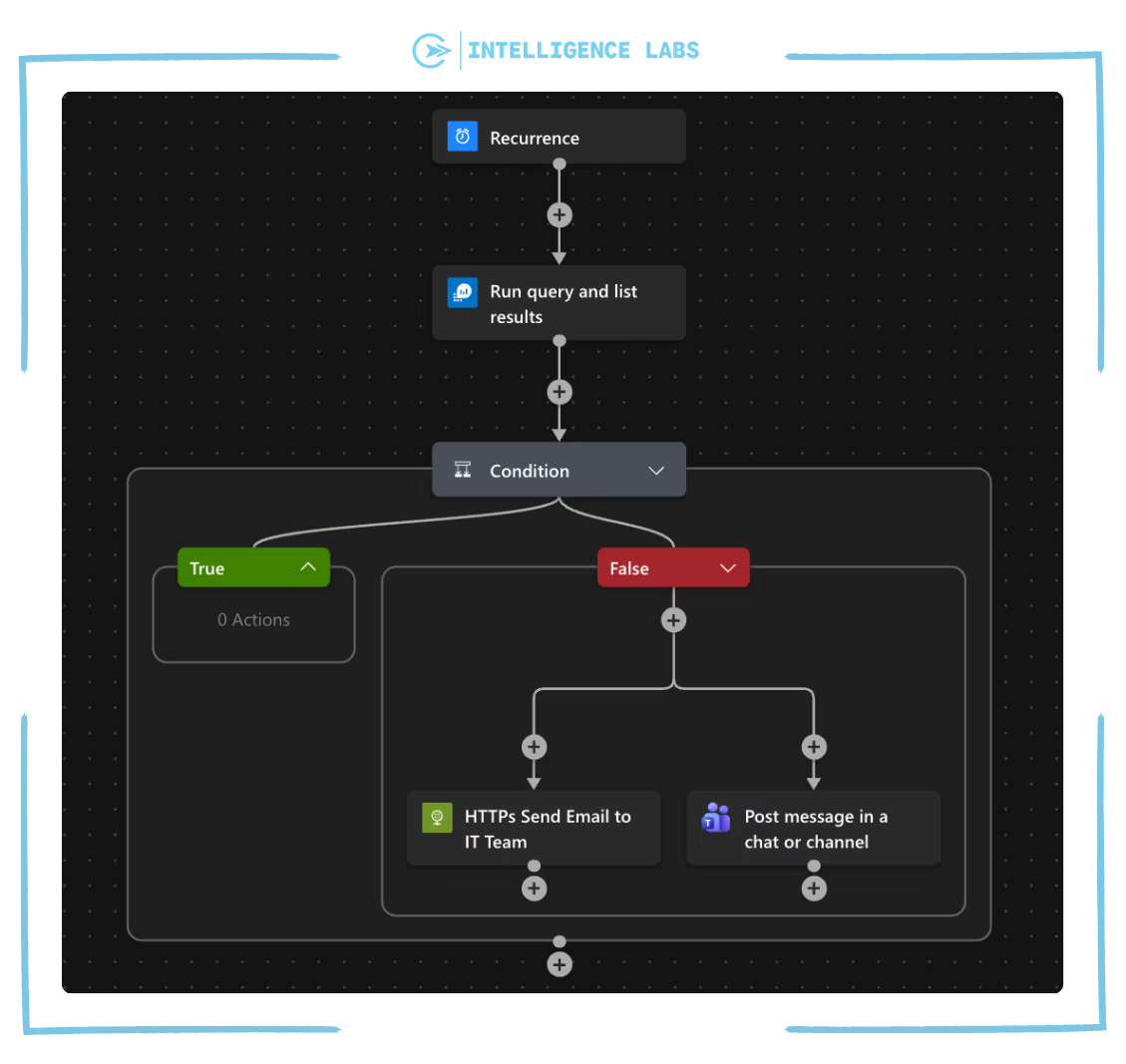
Recurrence
The Logic App runs every 1 hour – you can adjust this time based on your own needs.
Run query and list results
Executes the desired KQL query in configured Log Analytics Workspace.
Remember to align the TimeGenerated with the same recurrence time.
Condition
If the query returns results, these are shared over the Teams/email channel.
Send email
Utilizing the managed identity, we can trigger the send email action. This calls the Microsoft Graph sendMail endpoint and sends the query results to the team. This could come from a dedicated mailbox created for this purpose and not from a personal account.
To send email via the Logic App, the easiest/fastest method is the Office 365 Outlook connector, using the action “Send an email from a shared mailbox (V2)”. This works well, and in many cases is the right choice – you can configure it in a few clicks and it doesn’t require a dedicated app registration or a secret. In this instance, we have chosen to call Microsoft Graph with the Logic App’s managed identity. I’ve explained this choice in more detail in the note below.
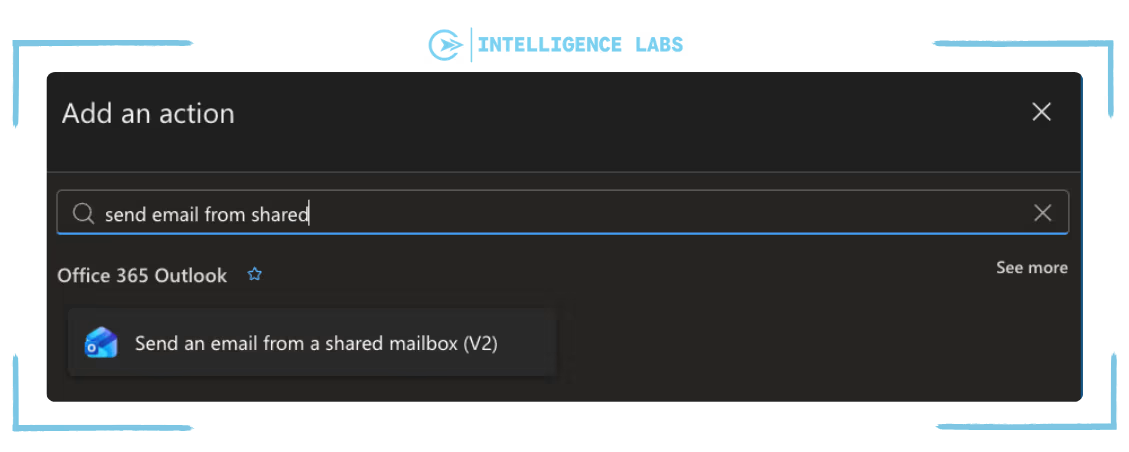
NOTE: The Office 365 Outlook connector uses a connection which is associated with a registered user. Emails are sent from that account using its permissions. If the password changes, a Conditional Access Policy requires re-authentication, or if the account is deactivated, the connection and the alert will stop working.
For this reason, we chose to call Microsoft Graph directly, with the Logic App’s managed identity. Sending no longer depends on a person, a service account or a secret that can expire: the identity belongs to the Logic App itself
Microsoft Teams - Post message in a chat or channel
Posts a message in the chosen channel with the same information as the email: the permission, the app, who granted it, and when.
Creating a dashboard in Azure Workbook
We can now send a notification via Teams or email, but we are still missing one thing: a dashboard which provides a single point to view of all apps that were created, which permissions were granted and by whom, and which of those permissions are High-Risk.
The alerts report what we have configured them to detect, but it is still possible these could be missed. An Azure Workbook provides a great central place to store all the KQL query results so that they can be accessed whenever needed.
In this section, we will quickly look at how to create an Azure Workbook that contains all the query results we have collected. It collects all the outputs in table or chart, and allows you to change periods and filters without editing the query.
Summary of Azure Workbook:
- Summary: Displays information on new app registrations, new service principals, application permissions granted, and delegated permissions granted during the selected time range.
- App creation: new app registrations and service principals, with a filter to choose who created them (users, apps, or all).
- Who granted what: a chart of granted permissions by type, the top 10 users or apps granting permissions, and the details of each grant.
- High-Risk permissions: application and delegated permissions on the High-Risk list, which you can change with a filter.
{
"version": "Notebook/1.0",
"items": [
{
"type": 1,
"content": {
"json": "\n\nBuilt by the **CoreView Security Team** · Companion workbook to the article [CoreView Intelligence Labs](https://www.coreview.com/intelligence-labs)· \n*Provided as-is: validate the results in your own tenant before acting on them.*\n\n---"
},
"name": "text - attribution"
},
{
"type": 1,
"content": {
"json": "# App & permission monitoring\nWhat is being **created**, **consented** and **granted** in the tenant\n\n*Select the workspace and the time range above. Use **Exclude automations** to hide the apps that grant permissions as part of known automations in your tenant.*"
},
"name": "text - title"
},
{
"type": 9,
"content": {
"version": "KqlParameterItem/1.0",
"parameters": [
{
"id": "a1b2c3d4-0001-4000-8000-000000000001",
"version": "KqlParameterItem/1.0",
"name": "Subscription",
"type": 6,
"isRequired": true,
"multiSelect": true,
"quote": "'",
"delimiter": ",",
"typeSettings": {
"additionalResourceOptions": [
"value::all"
],
"includeAll": true,
"showDefault": false
},
"timeContext": {
"durationMs": 86400000
},
"defaultValue": "value::all"
},
{
"id": "a1b2c3d4-0003-4000-8000-000000000003",
"version": "KqlParameterItem/1.0",
"name": "Workspace",
"label": "Log Analytics workspace",
"type": 2,
"isRequired": true,
"typeSettings": {
"additionalResourceOptions": [],
"showDefault": false
},
"queryType": 1,
"resourceType": "microsoft.resourcegraph/resources",
"crossComponentResources": [
"{Subscription}"
],
"query": "resources\n| where type =~ 'microsoft.operationalinsights/workspaces'\n| project value = id, label = name\n| order by label asc",
"timeContext": {
"durationMs": 86400000
},
"value": null
},
{
"id": "a1b2c3d4-0002-4000-8000-000000000002",
"version": "KqlParameterItem/1.0",
"name": "TimeRange",
"label": "Time range",
"type": 4,
"isRequired": true,
"value": {
"durationMs": 2592000000
},
"typeSettings": {
"selectableValues": [
{
"durationMs": 86400000
},
{
"durationMs": 604800000
},
{
"durationMs": 2592000000
},
{
"durationMs": 7776000000
},
{
"durationMs": 15552000000
}
],
"allowCustom": true
},
"timeContext": {
"durationMs": 86400000
}
},
{
"id": "a1b2c3d4-0005-4000-8000-000000000005",
"version": "KqlParameterItem/1.0",
"name": "ExcludedApps",
"label": "Exclude automations",
"type": 2,
"isRequired": true,
"multiSelect": true,
"quote": "'",
"delimiter": ",",
"query": "// Apps that created apps or granted permissions in the selected time range\nAuditLogs\n| where OperationName in (\"Add application\", \"Add service principal\", \"Add app role assignment to service principal\", \"Add delegated permission grant\")\n| where Result == \"success\"\n| extend App = tostring(InitiatedBy.app.displayName)\n| where isnotempty(App)\n| distinct App\n| project value = App, label = App, selected = false\n// Placeholder selected by default, so nothing is excluded until the user picks an app\n| union (print value = \"(none)\", label = \"(none)\", selected = true)\n| order by label asc",
"typeSettings": {
"additionalResourceOptions": [],
"showDefault": false
},
"timeContextFromParameter": "TimeRange",
"crossComponentResources": [
"{Workspace}"
],
"queryType": 0,
"resourceType": "microsoft.operationalinsights/workspaces"
}
],
"style": "pills",
"queryType": 0,
"resourceType": "microsoft.operationalinsights/workspaces"
},
"name": "parameters - main"
},
{
"type": 3,
"content": {
"version": "KqlItem/1.0",
"query": "// Summary counters for the selected time range\nlet newApps = AuditLogs\n| where OperationName == \"Add application\"\n| where Result == \"success\"\n| summarize Value = dcount(strcat(tostring(TimeGenerated), CorrelationId))\n| extend Metric = \"New app registrations\";\nlet newSps = AuditLogs\n| where OperationName == \"Add service principal\"\n| where Result == \"success\"\n| summarize Value = dcount(strcat(tostring(TimeGenerated), CorrelationId))\n| extend Metric = \"New enterprise applications\";\nlet appGrants = AuditLogs\n| where OperationName == \"Add app role assignment to service principal\"\n| where Result == \"success\"\n// Exclude the automations selected in the filter above\n| where tostring(InitiatedBy.app.displayName) !in~ ({ExcludedApps})\n| summarize Value = dcount(strcat(tostring(TimeGenerated), CorrelationId))\n| extend Metric = \"Application permissions granted\";\nlet delGrants = AuditLogs\n| where OperationName == \"Add delegated permission grant\"\n| where Result == \"success\"\n// Exclude the automations selected in the filter above\n| where tostring(InitiatedBy.app.displayName) !in~ ({ExcludedApps})\n| summarize Value = dcount(strcat(tostring(TimeGenerated), CorrelationId))\n| extend Metric = \"Delegated permission grants\";\nunion newApps, newSps, appGrants, delGrants\n| project Metric, Value",
"size": 4,
"title": "Summary",
"timeContextFromParameter": "TimeRange",
"queryType": 0,
"resourceType": "microsoft.operationalinsights/workspaces",
"crossComponentResources": [
"{Workspace}"
],
"visualization": "tiles",
"tileSettings": {
"showBorder": true,
"size": "auto",
"titleContent": {
"columnMatch": "Metric",
"formatter": 1
},
"leftContent": {
"columnMatch": "Value",
"formatter": 12,
"formatOptions": {
"palette": "auto"
},
"numberFormat": {
"unit": 17,
"options": {
"maximumSignificantDigits": 3,
"maximumFractionDigits": 2
}
}
}
}
},
"name": "query - summary"
},
{
"type": 1,
"content": {
"json": "## 1. App creation\nNew app registrations (`Add application`) and enterprise applications (`Add service principal`). \nUse the filter to separate what is created by a **user** from what is created by an **app**.\n\nUsers are shown by default."
},
"name": "text - creation"
},
{
"type": 9,
"content": {
"version": "KqlParameterItem/1.0",
"parameters": [
{
"id": "a1b2c3d4-0004-4000-8000-000000000004",
"version": "KqlParameterItem/1.0",
"name": "InitiatorType",
"label": "Initiator type",
"type": 2,
"isRequired": true,
"typeSettings": {
"additionalResourceOptions": [],
"showDefault": false
},
"jsonData": "[{ \"value\": \"User\", \"label\": \"User\" }, { \"value\": \"App\", \"label\": \"App\" }, { \"value\": \"All\", \"label\": \"All\" }]",
"timeContext": {
"durationMs": 86400000
},
"defaultValue": "User"
}
],
"style": "pills",
"queryType": 0,
"resourceType": "microsoft.operationalinsights/workspaces"
},
"name": "parameters - creation"
},
{
"type": 3,
"content": {
"version": "KqlItem/1.0",
"query": "AuditLogs\n// Keep only app registration and service principal creation events\n| where OperationName in (\"Add application\", \"Add service principal\")\n// Keep only successful operations\n| where Result == \"success\"\n// Split the initiator: a user or an app (for example an agent identity blueprint)\n| extend UserInitiator = tostring(InitiatedBy.user.userPrincipalName),\n AppInitiator = tostring(InitiatedBy.app.displayName)\n// Select the relevant fields\n| project TimeGenerated,\n Kind = iff(OperationName == \"Add application\", \"App registration\", \"Enterprise application\"),\n InitiatorType = iff(isnotempty(UserInitiator), \"User\", \"App\"),\n Initiator = coalesce(UserInitiator, AppInitiator),\n AppName = tostring(TargetResources[0].displayName),\n AppObjectId = tostring(TargetResources[0].id)\n// Apply the initiator type selected in the workbook filter (All shows everything)\n| where \"{InitiatorType}\" == \"All\" or InitiatorType == \"{InitiatorType}\"\n// Remove exact duplicates\n| distinct *\n// Sort by most recent first\n| sort by TimeGenerated desc",
"size": 0,
"title": "New apps in the tenant",
"noDataMessage": "No events in the selected time range.",
"timeContextFromParameter": "TimeRange",
"showExportToExcel": true,
"queryType": 0,
"resourceType": "microsoft.operationalinsights/workspaces",
"crossComponentResources": [
"{Workspace}"
],
"visualization": "table",
"gridSettings": {
"rowLimit": 500,
"filter": true,
"sortBy": [
{
"itemKey": "AppName",
"sortOrder": 2
}
]
},
"sortBy": [
{
"itemKey": "AppName",
"sortOrder": 2
}
]
},
"name": "query - creation"
},
{
"type": 1,
"content": {
"json": "## 2. Who granted what\nApplication and delegated permissions granted to apps, with the app name recovered from the consent event."
},
"name": "text - grants"
},
{
"type": 3,
"content": {
"version": "KqlItem/1.0",
"query": "AuditLogs\n| where OperationName in (\"Add app role assignment to service principal\", \"Add delegated permission grant\")\n| where Result == \"success\"\n| extend Type = iff(OperationName has \"delegated\", \"Delegated\", \"Application\"),\n Users = coalesce(tostring(InitiatedBy.user.userPrincipalName), tostring(InitiatedBy.app.displayName))\n// Remove exact duplicates before counting\n| distinct TimeGenerated, CorrelationId, OperationName, Type, Users\n// Exclude the automations selected in the filter above\n| where Users !in~ ({ExcludedApps})\n// Count the permissions granted each day, split by type\n| summarize Grants = count() by bin(TimeGenerated, 1d), Type",
"size": 1,
"title": "Permissions granted per day",
"timeContextFromParameter": "TimeRange",
"queryType": 0,
"resourceType": "microsoft.operationalinsights/workspaces",
"crossComponentResources": [
"{Workspace}"
],
"visualization": "timechart"
},
"name": "query - timeline"
},
{
"type": 3,
"content": {
"version": "KqlItem/1.0",
"query": "AuditLogs\n| where OperationName in (\"Add app role assignment to service principal\", \"Add delegated permission grant\")\n| where Result == \"success\"\n| extend Type = iff(OperationName has \"delegated\", \"Delegated\", \"Application\"),\n Users = coalesce(tostring(InitiatedBy.user.userPrincipalName), tostring(InitiatedBy.app.displayName))\n// Remove exact duplicates before counting\n| distinct TimeGenerated, CorrelationId, OperationName, Type, Users\n// Exclude the automations selected in the filter above\n| where Users !in~ ({ExcludedApps})\n// Count the permissions granted by each user and keep the top 10\n| summarize Grants = count() by Users\n| top 10 by Grants desc",
"size": 0,
"title": "Top 10 users granting permissions",
"timeContextFromParameter": "TimeRange",
"queryType": 0,
"resourceType": "microsoft.operationalinsights/workspaces",
"crossComponentResources": [
"{Workspace}"
],
"visualization": "barchart"
},
"name": "query - top"
},
{
"type": 3,
"content": {
"version": "KqlItem/1.0",
"query": "let consents = AuditLogs\n // filter only application consent\n | where OperationName == \"Consent to application\"\n // filter only successful action\n | where Result == \"success\"\n // keep only consent app name\n | summarize ConsentApp = take_any(tostring(TargetResources[0].displayName)) by CorrelationId;\nAuditLogs\n// filter on app/service principal role assignment/delegated permission\n| where OperationName in (\"Add app role assignment to service principal\", \"Add delegated permission grant\")\n// filter only successful action\n| where Result == \"success\"\n// take properties event details\n| extend Mods = TargetResources[0].modifiedProperties\n// turn list into dictionary, so each field can be read by name\n| mv-apply d = Mods on (\n summarize Props = make_bag(bag_pack(tostring(d.displayName), trim('\"', tostring(d.newValue))))\n )\n// add the app name from the consent event (delegated only)\n| join kind=leftouter consents on CorrelationId\n// filter only useful information\n| project\n TimeGenerated,\n Type = iff(OperationName has \"delegated\", \"Delegated\", \"Application\"),\n Users = coalesce(tostring(InitiatedBy.user.userPrincipalName), tostring(InitiatedBy.app.displayName)),\n Resource = tostring(TargetResources[0].displayName),\n App = coalesce(tostring(Props[\"ServicePrincipal.DisplayName\"]), ConsentApp),\n Permission = coalesce(tostring(Props[\"AppRole.Value\"]), tostring(Props[\"DelegatedPermissionGrant.Scope\"]))\n// remove exact duplicates\n| distinct *\n// Exclude the automations selected in the filter above\n| where Users !in~ ({ExcludedApps})\n// Sort by most recent first\n| sort by TimeGenerated desc",
"size": 0,
"title": "Permission grants (detail)",
"noDataMessage": "No events in the selected time range.",
"timeContextFromParameter": "TimeRange",
"showExportToExcel": true,
"queryType": 0,
"resourceType": "microsoft.operationalinsights/workspaces",
"crossComponentResources": [
"{Workspace}"
],
"visualization": "table",
"gridSettings": {
"rowLimit": 500,
"filter": true
}
},
"name": "query - detail"
},
{
"type": 1,
"content": {
"json": "## 3. High risk permissions\nEach filter lists the permissions granted in the selected period, plus the high risk ones. The **high risk list is selected by default**: add or remove permissions to look at anything else."
},
"name": "text - risk"
},
{
"type": 9,
"content": {
"version": "KqlParameterItem/1.0",
"parameters": [
{
"id": "a1b2c3d4-0006-4000-8000-000000000006",
"version": "KqlParameterItem/1.0",
"name": "AppPermissions",
"label": "Application permissions",
"type": 2,
"isRequired": true,
"multiSelect": true,
"quote": "'",
"delimiter": ",",
"query": "// High-risk application permissions, selected by default (adapt it to your tenant)\nlet highRisk = dynamic([\n \"RoleManagement.ReadWrite.Directory\", \"AppRoleAssignment.ReadWrite.All\",\n \"Application.ReadWrite.All\", \"Directory.ReadWrite.All\", \"User.ReadWrite.All\",\n \"Mail.Read\", \"Mail.ReadWrite\", \"Mail.Send\", \"Files.ReadWrite.All\", \"Sites.FullControl.All\"\n]);\n// Application permissions granted in the selected time range\nlet seen = AuditLogs\n| where OperationName == \"Add app role assignment to service principal\"\n| where Result == \"success\"\n| extend Mods = TargetResources[0].modifiedProperties\n| mv-apply d = Mods on (\n summarize Props = make_bag(bag_pack(tostring(d.displayName), trim('\"', tostring(d.newValue))))\n )\n| project Permission = tostring(Props[\"AppRole.Value\"]);\n// The high risk list, so that these permissions are always in the filter\nlet defaults = print Permission = highRisk\n| mv-expand Permission to typeof(string);\nunion seen, defaults\n| where isnotempty(Permission)\n| distinct Permission\n| project value = Permission, label = Permission, selected = set_has_element(highRisk, Permission)\n| order by label asc",
"typeSettings": {
"additionalResourceOptions": [
"value::all"
],
"showDefault": false
},
"timeContextFromParameter": "TimeRange",
"crossComponentResources": [
"{Workspace}"
],
"queryType": 0,
"resourceType": "microsoft.operationalinsights/workspaces"
}
],
"style": "pills",
"queryType": 0,
"resourceType": "microsoft.operationalinsights/workspaces"
},
"name": "parameters - AppPermissions"
},
{
"type": 3,
"content": {
"version": "KqlItem/1.0",
"query": "AuditLogs\n// Keep only application permission grants (app roles): delegated permissions are covered by the next query\n| where OperationName == \"Add app role assignment to service principal\"\n// Keep only successful operations\n| where Result == \"success\"\n// Take the event details, stored as a list of name/value pairs\n| extend Mods = TargetResources[0].modifiedProperties\n// Turn that list into a dictionary, so each field can be read by name instead of by position\n| mv-apply d = Mods on (\n summarize Props = make_bag(bag_pack(tostring(d.displayName), trim('\"', tostring(d.newValue))))\n )\n// Take the permission name from the dictionary\n| extend Permission = tostring(Props[\"AppRole.Value\"])\n// Keep only the permissions selected in the filter above (default: the high risk list)\n| where Permission in ({AppPermissions})\n// Select the relevant fields (the initiator can be a user or an app)\n| project TimeGenerated, Users = coalesce(tostring(InitiatedBy.user.userPrincipalName), tostring(InitiatedBy.app.displayName)), App = tostring(Props[\"ServicePrincipal.DisplayName\"]), Permission\n// Remove exact duplicates\n| distinct *\n// Exclude the automations selected in the filter above\n| where Users !in~ ({ExcludedApps})\n// Sort by most recent first\n| sort by TimeGenerated desc",
"size": 0,
"title": "Application permissions",
"noDataMessage": "No events in the selected time range.",
"timeContextFromParameter": "TimeRange",
"showExportToExcel": true,
"queryType": 0,
"resourceType": "microsoft.operationalinsights/workspaces",
"crossComponentResources": [
"{Workspace}"
],
"visualization": "table",
"gridSettings": {
"rowLimit": 500,
"filter": true
}
},
"name": "query - risk app"
},
{
"type": 9,
"content": {
"version": "KqlParameterItem/1.0",
"parameters": [
{
"id": "a1b2c3d4-0007-4000-8000-000000000007",
"version": "KqlParameterItem/1.0",
"name": "DelegatedPermissions",
"label": "Delegated permissions",
"type": 2,
"isRequired": true,
"multiSelect": true,
"quote": "'",
"delimiter": ",",
"query": "// High risk delegated permissions, selected by default (adapt it to your tenant)\nlet highRisk = dynamic([\n \"RoleManagement.ReadWrite.Directory\", \"AppRoleAssignment.ReadWrite.All\",\n \"Application.ReadWrite.All\", \"Directory.ReadWrite.All\", \"User.ReadWrite.All\",\n \"Mail.ReadWrite\", \"Mail.Send\", \"Files.ReadWrite.All\", \"Sites.FullControl.All\"\n]);\n// Delegated permissions granted in the selected time range (one event can contain many, separated by a space)\nlet seen = AuditLogs\n| where OperationName == \"Add delegated permission grant\"\n| where Result == \"success\"\n| extend Mods = TargetResources[0].modifiedProperties\n| mv-apply d = Mods on (\n summarize Props = make_bag(bag_pack(tostring(d.displayName), trim('\"', tostring(d.newValue))))\n )\n| extend Scope = tostring(Props[\"DelegatedPermissionGrant.Scope\"])\n| mv-expand Permission = split(trim(\" \", Scope), \" \") to typeof(string)\n| project Permission;\n// The high risk list, so that these permissions are always in the filter\nlet defaults = print Permission = highRisk\n| mv-expand Permission to typeof(string);\nunion seen, defaults\n| where isnotempty(Permission)\n| distinct Permission\n| project value = Permission, label = Permission, selected = set_has_element(highRisk, Permission)\n| order by label asc",
"typeSettings": {
"additionalResourceOptions": [
"value::all"
],
"showDefault": false
},
"timeContextFromParameter": "TimeRange",
"crossComponentResources": [
"{Workspace}"
],
"queryType": 0,
"resourceType": "microsoft.operationalinsights/workspaces"
}
],
"style": "pills",
"queryType": 0,
"resourceType": "microsoft.operationalinsights/workspaces"
},
"name": "parameters - DelegatedPermissions"
},
{
"type": 3,
"content": {
"version": "KqlItem/1.0",
"query": "// Get the app name from the consent events, linked by CorrelationId\nlet consents = AuditLogs\n| where OperationName == \"Consent to application\"\n| where Result == \"success\"\n| summarize ConsentApp = take_any(tostring(TargetResources[0].displayName)) by CorrelationId;\nAuditLogs\n// Keep only delegated permission grants\n| where OperationName == \"Add delegated permission grant\"\n// Keep only successful operations\n| where Result == \"success\"\n// Take the event details, stored as a list of name/value pairs\n| extend Mods = TargetResources[0].modifiedProperties\n// Turn that list into a dictionary, so each field can be read by name instead of by position\n| mv-apply p = Mods on (\n summarize Props = make_bag(bag_pack(tostring(p.displayName), trim('\"', tostring(p.newValue))))\n )\n// Take the granted permissions: one event can contain many, separated by a space\n| extend Scope = tostring(Props[\"DelegatedPermissionGrant.Scope\"])\n// Split the list so that each permission becomes its own row\n| mv-expand Permission = split(trim(\" \", Scope), \" \") to typeof(string)\n// Keep only the permissions selected in the filter above (default: the high risk list)\n| where Permission in ({DelegatedPermissions})\n// Add the app name from the consent event\n| join kind=leftouter consents on CorrelationId\n// Select the relevant fields (the initiator can be a user or an app)\n| project TimeGenerated,\n // Who granted the permission\n Users = coalesce(tostring(InitiatedBy.user.userPrincipalName), tostring(InitiatedBy.app.displayName)),\n // The API the permission refers to (for example Microsoft Graph)\n Resource = tostring(TargetResources[0].displayName),\n // The app that received the permission\n App = ConsentApp,\n // The permission that was granted\n Permission\n// Remove exact duplicates\n| distinct *\n// Exclude the automations selected in the filter above\n| where Users !in~ ({ExcludedApps})\n// Sort by most recent first\n| sort by TimeGenerated desc",
"size": 0,
"title": "Delegated permissions",
"noDataMessage": "No events in the selected time range.",
"timeContextFromParameter": "TimeRange",
"showExportToExcel": true,
"queryType": 0,
"resourceType": "microsoft.operationalinsights/workspaces",
"crossComponentResources": [
"{Workspace}"
],
"visualization": "table",
"gridSettings": {
"rowLimit": 500,
"filter": true
}
},
"name": "query - risk del"
}
],
"fallbackResourceIds": [
"azure monitor"
],
"$schema": "https://github.com/Microsoft/Application-Insights-Workbooks/blob/master/schema/workbook.json"
}Above is the JSON link so you can easily import it into Azure:
- In Azure Monitor open Workbooks → New, later click on Advanced editor.
- Inside Gallery Template paste the content.
- Click Apply, and Save it.
Summary: Application governance is critical to tenant resilience
Governing the applications created in your Microsoft 365 tenant is a critical step in keeping your environment under control and ensuring you’re not leaving the organization exposed. Because an app can be created, receive consent, and/or obtain new permissions at any time, you need to be constantly monitoring those changes to prevent anything slipping through unnoticed.
It’s also important to underline that monitoring does not replace prevention. Where possible, it is always better to limit who can register apps and who can give consent, while remembering that some administrative roles keep these abilities even with the most restrictive settings. On top of this, not all permissions carry the same weight, so you need to focus on High-Risk permissions first – it’s important to note that what is considered High-Risk will vary between businesses so you will need to make sure these are specific to your business’ needs and not just a generic list. Broadly speaking, High-Risk permissions cover anything that writes data, sends emails, reads data from the whole tenant, or changes roles, because they can have a bigger impact in case of compromise.


