



In the ongoing cat and mouse game of security, attackers are deploying new tactics to get around MFA. Adversary-in-the-middle (AiTM) attacks are enabling the bad guys to steal live session tokens and gain access to your systems. This article looks at how these attacks work, and how phishing-resistant authentication and strengthening your Entra ID controls reduces the risk of compromise.
Multifactor authentication (MFA) has been around for years as a key method to help shut down most password-based attacks. Cybersecurity has always been a cat and mouse game, and attackers have now adapted to find their way around MFA. In Adversary-in-the-Middle (AitM) attacks the victim completes a full authentication, including second factor, before the threat actor then steals the functioning session token. And with that, the attacker can become the user.
In this article, I’ll walk you through how AitM attacks work. I will also review three different AitM campaigns from the past year and discuss how phishing-resistant authentication in Entra ID could have stopped them. Finally, I’ll briefly cover other ways attackers can steal sessions, what passkeys don’t solve, and how you can harden your Entra ID environment.
I’ve covered passkeys in both What Microsoft’s Entra ID Passkey Rollout Means for Microsoft 365 Admins and Best Practices for Enabling and Enforcing Passkeys in Microsoft Entra ID, so I will not go into how they work here. If you want to see that, please read the other two blogs.
How does an AitM attack work?
As a first step, I will explain how an AitM works. Normal phishing attacks will lure the victim to a fake login page where the attacker can steal the entered credentials. MFA mitigates this risk because the attacker cannot login with the stolen credentials without successfully completing the MFA challenge.
From the attacker’s perspective, AitM attacks solve this by incorporating the real sign-in page into the attack process. It looks like this:
- The victim is lured to the attacker’s site, which will show a replica of the organization’s Microsoft sign-in page.
- The victim enters the credentials, which are then forwarded, in real time, to the genuine login page via the attacker’s site.
- The attacker’s site will then relay the MFA challenge it has received from Microsoft, back to the victim.
- The victim completes the challenge, and the attacker’s site takes these details and completes the genuine authentication. The attacker now has a valid session token which allows them in.
- The attacker can then display an error to the victim.

The captured session token is basically a cookie, that when presented in a session, ensures that the attacker is treated as the signed-in user until the token expires or is revoked. The MFA claim is also present, so the attacker will not need to present the password. Even a password reset by the victim will do nothing to stop the stolen token from working.
Here’s an example of how this works in practice: Bob works in the imaginary company, Contoso, where he owns the AgendaSync application. Bob gets a phishing email, clicks the link, enters his credentials, and the number from his Authenticator app. He is then presented with an error, figures he will try again later, and goes back to work. All the while, the attackers now have access to his emails, files, and the ownership of the AgendaSync application.
Three AitM campaign examples from the real world
A campaign is a series of attacks performed over a period of time against a range of victims and with a shared objective. Here are three campaigns from the past year that used AitM attacks.
Storm-2755: Payroll pirates in Canada
(Note: Various companies assign names to threat actors, including Microsoft. Microsoft’s usual naming convention for emerging threat actors is Storm-####.)
In April 2026, Microsoft reported that it had observed an emerging threat actor, named Storm-2755 targeting Canadian users in financially motivated attacks.
The attacker used AitM techniques to steal authenticated sessions. Storm-2755 lured its victims to the fake login site via malvertising and SEO poisoning attacks. Once they achieved a valid session token, they hijacked the user’s email to contact payroll or HR requesting a change of payment information. If this was not successful, it was observed that attempts were made to change the payment information directly in the HR system.
Energy sector SharePoint campaign
In January 2026, Microsoft reported that multiple organizations in the energy sector were being targeted in a campaign. For this campaign, the first email came from a compromised account from another trusted company or organization. The email contained what looked like a SharePoint link to a normal document share, but in fact led to an AitM page.
Once inside the organization’s tenant the threat actor then created inbox rules that marked incoming emails as read and deleted them. Then the compromised account was used to distribute new phishing emails to the users’ contacts, this allowed the campaign kept on spreading and getting an ever-increasing reach without being noticed.
BigBear 2.0 Phishing-as-a-service framework
In September 2026, CloudSEK reported, that it had discovered BigBear 2.0, a re-branded phishing-as-a-service framework running on Evilginx2. Although this is not a specific campaign, it was a tool used in multiple campaigns. In the period of June 23 to the publication by CloudSEK on September 7, BigBear was used to target hundreds of organizations in more than 40 different countries using AitM attacks.
BigBear works by automatically trying to block passkeys as an authentication method, forcing the user to fall back to an authentication method that it was able to intercept. It was recorded that 4,148 session tokens were stolen in the period from June to September.
Side-by-side comparison
How are attackers accessing AitM tooling
The tools being used in these AitM campaigns are normally rented via Phishing-as-a-Service setups, and come with ready-to-work templates, admin pages, and even documentation. This means even threat actors with limited technical capabilities can incorporate these techniques.
The most prominent examples of these tools include:
Tycoon 2FA: Run by Storm-1747. In May 2025, Microsoft estimated that 62% of all phishing attempts that the company blocked came from Tycoon 2FA. It was shut down by multiple players, including Microsoft and Europol in March 2026.
Kratos: Also known as SneakyLog. This was responsible for up to 15,000 phishing campaigns per month. It was shut down by German and US law enforcement in July 2026.
Evilginx: Open-source tool intended for red teamers and demonstration purposes. Originally released in 2017, this tool is used by some threat actors, including BigBear 2.0.
How phishing-resistant authentication prevents AitM attacks
With standard phishing attacks we are predominantly dependent on end-users being vigilant and detecting that they have landed on a phishing site. Companies invest time, effort, and budget into security awareness programs, yet phishing is still an everyday event.
A passkey on the other hand, does not rely on the end user noticing anything. As we covered in previous articles, passkeys are bound to the site they were registered with.
This means that the ability to login with the passkey does not present itself unless it is the true valid Microsoft Login page, no matter how well made the phishing attack and phishing page the victim was lured to.
Example: Suppose that Bob has registered a device-bound passkey in Microsoft Authenticator, and that his company Contoso, has a Conditional Access Policy that requires phishing-resistant authentication. When clicking the phishing email and being lured to the fake login site, Bob would have no passkey registered for that site, so would be unable to login. In this case there would be nothing for the threat actor to steal.
Mitigating the AitM fallback issue
If Bob has other authentication methods registered and Contoso’s Conditional Access Policies are only set to require multifactor authentication, then the attacker’s page will fall back to these phishable authentication methods. This means registration of a passkey is not enough to prevent these types of attacks, you also need to ensure that the authentication strengths in your Conditional Access Policies are set accordingly. See Hardening your Microsoft 365 tenant against AitM attacks section below for a walk through on how to do this.
Note: If your device has been compromised, for example by malware, then a session that has been authenticated with a phishing-resistant authentication method can still be stolen by the malware on the device.
The Caveat: Where passkeys are still vulnerable
As I already mentioned above, passkeys offer a stronger defense against phishing attacks because they are essentially married to the site on which they are created, and so even if you click on a phishing link the passkey won’t pop up. However, there are still areas where passkeys are vulnerable to attack.
This moves beyond normal phishing techniques. If an attacker wants to steal a valid session that has been established through a passkey, they need to be present on the device itself. This means having malware – like an infostealer – on the device so that when the successful authentication happens, and the session token is returned in a cookie which is used by the browser, the infostealer can do its job and pass the token on.
So it’s important to note that while passkeys will actually stop the majority of stuff, they are not the Holy Grail because they can still be attacked and session tokens can still be stolen.
Hardening your Microsoft 365 tenant against AitM attacks
Based on what I’ve covered in this article so far, here are a few controls that you should review in your tenant:
Attackers like to establish persistence after a compromise
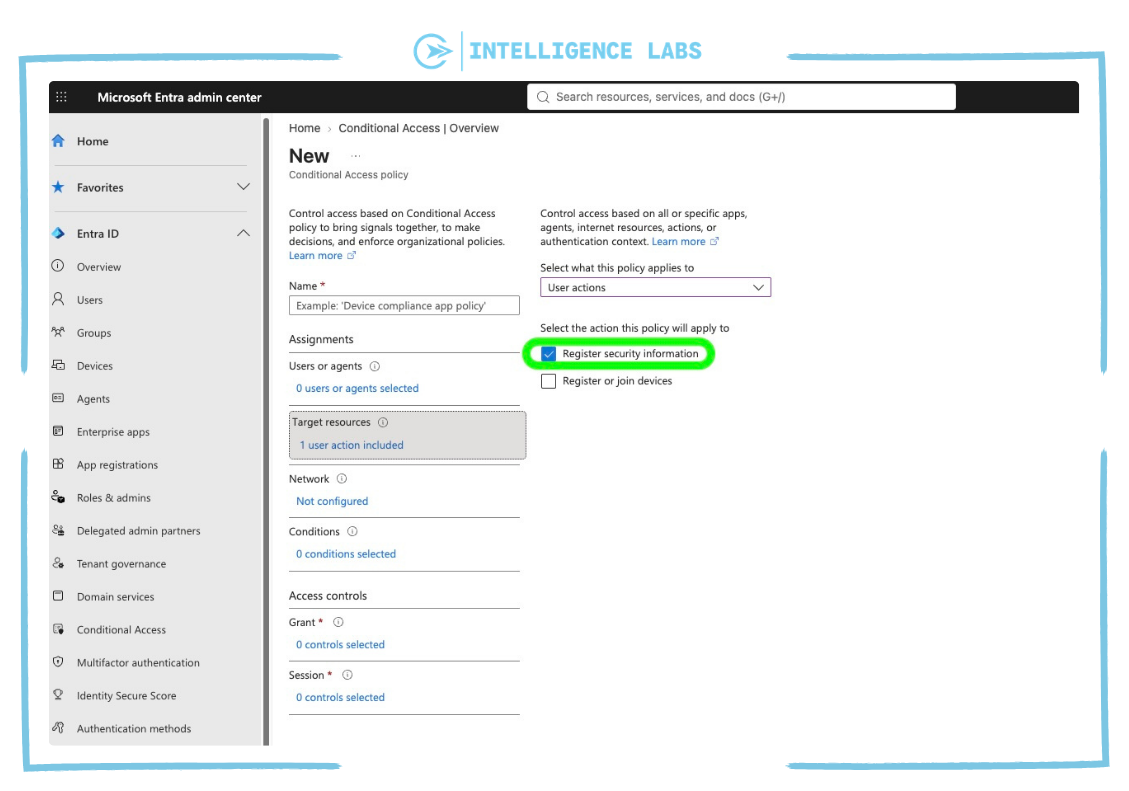
This is sometimes done by registering an additional sign-in method. This can be mitigated by creating a Conditional Access Policy that targets “Register security information” and requires strong authentication, a compliant device, or a trusted location such as the outbound IP of the main office.
Adding “Register security information” to your Conditional Access Policy
To do this, in your Microsoft Entra admin center go to Conditional Access -> New policy -> Target resources.
Then select “User actions” in the dropdown, and click the “Register security information” checkbox.
Configure the rest of the CAP as applicable to your tenant and setup.
Some attacks are still delivered over email
This can include things like .HTML and .SVG attachments. Make sure these are blocked and if there is a business requirement to share such files, use other means than email for sharing.
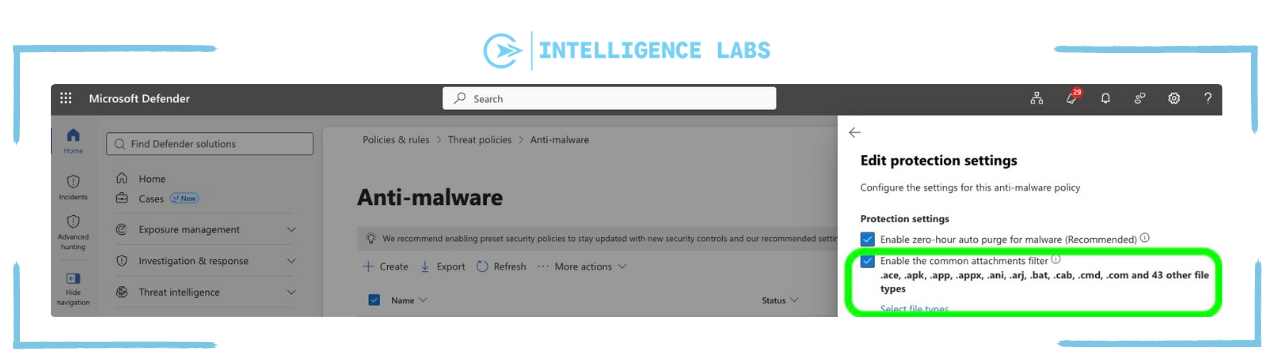
Blocking attachments in Defender
To do this, go to your Microsoft Defender Portal and then select “Email & Collaboration” -> “Policies & rules” -> “Threat policies” -> “Anti-malware” -> Create/Update a policy -> Edit protection settings
Under “select file types” make sure you include .SVG and .HTML in the common attachments filter.
Include high-risk users in a conditional access policy with the “Require risk remediation” grant control
This ensures that if user risk is detected, the CAP requires the user to log in again, and all old sessions are revoked.
Adding “Require risk remediation” for high-risk users
To do this, go to you Microsoft Entra admin center, then select Conditional Access -> Policies -> Existing (or new) policy -> Access Controls -> Grant
Next click the “Require risk remediation” checkbox.
Configure the rest of the CAP as applicable to your tenant and setup.

Summary: Phishing-resistant authentication can help improve your security posture
The campaign examples shown in this article cover just a very small subset of all the attacks going on where the threat actor ends up stealing session tokens and getting access to an organizations tenant. This happens daily, even with so much spend and attention focused on security awareness.
Adopting phishing-resistant authentication methods and having conditional access policies with applicable authentication strength can dramatically increase your overall security posture against these types of attacks.
I encourage you to start the process today of adapting phishing-resistance authentication methods for the identities with the biggest risk. It is just a matter of time before we are back playing cat and mouse again.