



In the previous Intelligence Labs article – Automating app permission management and monitoring in your Microsoft Entra ID – we explained how to monitor creation, consent, and permissions related to apps.
In this article, we’re going to take things a step further and look at how to monitor and audit app credentials.
Before we start, it’s important to reinforce the different roles permissions and credentials serve:
- Permissions define what a service principal can do
- Credentials define who can authenticate as it
Why does this matter? An attacker doesn’t always need new permissions. If they add a credential to an app registration or service principal that already exists, they can sign in as that service principal and use every permission it already has, without creating anything, granting anything, or triggering a consent.
Take, for example, the recent ConnectWise incident; a compromised service principal gave itself the Global Administrator role and added client secrets to two other existing service principals to allow the attacker a route back in even after the vendor has provided a fix for the initial compromise. This raises an important point that admins need to be aware of: the vendor may have closed the front door; but you are responsible for the backdoor.
ConnectWise is not the only recent case of this type of compromise. In November, unified cybersecurity platform Todyl found an attacker had been able to sign in to Entra ID and Azure DevOps using stolen credentials that were still valid. No consent – no new permission – no MFA to verify – direct access to the tenant!
Both of these examples highlight why in order to protect our tenants we need to be able to monitor any changes made inside them.
Why credentials matter
Client secrets, certificates, and federated credentials are the three ways a service principal can prove its identity. A client secret works like a password, while a certificate keeps its private key on the client. A federated credential, on the other hand, doesn’t store anything in the app registration: Entra ID trusts tokens issued by an external identity provider, such as GitHub Actions or Kubernetes, and exchanges them for an access token. In each case, whoever authenticates with one of these credentials can act as the service principal, with all the permissions and roles assigned to it.
If you want to know more about application authentication, we go into it in more detail in a previous Intelligence Labs article: How Enterprise Applications Authenticate in Entra ID.
When it comes to protecting our tenant, a small blind spot can give an attacker the ability to create a backdoor and gain access. Simply monitoring the most privileged service principal is not enough – we need to monitor our entire Microsoft 365 environment. Cybersecurity firm Huntress demonstrated during the ConnectWise attack that the service principal that were compromised appeared to be chosen at random – some were less privileged than others, while much more powerful service principal were left unchanged.
Who can add credentials to app registration and service principals
Before we can fully understand what events and changes we should be monitoring for, we need to take a step back and figure out who can add credentials to the app registrations and service principals in our tenant.
Understanding this allows us to see which users could potentially enable an attacker to cause the same issues we saw in the ConnectWise attack.
NOTE: Please observe the Application.ReadWrite.All and Directory.ReadWrite.All permissions in this table, as they are considered classified as High-Risk permissions. This is because any service principal that is assigned one of those permissions can add a credential to any other app registration or service principal, even one with more privileges.
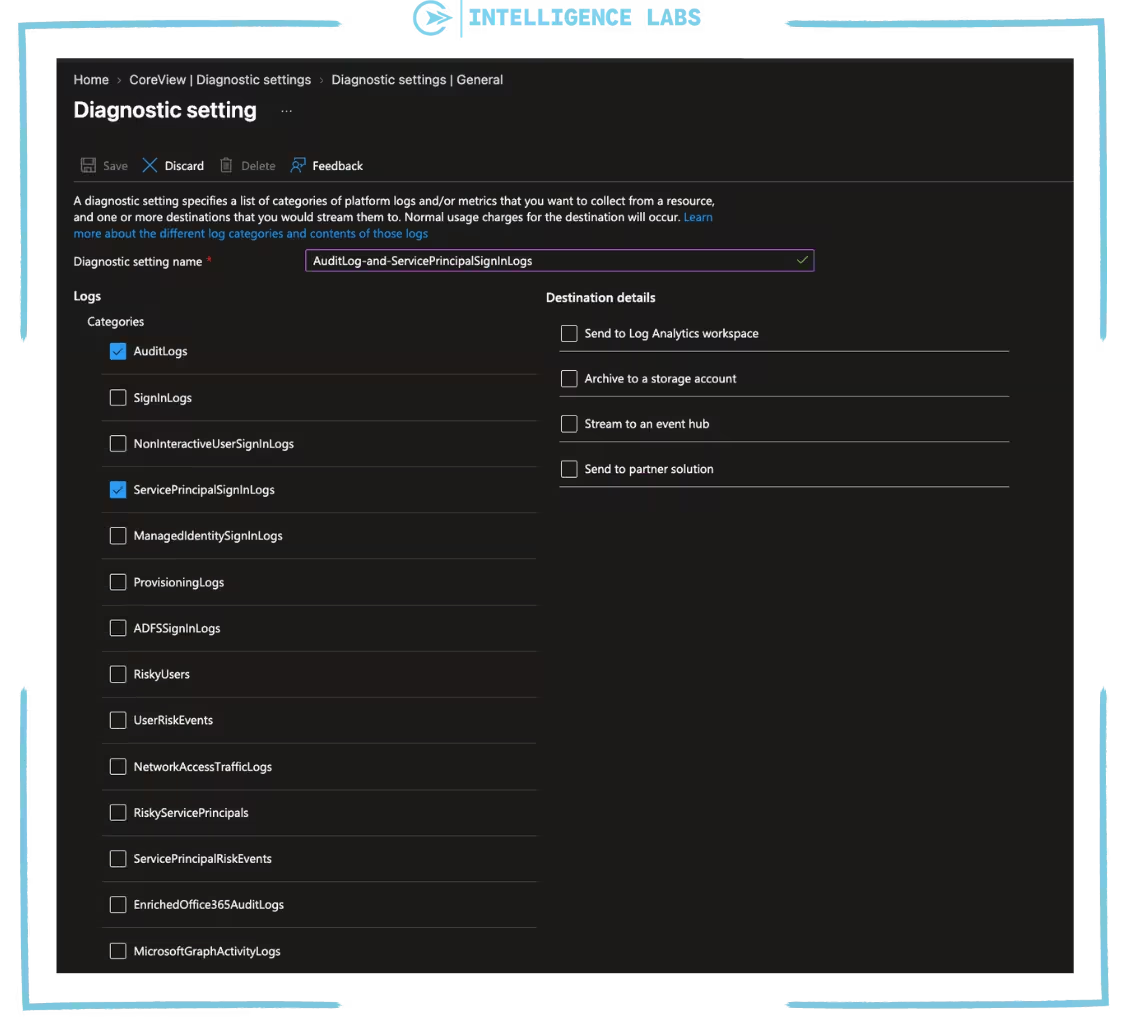
Enable Diagnostic settings
The KQL query section below requires you to enable Diagnostic settings. We covered this in the first article, “Automating app permission management and monitoring in your Microsoft Entra ID”. If you’ve already followed these steps, you can continue; otherwise, please go back to this step in the previous article: Enabling “Diagnostic settings” in Entra ID.
While AuditLogs show when credentials are added or changed and by whom, then we would also like to monitor SigninLogs for the service principals, as this allows us to detect which credentials are being used. So we need to enable ServicePrincipalSignInLogs in Diagnostic setting.
What the audit logs show?
There are 4 main logs to monitor:
The table highlights two important things that we need to keep in mind.
Up to this point, we’ve only discussed the role of credentials from the perspective of an app registration. However, a service principal can also have credentials of its own. For a third-party application, the app registration, and hence upstream credentials lives in the vendor’s tenant. The service principal in your tenant is the place an attacker can add credentials locally. This is why we need to monitor service principals as well.
KQL query to monitor credentials added to app registrations and service principals
In this section we’ll look at how we can use KQL query to monitor the credentials added to app registrations and service principals, who added them, and whether they were used:
KQL query – Monitor credentials added to app registrations and service principals
AuditLogs
// Look at the last 7 days
| where TimeGenerated > ago(7d)
// Filter on changes to app registrations and service principals
| where OperationName has_any ("Add service principal credentials", "Update application", "Update service principal")
// Filter only successful actions
| where Result == "success"
// Take the target (app registration or service principal) and its changed properties
| mv-apply Target = TargetResources on (
where tostring(Target.type) in~ ("Application", "ServicePrincipal")
| extend TargetType = tostring(Target.type), TargetName = tostring(Target.displayName), TargetId = tostring(Target.id), Mods = Target.modifiedProperties
)
// Keep only the changes to credentials: read the list before and after the change
| mv-apply Property = Mods on (
where tostring(Property.displayName) =~ "KeyDescription"
| extend NewKeys = parse_json(tostring(Property.newValue)), OldKeys = parse_json(tostring(Property.oldValue))
)
// Keep only the credentials that were added (in the new list but not in the old one)
| extend Added = set_difference(NewKeys, OldKeys), HadCredentialsBefore = array_length(OldKeys) > 0
| where array_length(Added) > 0
| mv-expand AddedKey = Added to typeof(string)
// Split the credential details: ID, type (secret or certificate) and name
| parse AddedKey with * "KeyIdentifier=" KeyId:string ",KeyType=" KeyType:string ",KeyUsage=" KeyUsage:string ",DisplayName=" KeyName:string "]" *
// Who did it (a user or an application) and with which tool (user agent)
| extend InitiatorType = iff(isnotempty(tostring(InitiatedBy.user.userPrincipalName)), "User", "App"),
Initiator = coalesce(tostring(InitiatedBy.user.userPrincipalName), tostring(InitiatedBy.app.displayName)),
UserAgent = extract(@'"key":"User-Agent","value":"([^"]*)"', 1, tostring(AdditionalDetails))
// One row per credential, even when the change is logged by more than one event
| summarize arg_min(TimeGenerated, InitiatorType, Initiator, UserAgent, TargetType, TargetName, KeyType, KeyName, HadCredentialsBefore) by KeyId, TargetId
// Sort by most recent first
| sort by TimeGenerated desc
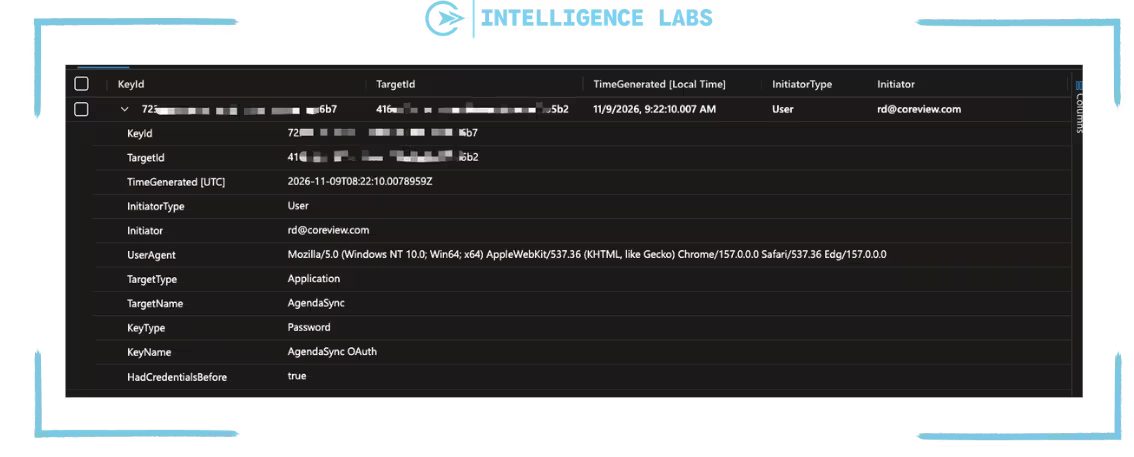
Query result
This query checks the AuditLogs table for the past 7 days to see all app registration and service principal changes. It compares the list of credentials before and after each change and keeps only the ones that were added.
For each event log it shows a timestamp, KeyId, TargetId, who added it (whether it was a user or a service principal), the user agent used, the app registration or service principal that received it, the type of credential, its name, and its ID. The HadCredentialsBefore also flags if a credential is already present or not.
Extending this query to monitor credentials added by a service principal
We can choose to only monitor credentials added by a service principal , by adding the following code:
| where InitiatorType == "App"
This should be added after:
| extend InitiatorType = iff(isnotempty(tostring(InitiatedBy.user.userPrincipalName)), "User", "App"), Initiator = coalesce(tostring(InitiatedBy.user.userPrincipalName), tostring(InitiatedBy.app.displayName)), UserAgent = extract(@'"key":"User-Agent","value":"([^"]*)"', 1, tostring(AdditionalDetails))
Three indicators within this query help us understand where to look in more detail:
- InitiatorType = App – Shows that service principal added a credential to another app registration or service principal. This is exactly what happened in the ConnectWise case.
- HadCredentialsBefore = True – This means that an app registration or service principal already had a credentials and now has another one. A rotation of secrets usually adds a new one and remove the old one.
- UserAgent – This string can assist as an indicator helping us to detect if a change is potentially malicious.
Query result
This query checks the AuditLogs table for the past 7 days for changes to app registrations and service principals made by a service principal (InitiatorType = <App-name>), not by a person. It compares the list of credentials before and after each change and keeps only the ones that were added.
For each event logs it shows: the timestamp, the service principal that added it, the user agent of the tool used, the service principal registration or service principal that received it, the type of credential, its name, and its ID.
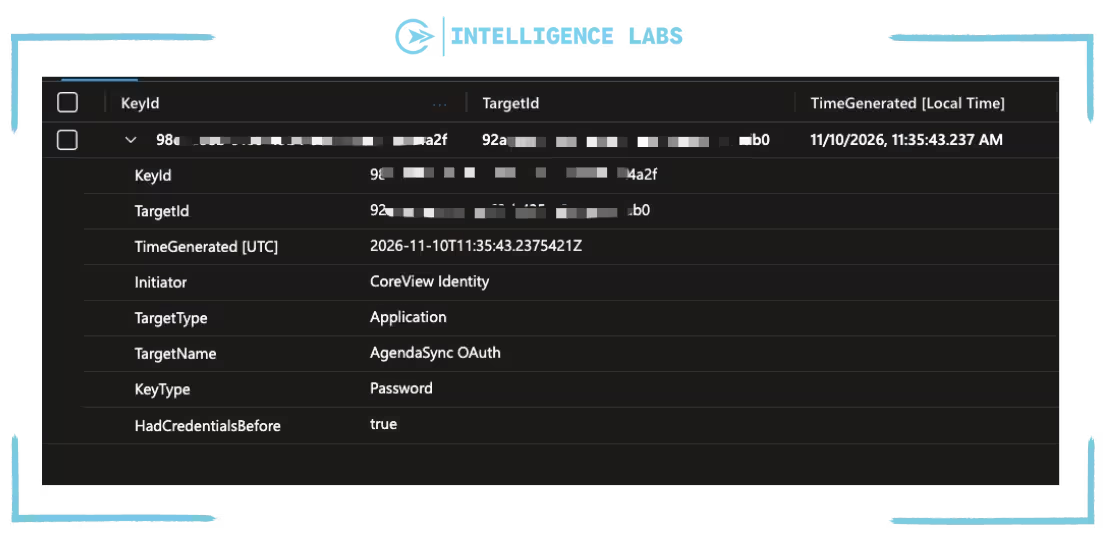
There can be a lot of noise here due to automations that rotate secrets and Azure services that manage certificates for managed identities.
Check them and exclude the ones you know to help reduce the noise.
KQL query – Credentials added by someone for the first time in the past 90 days
This KQL query detects credentials added by a user or service principal that hasn’t added one in the past 90 days – meaning that it is not something that is usual behavior for that user. This is the detection most security tools use for this technique.
// History to compare with (within your workspace retention)
let lookback = 90d;
// The period to check (align it with the Logic App recurrence)
let window = 1d;
// Credentials added to app registrations and service principals, with who did it
let credAdds = AuditLogs
// Look at the history period
| where TimeGenerated > ago(lookback)
// Filter on changes to app registrations and service principals
| where OperationName has_any ("Add service principal credentials", "Update application", "Update service principal")
// Filter only successful actions
| where Result == "success"
// Take the target (app registration or service principal) and its changed properties
| mv-apply Target = TargetResources on (
where tostring(Target.type) in~ ("Application", "ServicePrincipal")
| extend TargetType = tostring(Target.type), TargetName = tostring(Target.displayName), Mods = Target.modifiedProperties
)
// Keep only the changes to credentials: read the list before and after the change
| mv-apply Property = Mods on (
where tostring(Property.displayName) =~ "KeyDescription"
| extend NewKeys = parse_json(tostring(Property.newValue)), OldKeys = parse_json(tostring(Property.oldValue))
)
// Keep only the changes that added a credential (in the new list but not in the old one)
| where array_length(set_difference(NewKeys, OldKeys)) > 0
// Who did it: a user or an appplication
| extend Initiator = coalesce(tostring(InitiatedBy.user.userPrincipalName), tostring(InitiatedBy.app.displayName))
// Filter only useful information
| project TimeGenerated, Initiator, TargetType, TargetName;
// Users and apps that already added a credential before the period to check
let knownActors = credAdds
// Keep only the history before the period to check
| where TimeGenerated < ago(window)
// One row for each user or application
| distinct Initiator;
// Credentials added in the period by someone who never did it before
credAdds
// Keep only the period to check
| where TimeGenerated >= ago(window)
// Keep only the users and apps that never added a credential before
| where Initiator !in (knownActors)
// Sort by most recent first
| sort by TimeGenerated desc
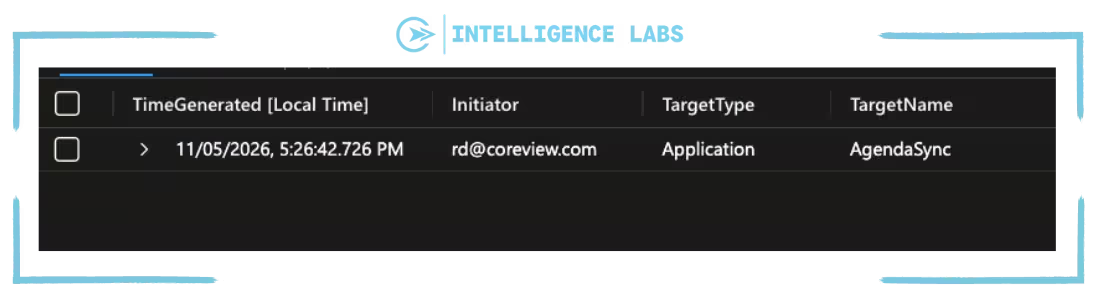
Query result
This query checks the AuditLogs table for the past 90 days (you can set this time to what you want) for credentials added to app registration and service principals, and builds a list of users and service principals that already added one. It keeps only credentials added in the past “windows” period by someone who is not in that list.
For each event log it shows: the timestamp, who added it, and the app registration or service principal that received it.
KQL query – Detect a role assignment followed by changes to other app registration and service principals
This query helps us detect threats similar to the ConnectWise attack. A service principals that receives a directory role and then changes other app registrations or service principals.
// Service principals that received a directory role
let rolesToServiceprincipals = AuditLogs
// Look at the last 7 days
| where TimeGenerated > ago(300d)
// Filter on role assignments
| where OperationName == "Add member to role"
// Filter only successful actions
| where Result == "success"
// Keep only the assignments where the new member is a service principal
| where tostring(TargetResources[0].type) =~ "ServicePrincipal"
// Take the event details, stored as a list of name/value pairs
| extend Mods = TargetResources[0].modifiedProperties
// Turn that list into a dictionary, so each field can be read by name
| mv-apply d = Mods on (
summarize Props = make_bag(bag_pack(tostring(d.displayName), trim('"', tostring(d.newValue))))
)
// Filter only useful information: when, which service principal and which role
| project RoleTime = TimeGenerated, AppId = tostring(TargetResources[0].id), AppName = tostring(TargetResources[0].displayName), Role = tostring(Props["Role.DisplayName"]);
// Changes to app registrations and service principals made by an app
let changesByApps = AuditLogs
// Look at the last 7 days
| where TimeGenerated > ago(7d)
// Filter on changes to app registrations and service principals
| where OperationName has_any ("Add service principal credentials", "Update application", "Update service principal")
// Filter only successful actions
| where Result == "success"
// Keep only the changes made by a service principal, not by a person
| where isnotempty(tostring(InitiatedBy.app.servicePrincipalId))
// Filter only useful information: when, which service principals did it, what it changed and on which app registration or service principals
| project ChangeTime = TimeGenerated, ActorId = tostring(InitiatedBy.app.servicePrincipalId), Operation = OperationName, ChangedApp = tostring(TargetResources[0].displayName);
// The same service principals received a role and then changed other app registration or service principal within one hour
rolesToServiceprincipals
// Match the service principals that received the role with the one that made the changes
| join kind=inner changesByApps on $left.AppId == $right.ActorId
// Keep only the changes made within one hour after the role assignment
| where ChangeTime between (RoleTime .. (RoleTime + 1h))
// Filter only useful information
| project RoleTime, AppName, Role, ChangeTime, Operation, ChangedApp
// Sort by most recent first
| sort by RoleTime desc
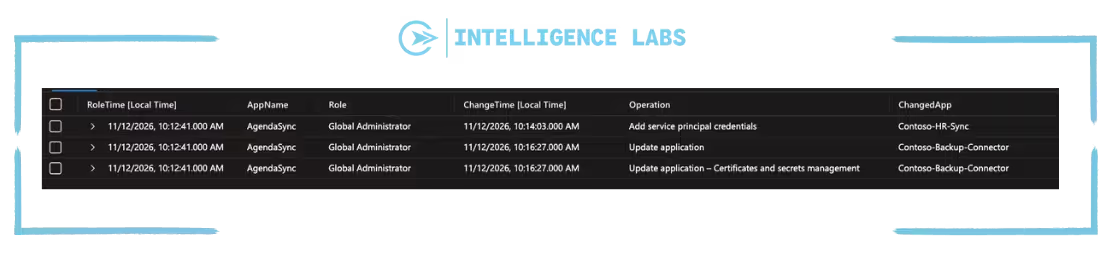
Query result
This query checks the AuditLogs table for the past 7 days for every directory role assigned to a service principal, and checks every change made by an service principals to app registration or service principal. It shows exactly what happened in the ConnectWise attack where a service principals received a role changed and then changed other app registration or service principals within one hour.
For each match it shows: when the role was assigned, the service principals and the role, and then when and how it changed which other app registration and service principals.
KQL query – Credentials added to rarely used service principals
This KLQ query will show up any new credential on a service principals that hasn’t signed in for months. If nobody expects activity from it, nobody will notice a change. This query uses the service principal Sign-in logs, so it needs the ServicePrincipalSignInLogs category discussed in the “Enable Diagnostic settings” section above .
// The period to check (align it with the Logic App recurrence)
let window = 1h;
// Service principals that signed in successfully during the last 90 days
let activeServicePrincipals = AADServicePrincipalSignInLogs
// Look at the last 90 days
| where TimeGenerated > ago(90d)
// Keep only successful sign-ins
| where ResultType == "0"
// One row for each service principal, with its object ID and its Application (client) ID
| distinct ServicePrincipalId, AppId;
// Object IDs of the active service principals
let activeSpIds = activeServicePrincipals | distinct ServicePrincipalId;
// Application (client) IDs of the active service principals
let activeAppIds = activeServicePrincipals | distinct AppId;
AuditLogs
// Look at the period to check
| where TimeGenerated > ago(window)
// Filter on changes to app registrations and service principals
| where OperationName has_any ("Add service principal credentials", "Update application", "Update service principal")
// Filter only successful actions
| where Result == "success"
// Take the target (app registration or service principal), its object ID and its changed properties
| mv-apply Target = TargetResources on (
where tostring(Target.type) in~ ("Application", "ServicePrincipal")
| extend TargetType = tostring(Target.type), TargetId = tostring(Target.id), TargetName = tostring(Target.displayName), Mods = Target.modifiedProperties
)
// Keep only the changes to credentials: read the list before and after the change
| mv-apply Property = Mods on (
where tostring(Property.displayName) =~ "KeyDescription"
| extend NewKeys = parse_json(tostring(Property.newValue)), OldKeys = parse_json(tostring(Property.oldValue))
)
// Keep only the credentials that were added (in the new list but not in the old one)
| extend Added = set_difference(NewKeys, OldKeys)
| where array_length(Added) > 0
| mv-expand AddedKey = Added to typeof(string)
// Take the ID of each added credential
| parse AddedKey with * "KeyIdentifier=" KeyId:string ",KeyType=" *
// Take the Application (client) ID of the app from the event details
| extend AppId = extract(@'"key":"AppId","value":"([^"]*)"', 1, tostring(AdditionalDetails))
// Keep only the targets that didn't sign in during the last 90 days:
// service principals by object ID, app registrations by Application (client) ID
| where (TargetType =~ "ServicePrincipal" and TargetId !in (activeSpIds))
or (TargetType =~ "Application" and AppId !in (activeAppIds))
// Who added it (a user or a service principal)
| extend Initiator = coalesce(tostring(InitiatedBy.user.userPrincipalName), tostring(InitiatedBy.app.displayName))
// One row per credential, even when the change is logged by more than one event
| summarize arg_min(TimeGenerated, Initiator, TargetType, TargetName) by KeyId, TargetId
// Filter only useful information
| project TimeGenerated, Initiator, TargetType, TargetId, TargetName
// Sort by most recent first
| sort by TimeGenerated desc
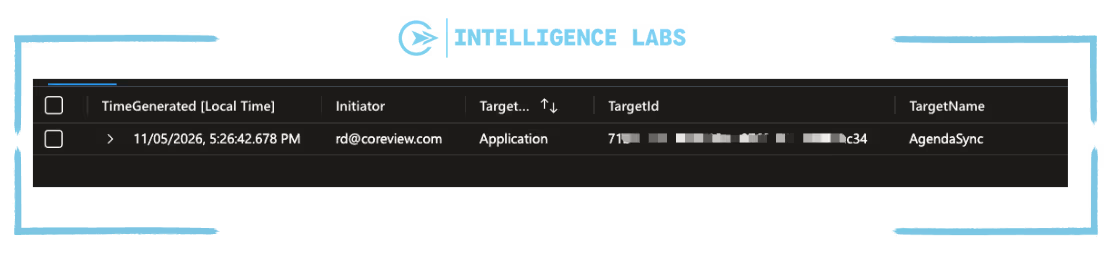
Query result
This query checks the AuditLogs table for the past hour for credentials added to app registrations and service principals. It keeps only the service principals that didn’t sign in successfully during the past 90 days.
For each new credential it shows: the timestamp, who added it, and the rarely used service principals that received it.
KQL query – Check whether a new credential was used
AADServicePrincipalSignInLogs
// Look at the last 7 days
| where TimeGenerated > ago(7d)
// Paste the KeyId returned by the first query
| where ServicePrincipalCredentialKeyId == "<KeyId>"
// Filter only useful information
| project TimeGenerated, ServicePrincipalName, IPAddress, ResultType, ResourceDisplayName
// Sort by most recent first
| sort by TimeGenerated desc
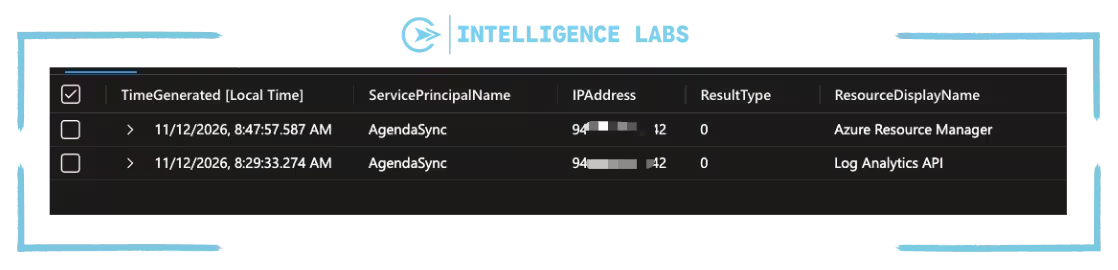
Query result
This query checks the service principal Microsoft Entra ID sign-in logs for the credential found by the first query. It shows when it was used, by what service principal, from what IP address, if the sign-in was successful, and what resource it accessed.
A sign-in from an IP address you don’t expect is a strong indicator that the credential is in the wrong hands. In the ConnectWise case, the legitimate service principal signed in from Azure ranges, while the attacker used a hosting provider address.
Alerting via Email and Teams
As before in the previous article we need to create a Logic App that will alert the team of any findings. We can easily recreate the same flow as before; same recurrence, same managed identity with the Mail.Send permission and the same Email and Teams steps. The only changes will be that the query should run inside the Run query and list results.
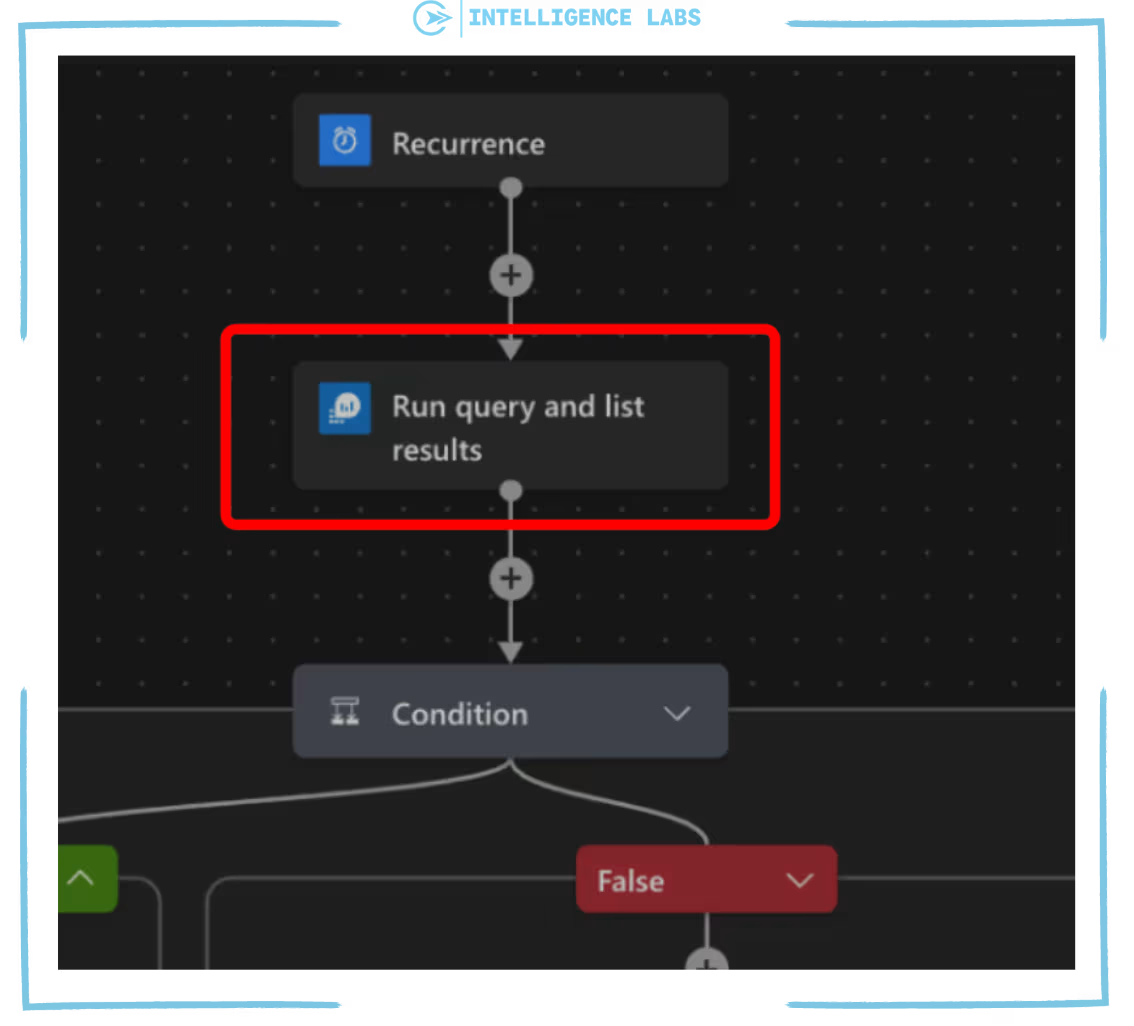
Note that not every new credential deserves an alert: teams rotate secrets regularly, and an alert on each of them would soon be ignored.
What should we do once an alert comes up?
- Confirm the finding, verify if it was done on purpose.
- Check for usage, was the added credential used.
- Remove/contain, rotate the compromised credentials and remove the added credentials.
- Review changes, identify all changes made by the affected service principal and revert them.
Adding credentials on a dashboard in Azure Workbook
Instead of building a new dashboard we have extended the workbook from the previous article: Creating a dashboard in Azure Workbook.
{
"version": "Notebook/1.0",
"items": [
{
"type": 1,
"content": {
"json": "\n\nBuilt by the **CoreView Security Team** · Companion workbook to the article [CoreView Intelligence Labs](https://www.coreview.com/intelligence-labs)· \n*Provided as-is: validate the results in your own tenant before acting on them.*\n\n---"
},
"name": "text - attribution"
},
{
"type": 1,
"content": {
"json": "# App, permission & credential monitoring\nWhat is being **created**, **consented**, **granted** and which **credentials** are added in the tenant\n\n*Select the workspace and the time range above. Use **Exclude automations** to hide the apps that grant permissions or add credentials as part of known automations in your tenant.*"
},
"name": "text - title"
},
{
"type": 9,
"content": {
"version": "KqlParameterItem/1.0",
"parameters": [
{
"id": "a1b2c3d4-0001-4000-8000-000000000001",
"version": "KqlParameterItem/1.0",
"name": "Subscription",
"type": 6,
"isRequired": true,
"multiSelect": true,
"quote": "'",
"delimiter": ",",
"typeSettings": {
"additionalResourceOptions": [
"value::all"
],
"includeAll": true,
"showDefault": false
},
"timeContext": {
"durationMs": 86400000
},
"defaultValue": "value::all"
},
{
"id": "a1b2c3d4-0003-4000-8000-000000000003",
"version": "KqlParameterItem/1.0",
"name": "Workspace",
"label": "Log Analytics workspace",
"type": 2,
"isRequired": true,
"typeSettings": {
"additionalResourceOptions": [],
"showDefault": false
},
"queryType": 1,
"resourceType": "microsoft.resourcegraph/resources",
"crossComponentResources": [
"{Subscription}"
],
"query": "resources\n| where type =~ 'microsoft.operationalinsights/workspaces'\n| project value = id, label = name\n| order by label asc",
"timeContext": {
"durationMs": 86400000
},
"value": null
},
{
"id": "a1b2c3d4-0002-4000-8000-000000000002",
"version": "KqlParameterItem/1.0",
"name": "TimeRange",
"label": "Time range",
"type": 4,
"isRequired": true,
"value": {
"durationMs": 2592000000
},
"typeSettings": {
"selectableValues": [
{
"durationMs": 86400000
},
{
"durationMs": 604800000
},
{
"durationMs": 2592000000
},
{
"durationMs": 7776000000
},
{
"durationMs": 15552000000
}
],
"allowCustom": true
},
"timeContext": {
"durationMs": 86400000
}
},
{
"id": "a1b2c3d4-0005-4000-8000-000000000005",
"version": "KqlParameterItem/1.0",
"name": "ExcludedApps",
"label": "Exclude automations",
"type": 2,
"isRequired": true,
"multiSelect": true,
"quote": "'",
"delimiter": ",",
"query": "// Apps that created apps, granted permissions or added credentials in the selected time range\nAuditLogs\n| where OperationName in (\"Add application\", \"Add service principal\", \"Add app role assignment to service principal\", \"Add delegated permission grant\", \"Add service principal credentials\")\n or OperationName has \"Certificates and secrets management\"\n| where Result == \"success\"\n| extend App = tostring(InitiatedBy.app.displayName)\n| where isnotempty(App)\n| distinct App\n| project value = App, label = App, selected = false\n// Placeholder selected by default, so nothing is excluded until the user picks an app\n| union (print value = \"(none)\", label = \"(none)\", selected = true)\n| order by label asc",
"typeSettings": {
"additionalResourceOptions": [],
"showDefault": false
},
"timeContextFromParameter": "TimeRange",
"crossComponentResources": [
"{Workspace}"
],
"queryType": 0,
"resourceType": "microsoft.operationalinsights/workspaces"
}
],
"style": "pills",
"queryType": 0,
"resourceType": "microsoft.operationalinsights/workspaces"
},
"name": "parameters - main"
},
{
"type": 3,
"content": {
"version": "KqlItem/1.0",
"query": "// Summary counters for the selected time range\nlet newApps = AuditLogs\n| where OperationName == \"Add application\"\n| where Result == \"success\"\n| summarize Value = dcount(strcat(tostring(TimeGenerated), CorrelationId))\n| extend Metric = \"New app registrations\";\nlet newSps = AuditLogs\n| where OperationName == \"Add service principal\"\n| where Result == \"success\"\n| summarize Value = dcount(strcat(tostring(TimeGenerated), CorrelationId))\n| extend Metric = \"New enterprise applications\";\nlet appGrants = AuditLogs\n| where OperationName == \"Add app role assignment to service principal\"\n| where Result == \"success\"\n// Exclude the automations selected in the filter above\n| where tostring(InitiatedBy.app.displayName) !in~ ({ExcludedApps})\n| summarize Value = dcount(strcat(tostring(TimeGenerated), CorrelationId))\n| extend Metric = \"Application permissions granted\";\nlet delGrants = AuditLogs\n| where OperationName == \"Add delegated permission grant\"\n| where Result == \"success\"\n// Exclude the automations selected in the filter above\n| where tostring(InitiatedBy.app.displayName) !in~ ({ExcludedApps})\n| summarize Value = dcount(strcat(tostring(TimeGenerated), CorrelationId))\n| extend Metric = \"Delegated permission grants\";\nlet credAdds = AuditLogs\n| where OperationName has_any (\"Add service principal credentials\", \"Update application\", \"Update service principal\")\n| where Result == \"success\"\n// Exclude the automations selected in the filter above\n| where tostring(InitiatedBy.app.displayName) !in~ ({ExcludedApps})\n| mv-apply Target = TargetResources on (\n where tostring(Target.type) in~ (\"Application\", \"ServicePrincipal\")\n | extend Mods = Target.modifiedProperties\n )\n| mv-apply Property = Mods on (\n where tostring(Property.displayName) =~ \"KeyDescription\"\n | extend NewKeys = parse_json(tostring(Property.newValue)), OldKeys = parse_json(tostring(Property.oldValue))\n )\n// Count each added credential once\n| mv-expand AddedKey = set_difference(NewKeys, OldKeys) to typeof(string)\n| where isnotempty(AddedKey)\n| summarize Value = dcount(AddedKey)\n| extend Metric = \"Credentials added\";\nunion newApps, newSps, appGrants, delGrants, credAdds\n| project Metric, Value",
"size": 4,
"title": "Summary",
"timeContextFromParameter": "TimeRange",
"queryType": 0,
"resourceType": "microsoft.operationalinsights/workspaces",
"crossComponentResources": [
"{Workspace}"
],
"visualization": "tiles",
"tileSettings": {
"showBorder": true,
"size": "auto",
"titleContent": {
"columnMatch": "Metric",
"formatter": 1
},
"leftContent": {
"columnMatch": "Value",
"formatter": 12,
"formatOptions": {
"palette": "auto"
},
"numberFormat": {
"unit": 17,
"options": {
"maximumSignificantDigits": 3,
"maximumFractionDigits": 2
}
}
}
}
},
"name": "query - summary"
},
{
"type": 1,
"content": {
"json": "## 1. App creation\nNew app registrations (`Add application`) and enterprise applications (`Add service principal`). \nUse the filter to separate what is created by a **user** from what is created by an **app**.\n\nUsers are shown by default."
},
"name": "text - creation"
},
{
"type": 9,
"content": {
"version": "KqlParameterItem/1.0",
"parameters": [
{
"id": "a1b2c3d4-0004-4000-8000-000000000004",
"version": "KqlParameterItem/1.0",
"name": "InitiatorType",
"label": "Initiator type",
"type": 2,
"isRequired": true,
"typeSettings": {
"additionalResourceOptions": [],
"showDefault": false
},
"jsonData": "[{ \"value\": \"User\", \"label\": \"User\" }, { \"value\": \"App\", \"label\": \"App\" }, { \"value\": \"All\", \"label\": \"All\" }]",
"timeContext": {
"durationMs": 86400000
},
"defaultValue": "User"
}
],
"style": "pills",
"queryType": 0,
"resourceType": "microsoft.operationalinsights/workspaces"
},
"name": "parameters - creation"
},
{
"type": 3,
"content": {
"version": "KqlItem/1.0",
"query": "AuditLogs\n// Keep only app registration and service principal creation events\n| where OperationName in (\"Add application\", \"Add service principal\")\n// Keep only successful operations\n| where Result == \"success\"\n// Split the initiator: a user or an app (for example an agent identity blueprint)\n| extend UserInitiator = tostring(InitiatedBy.user.userPrincipalName),\n AppInitiator = tostring(InitiatedBy.app.displayName)\n// Select the relevant fields\n| project TimeGenerated,\n Kind = iff(OperationName == \"Add application\", \"App registration\", \"Enterprise application\"),\n InitiatorType = iff(isnotempty(UserInitiator), \"User\", \"App\"),\n Initiator = coalesce(UserInitiator, AppInitiator),\n AppName = tostring(TargetResources[0].displayName),\n AppObjectId = tostring(TargetResources[0].id)\n// Apply the initiator type selected in the workbook filter (All shows everything)\n| where \"{InitiatorType}\" == \"All\" or InitiatorType == \"{InitiatorType}\"\n// Remove exact duplicates\n| distinct *\n// Sort by most recent first\n| sort by TimeGenerated desc",
"size": 0,
"title": "New apps in the tenant",
"noDataMessage": "No events in the selected time range.",
"timeContextFromParameter": "TimeRange",
"showExportToExcel": true,
"queryType": 0,
"resourceType": "microsoft.operationalinsights/workspaces",
"crossComponentResources": [
"{Workspace}"
],
"visualization": "table",
"gridSettings": {
"rowLimit": 500,
"filter": true,
"sortBy": [
{
"itemKey": "AppName",
"sortOrder": 2
}
]
},
"sortBy": [
{
"itemKey": "AppName",
"sortOrder": 2
}
]
},
"name": "query - creation"
},
{
"type": 1,
"content": {
"json": "## 2. Who granted what\nApplication and delegated permissions granted to apps, with the app name recovered from the consent event."
},
"name": "text - grants"
},
{
"type": 3,
"content": {
"version": "KqlItem/1.0",
"query": "AuditLogs\n| where OperationName in (\"Add app role assignment to service principal\", \"Add delegated permission grant\")\n| where Result == \"success\"\n| extend Type = iff(OperationName has \"delegated\", \"Delegated\", \"Application\"),\n Users = coalesce(tostring(InitiatedBy.user.userPrincipalName), tostring(InitiatedBy.app.displayName))\n// Remove exact duplicates before counting\n| distinct TimeGenerated, CorrelationId, OperationName, Type, Users\n// Exclude the automations selected in the filter above\n| where Users !in~ ({ExcludedApps})\n// Count the permissions granted each day, split by type\n| summarize Grants = count() by bin(TimeGenerated, 1d), Type",
"size": 1,
"title": "Permissions granted per day",
"timeContextFromParameter": "TimeRange",
"queryType": 0,
"resourceType": "microsoft.operationalinsights/workspaces",
"crossComponentResources": [
"{Workspace}"
],
"visualization": "timechart"
},
"name": "query - timeline"
},
{
"type": 3,
"content": {
"version": "KqlItem/1.0",
"query": "AuditLogs\n| where OperationName in (\"Add app role assignment to service principal\", \"Add delegated permission grant\")\n| where Result == \"success\"\n| extend Type = iff(OperationName has \"delegated\", \"Delegated\", \"Application\"),\n Users = coalesce(tostring(InitiatedBy.user.userPrincipalName), tostring(InitiatedBy.app.displayName))\n// Remove exact duplicates before counting\n| distinct TimeGenerated, CorrelationId, OperationName, Type, Users\n// Exclude the automations selected in the filter above\n| where Users !in~ ({ExcludedApps})\n// Count the permissions granted by each user and keep the top 10\n| summarize Grants = count() by Users\n| top 10 by Grants desc",
"size": 0,
"title": "Top 10 users granting permissions",
"timeContextFromParameter": "TimeRange",
"queryType": 0,
"resourceType": "microsoft.operationalinsights/workspaces",
"crossComponentResources": [
"{Workspace}"
],
"visualization": "barchart"
},
"name": "query - top"
},
{
"type": 3,
"content": {
"version": "KqlItem/1.0",
"query": "let consents = AuditLogs\n // filter only application consent\n | where OperationName == \"Consent to application\"\n // filter only successful action\n | where Result == \"success\"\n // keep only consent app name\n | summarize ConsentApp = take_any(tostring(TargetResources[0].displayName)) by CorrelationId;\nAuditLogs\n// filter on app/service principal role assignment/delegated permission\n| where OperationName in (\"Add app role assignment to service principal\", \"Add delegated permission grant\")\n// filter only successful action\n| where Result == \"success\"\n// take properties event details\n| extend Mods = TargetResources[0].modifiedProperties\n// turn list into dictionary, so each field can be read by name\n| mv-apply d = Mods on (\n summarize Props = make_bag(bag_pack(tostring(d.displayName), trim('\"', tostring(d.newValue))))\n )\n// add the app name from the consent event (delegated only)\n| join kind=leftouter consents on CorrelationId\n// filter only useful information\n| project\n TimeGenerated,\n Type = iff(OperationName has \"delegated\", \"Delegated\", \"Application\"),\n Users = coalesce(tostring(InitiatedBy.user.userPrincipalName), tostring(InitiatedBy.app.displayName)),\n Resource = tostring(TargetResources[0].displayName),\n App = coalesce(tostring(Props[\"ServicePrincipal.DisplayName\"]), ConsentApp),\n Permission = coalesce(tostring(Props[\"AppRole.Value\"]), tostring(Props[\"DelegatedPermissionGrant.Scope\"]))\n// remove exact duplicates\n| distinct *\n// Exclude the automations selected in the filter above\n| where Users !in~ ({ExcludedApps})\n// Sort by most recent first\n| sort by TimeGenerated desc",
"size": 0,
"title": "Permission grants (detail)",
"noDataMessage": "No events in the selected time range.",
"timeContextFromParameter": "TimeRange",
"showExportToExcel": true,
"queryType": 0,
"resourceType": "microsoft.operationalinsights/workspaces",
"crossComponentResources": [
"{Workspace}"
],
"visualization": "table",
"gridSettings": {
"rowLimit": 500,
"filter": true
}
},
"name": "query - detail"
},
{
"type": 1,
"content": {
"json": "## 3. High risk permissions\nEach filter lists the permissions granted in the selected period, plus the high risk ones. The **high risk list is selected by default**: add or remove permissions to look at anything else."
},
"name": "text - risk"
},
{
"type": 9,
"content": {
"version": "KqlParameterItem/1.0",
"parameters": [
{
"id": "a1b2c3d4-0006-4000-8000-000000000006",
"version": "KqlParameterItem/1.0",
"name": "AppPermissions",
"label": "Application permissions",
"type": 2,
"isRequired": true,
"multiSelect": true,
"quote": "'",
"delimiter": ",",
"query": "// High-risk application permissions, selected by default (adapt it to your tenant)\nlet highRisk = dynamic([\n \"RoleManagement.ReadWrite.Directory\", \"AppRoleAssignment.ReadWrite.All\",\n \"Application.ReadWrite.All\", \"Directory.ReadWrite.All\", \"User.ReadWrite.All\",\n \"Mail.Read\", \"Mail.ReadWrite\", \"Mail.Send\", \"Files.ReadWrite.All\", \"Sites.FullControl.All\"\n]);\n// Application permissions granted in the selected time range\nlet seen = AuditLogs\n| where OperationName == \"Add app role assignment to service principal\"\n| where Result == \"success\"\n| extend Mods = TargetResources[0].modifiedProperties\n| mv-apply d = Mods on (\n summarize Props = make_bag(bag_pack(tostring(d.displayName), trim('\"', tostring(d.newValue))))\n )\n| project Permission = tostring(Props[\"AppRole.Value\"]);\n// The high risk list, so that these permissions are always in the filter\nlet defaults = print Permission = highRisk\n| mv-expand Permission to typeof(string);\nunion seen, defaults\n| where isnotempty(Permission)\n| distinct Permission\n| project value = Permission, label = Permission, selected = set_has_element(highRisk, Permission)\n| order by label asc",
"typeSettings": {
"additionalResourceOptions": [
"value::all"
],
"showDefault": false
},
"timeContextFromParameter": "TimeRange",
"crossComponentResources": [
"{Workspace}"
],
"queryType": 0,
"resourceType": "microsoft.operationalinsights/workspaces"
}
],
"style": "pills",
"queryType": 0,
"resourceType": "microsoft.operationalinsights/workspaces"
},
"name": "parameters - AppPermissions"
},
{
"type": 3,
"content": {
"version": "KqlItem/1.0",
"query": "AuditLogs\n// Keep only application permission grants (app roles): delegated permissions are covered by the next query\n| where OperationName == \"Add app role assignment to service principal\"\n// Keep only successful operations\n| where Result == \"success\"\n// Take the event details, stored as a list of name/value pairs\n| extend Mods = TargetResources[0].modifiedProperties\n// Turn that list into a dictionary, so each field can be read by name instead of by position\n| mv-apply d = Mods on (\n summarize Props = make_bag(bag_pack(tostring(d.displayName), trim('\"', tostring(d.newValue))))\n )\n// Take the permission name from the dictionary\n| extend Permission = tostring(Props[\"AppRole.Value\"])\n// Keep only the permissions selected in the filter above (default: the high risk list)\n| where Permission in ({AppPermissions})\n// Select the relevant fields (the initiator can be a user or an app)\n| project TimeGenerated, Users = coalesce(tostring(InitiatedBy.user.userPrincipalName), tostring(InitiatedBy.app.displayName)), App = tostring(Props[\"ServicePrincipal.DisplayName\"]), Permission\n// Remove exact duplicates\n| distinct *\n// Exclude the automations selected in the filter above\n| where Users !in~ ({ExcludedApps})\n// Sort by most recent first\n| sort by TimeGenerated desc",
"size": 0,
"title": "Application permissions",
"noDataMessage": "No events in the selected time range.",
"timeContextFromParameter": "TimeRange",
"showExportToExcel": true,
"queryType": 0,
"resourceType": "microsoft.operationalinsights/workspaces",
"crossComponentResources": [
"{Workspace}"
],
"visualization": "table",
"gridSettings": {
"rowLimit": 500,
"filter": true
}
},
"name": "query - risk app"
},
{
"type": 9,
"content": {
"version": "KqlParameterItem/1.0",
"parameters": [
{
"id": "a1b2c3d4-0007-4000-8000-000000000007",
"version": "KqlParameterItem/1.0",
"name": "DelegatedPermissions",
"label": "Delegated permissions",
"type": 2,
"isRequired": true,
"multiSelect": true,
"quote": "'",
"delimiter": ",",
"query": "// High risk delegated permissions, selected by default (adapt it to your tenant)\nlet highRisk = dynamic([\n \"RoleManagement.ReadWrite.Directory\", \"AppRoleAssignment.ReadWrite.All\",\n \"Application.ReadWrite.All\", \"Directory.ReadWrite.All\", \"User.ReadWrite.All\",\n \"Mail.ReadWrite\", \"Mail.Send\", \"Files.ReadWrite.All\", \"Sites.FullControl.All\"\n]);\n// Delegated permissions granted in the selected time range (one event can contain many, separated by a space)\nlet seen = AuditLogs\n| where OperationName == \"Add delegated permission grant\"\n| where Result == \"success\"\n| extend Mods = TargetResources[0].modifiedProperties\n| mv-apply d = Mods on (\n summarize Props = make_bag(bag_pack(tostring(d.displayName), trim('\"', tostring(d.newValue))))\n )\n| extend Scope = tostring(Props[\"DelegatedPermissionGrant.Scope\"])\n| mv-expand Permission = split(trim(\" \", Scope), \" \") to typeof(string)\n| project Permission;\n// The high risk list, so that these permissions are always in the filter\nlet defaults = print Permission = highRisk\n| mv-expand Permission to typeof(string);\nunion seen, defaults\n| where isnotempty(Permission)\n| distinct Permission\n| project value = Permission, label = Permission, selected = set_has_element(highRisk, Permission)\n| order by label asc",
"typeSettings": {
"additionalResourceOptions": [
"value::all"
],
"showDefault": false
},
"timeContextFromParameter": "TimeRange",
"crossComponentResources": [
"{Workspace}"
],
"queryType": 0,
"resourceType": "microsoft.operationalinsights/workspaces"
}
],
"style": "pills",
"queryType": 0,
"resourceType": "microsoft.operationalinsights/workspaces"
},
"name": "parameters - DelegatedPermissions"
},
{
"type": 3,
"content": {
"version": "KqlItem/1.0",
"query": "// Get the app name from the consent events, linked by CorrelationId\nlet consents = AuditLogs\n| where OperationName == \"Consent to application\"\n| where Result == \"success\"\n| summarize ConsentApp = take_any(tostring(TargetResources[0].displayName)) by CorrelationId;\nAuditLogs\n// Keep only delegated permission grants\n| where OperationName == \"Add delegated permission grant\"\n// Keep only successful operations\n| where Result == \"success\"\n// Take the event details, stored as a list of name/value pairs\n| extend Mods = TargetResources[0].modifiedProperties\n// Turn that list into a dictionary, so each field can be read by name instead of by position\n| mv-apply p = Mods on (\n summarize Props = make_bag(bag_pack(tostring(p.displayName), trim('\"', tostring(p.newValue))))\n )\n// Take the granted permissions: one event can contain many, separated by a space\n| extend Scope = tostring(Props[\"DelegatedPermissionGrant.Scope\"])\n// Split the list so that each permission becomes its own row\n| mv-expand Permission = split(trim(\" \", Scope), \" \") to typeof(string)\n// Keep only the permissions selected in the filter above (default: the high risk list)\n| where Permission in ({DelegatedPermissions})\n// Add the app name from the consent event\n| join kind=leftouter consents on CorrelationId\n// Select the relevant fields (the initiator can be a user or an app)\n| project TimeGenerated,\n // Who granted the permission\n Users = coalesce(tostring(InitiatedBy.user.userPrincipalName), tostring(InitiatedBy.app.displayName)),\n // The API the permission refers to (for example Microsoft Graph)\n Resource = tostring(TargetResources[0].displayName),\n // The app that received the permission\n App = ConsentApp,\n // The permission that was granted\n Permission\n// Remove exact duplicates\n| distinct *\n// Exclude the automations selected in the filter above\n| where Users !in~ ({ExcludedApps})\n// Sort by most recent first\n| sort by TimeGenerated desc",
"size": 0,
"title": "Delegated permissions",
"noDataMessage": "No events in the selected time range.",
"timeContextFromParameter": "TimeRange",
"showExportToExcel": true,
"queryType": 0,
"resourceType": "microsoft.operationalinsights/workspaces",
"crossComponentResources": [
"{Workspace}"
],
"visualization": "table",
"gridSettings": {
"rowLimit": 500,
"filter": true
}
},
"name": "query - risk del"
},
{
"type": 1,
"content": {
"json": "## 4. Credentials\nSecrets and certificates added to app registrations and service principals. Look first at the ones added by a **service principal**, and at the ones where the app registration or service principal already had a credential (**HadCredentialsBefore**).\n\nAll initiators and targets are shown by default."
},
"name": "text - credentials"
},
{
"type": 9,
"content": {
"version": "KqlParameterItem/1.0",
"parameters": [
{
"id": "a1b2c3d4-0008-4000-8000-000000000008",
"version": "KqlParameterItem/1.0",
"name": "CredInitiatorType",
"label": "Initiator type",
"type": 2,
"isRequired": true,
"typeSettings": {
"additionalResourceOptions": [],
"showDefault": false
},
"jsonData": "[{\"value\": \"User\", \"label\": \"User\"}, {\"value\": \"App\", \"label\": \"Service principal\"}, {\"value\": \"All\", \"label\": \"All\"}]",
"timeContext": {
"durationMs": 86400000
},
"defaultValue": "All"
},
{
"id": "a1b2c3d4-0009-4000-8000-000000000009",
"version": "KqlParameterItem/1.0",
"name": "CredTargetType",
"label": "Target",
"type": 2,
"isRequired": true,
"typeSettings": {
"additionalResourceOptions": [],
"showDefault": false
},
"jsonData": "[{\"value\": \"Application\", \"label\": \"App registrations\"}, {\"value\": \"ServicePrincipal\", \"label\": \"Service principals\"}, {\"value\": \"All\", \"label\": \"All\"}]",
"timeContext": {
"durationMs": 86400000
},
"defaultValue": "All"
}
],
"style": "pills",
"queryType": 0,
"resourceType": "microsoft.operationalinsights/workspaces"
},
"name": "parameters - credentials"
},
{
"type": 3,
"content": {
"version": "KqlItem/1.0",
"query": "AuditLogs\n// Filter on changes to app registrations and service principals\n| where OperationName has_any (\"Add service principal credentials\", \"Update application\", \"Update service principal\")\n// Filter only successful actions\n| where Result == \"success\"\n// Take the target (app registration or service principal) and its changed properties\n| mv-apply Target = TargetResources on (\n where tostring(Target.type) in~ (\"Application\", \"ServicePrincipal\")\n | extend TargetType = tostring(Target.type), TargetName = tostring(Target.displayName), TargetId = tostring(Target.id), Mods = Target.modifiedProperties\n )\n// Keep only the changes to credentials: read the list before and after the change\n| mv-apply Property = Mods on (\n where tostring(Property.displayName) =~ \"KeyDescription\"\n | extend NewKeys = parse_json(tostring(Property.newValue)), OldKeys = parse_json(tostring(Property.oldValue))\n )\n// Keep only the credentials that were added (in the new list but not in the old one)\n| extend Added = set_difference(NewKeys, OldKeys), HadCredentialsBefore = array_length(OldKeys) > 0\n| where array_length(Added) > 0\n| mv-expand AddedKey = Added to typeof(string)\n// Split the credential details: ID, type (secret or certificate) and name\n| parse AddedKey with * \"KeyIdentifier=\" KeyId:string \",KeyType=\" KeyType:string \",KeyUsage=\" KeyUsage:string \",DisplayName=\" KeyName:string \"]\" *\n// Who did it (a user or a service principal) and with which tool (user agent)\n| extend InitiatorType = iff(isnotempty(tostring(InitiatedBy.user.userPrincipalName)), \"User\", \"App\"),\n Initiator = coalesce(tostring(InitiatedBy.user.userPrincipalName), tostring(InitiatedBy.app.displayName)),\n UserAgent = extract(@'\"key\":\"User-Agent\",\"value\":\"([^\"]*)\"', 1, tostring(AdditionalDetails))\n// One row per credential, even when the change is logged by more than one event\n| summarize arg_min(TimeGenerated, InitiatorType, Initiator, UserAgent, TargetType, TargetName, KeyType, KeyName, HadCredentialsBefore) by KeyId, TargetId\n// Apply the initiator and target selected in the filters above (All shows everything)\n| where \"{CredInitiatorType}\" == \"All\" or InitiatorType == \"{CredInitiatorType}\"\n| where \"{CredTargetType}\" == \"All\" or TargetType =~ \"{CredTargetType}\"\n// Exclude the automations selected in the filter above\n| where Initiator !in~ ({ExcludedApps})\n// Filter only useful information\n| project TimeGenerated, InitiatorType, Initiator, UserAgent, TargetType, TargetName, KeyType, KeyName, KeyId, HadCredentialsBefore\n// Sort by most recent first\n| sort by TimeGenerated desc",
"size": 0,
"title": "Credentials added to app registrations and service principals",
"noDataMessage": "No events in the selected time range.",
"timeContextFromParameter": "TimeRange",
"showExportToExcel": true,
"queryType": 0,
"resourceType": "microsoft.operationalinsights/workspaces",
"crossComponentResources": [
"{Workspace}"
],
"visualization": "table",
"gridSettings": {
"rowLimit": 500,
"filter": true
}
},
"name": "query - credentials"
},
{
"type": 1,
"content": {
"json": "### Role assignments followed by changes\nService principals that received a directory role and then changed other app registrations or service principals within one hour: the sequence seen in the ConnectWise incident."
},
"name": "text - sequence"
},
{
"type": 3,
"content": {
"version": "KqlItem/1.0",
"query": "// Service principals that received a directory role\nlet rolesToServicePrincipals = AuditLogs\n// Filter on role assignments\n| where OperationName == \"Add member to role\"\n// Filter only successful actions\n| where Result == \"success\"\n// Keep only the assignments where the new member is a service principal\n| where tostring(TargetResources[0].type) =~ \"ServicePrincipal\"\n// Take the event details, stored as a list of name/value pairs\n| extend Mods = TargetResources[0].modifiedProperties\n// Turn that list into a dictionary, so each field can be read by name\n| mv-apply d = Mods on (\n summarize Props = make_bag(bag_pack(tostring(d.displayName), trim('\"', tostring(d.newValue))))\n )\n// Filter only useful information: when, which service principal and which role\n| project RoleTime = TimeGenerated, AppId = tostring(TargetResources[0].id), AppName = tostring(TargetResources[0].displayName), Role = tostring(Props[\"Role.DisplayName\"]);\n// Changes to app registrations and service principals made by a service principal\nlet changesByServicePrincipals = AuditLogs\n// Filter on changes to app registrations and service principals\n| where OperationName has_any (\"Add service principal credentials\", \"Update application\", \"Update service principal\")\n// Filter only successful actions\n| where Result == \"success\"\n// Keep only the changes made by a service principal, not by a person\n| where isnotempty(tostring(InitiatedBy.app.servicePrincipalId))\n// Filter only useful information: when, which service principal did it, what it changed and on which app registration or service principal\n| project ChangeTime = TimeGenerated, ActorId = tostring(InitiatedBy.app.servicePrincipalId), Operation = OperationName, ChangedApp = tostring(TargetResources[0].displayName);\n// The same service principal received a role and then changed other app registrations or service principals within one hour\nrolesToServicePrincipals\n// Match the service principal that received the role with the one that made the changes\n| join kind=inner changesByServicePrincipals on $left.AppId == $right.ActorId\n// Keep only the changes made within one hour after the role assignment\n| where ChangeTime between (RoleTime .. (RoleTime + 1h))\n// Filter only useful information\n| project RoleTime, AppName, Role, ChangeTime, Operation, ChangedApp\n// Sort by most recent first\n| sort by RoleTime desc",
"size": 0,
"title": "Role assignments followed by changes to other app registrations and service principals",
"noDataMessage": "No events in the selected time range.",
"timeContextFromParameter": "TimeRange",
"showExportToExcel": true,
"queryType": 0,
"resourceType": "microsoft.operationalinsights/workspaces",
"crossComponentResources": [
"{Workspace}"
],
"visualization": "table",
"gridSettings": {
"rowLimit": 500,
"filter": true
}
},
"name": "query - sequence"
}
],
"fallbackResourceIds": [
"azure monitor"
],
"$schema": "https://github.com/Microsoft/Application-Insights-Workbooks/blob/master/schema/workbook.json"
}
Above is the JSON link so you can easily import it into Azure:
- In Azure Monitor open Workbooks → New, then click on Advanced editor.
- Inside Gallery Template paste the content.
- Click Apply, and Save it.
Summary: Closing the credentials gap
The first part of this article series shows how to monitor the permission that your service principal receives. This part closes the gaps with the credentials.
The ConnectWise incident clearly showed why this matters. Disabling the vendor’s service principal closed the way in, but the secrets added to the other service principal still existed and worked. It’s important to reiterate that monitoring does not replace prevention. That’s why we also recommend that you do the following regularly:
- Review roles and check if they are needed
- Check who can add credentials in the tenant (see the “Who can add credentials to apps registration and service principals” table above)
- Review app registration and service principal owners, including Application Developers
Where possible, we strongly suggest that you use managed identities where applicable, as that gives you no credentials to manage. Just like we did for the Logic App in the previous article.
For the app registrations or service principals that need credentials, use certificates instead of client secrets. Consider using application policies to block client secrets or limit their lifetime. This ensures a forgotten or stolen secret doesn’t stay valid for years.


