Microsoft 365 configuration drift doesn’t announce itself – it quietly spreads across Entra, Intune, Exchange, Teams, SharePoint/OneDrive, Purview, and Defender until an audit, outage, or incident forces you to explain what changed. This article will help you understand the limits of Microsoft’s supports for drift management and what your third-party options are.
Inside this article
Microsoft 365 (M365) tenant configuration is the slow and steady accumulation of small edits across every aspect of the M365 environment – often made under time pressure, across many admin portals. M365 doesn’t provide a single consolidated view of what changed across its interconnected services, leaving many organizations to parse logs or build scripts to fill the gap. This article explains key drift and tampering use cases, what to look for in drift management tools, where Microsoft-native approaches fit (and where they don’t), and how to choose tooling that supports audits, investigations, and recovery.
Most organizations harden M365 to a known-good state. Then day-to-day operations begin: requests come in, exceptions pile up, and admins make “small tweaks” that feel harmless at the time. Over weeks and months, these edits accumulate into drift – settings that no longer match what was approved and can put the company and its M365 tenant at risk of compromise.
So how do you know when a drift has happened? The answer is you don’t, because Microsoft doesn’t tell you. The reason for this is structural. M365 isn’t one product. It’s a collection of interconnected services, each with their own controls and admin experiences. There are no consolidated tool or tools you can use in M365 that span the 60-plus applications and services.
This matters because ensuring your M365 configurations remain constant is crucial to maintaining your security posture. If an identity policy is weakened, an external sharing control is loosened, or a privileged pathway quietly expands, your defenses can change without an obvious alert – and without an easy way to prove what changed, when, and why.
Why you need specific drift management tools is best understood by where they fit operationally – whether you need posture visibility, risk prioritization, access governance, or threat detection around Microsoft 365.
Any drift management program starts with “what good looks like.” Depending on what framework(s) your organization is using, there could be hundreds of benchmark recommendations you need to work to. CIS for examples has 140 benchmark recommendations. This takes time, but it is critical to being able to monitor drift.
Understanding what good looks like for an M365 tenant perspective provides positive practical outcomes:
In a recent interview, an animal health care company highlighted the difficulty of managing an effective configurations baseline within M365, and where other organizations need to focus their attention. The problem the company was facing wasn’t a lack of hardening intent, it was the difficulty of proving “approved state” in a way that maps to compliance reality. The gap between a generic drift view and an audit-ready narrative is hard to do cleanly when reporting is clunky or incomplete.
When drift becomes suspicious – or when an outage hits – you need to know more than “something changed.” You need the specific delta. You want the before and after snapshots so that you can understand exactly what’s happened. This way you can ensure that you have:
A home care company describes drift as a day-to-day operational risk: when Microsoft 365 configuration changes aren’t consistently backed up and tracked. The IT team found this was especially challenging in identity and access management, where untracked changes can create identity weakening, increased downtime, and audit gaps. In business terms, that translates into greater exposure to compliance failure and continuity risk when critical controls drift.
Drift is hard enough to manage in one tenant. But you may need consistent posture across regions, mergers, business units, or regulated subdivisions. If you’re managing 8-9 different tenants it becomes incredibly complex, because you’re enforcing the same baselines and exceptions over different configurations, admin models, and change cadences– this means visibility, consistency, and attribution of “who changed what where” can quickly break down without centralized governance.
Being able to effectively manage across multiple tenants gives you:
This exact challenge was highlighted to us by a recruitment consultancy group. The group had brought together a number of companies through M&A and needed to have both tenant visibility and a repeatable way to answer: How different are these tenants? Which differences are acceptable? Which ones are risky? They also required practical governance requirement: keeping synchronization and configuration data inside customer-controlled workflows (they discussed integration with their own Azure DevOps) to align with internal controls and audit expectations. Without this kind of standardization, multi-tenant governance devolves into manual assessment and one-off fixes, which become slow to execute, hard to repeat, and prone to inconsistency.
Drift isn’t always accidental. Tampering is a direct security concern because it can be used by an attacker to maintain M365 access even after a security event has seemingly been remediated. Tampering with configuration can help ensure that they maintain a a back door for future incursions. If you can detect tampering you can:
An energy company outlined to us how drift can be the mechanism by which controls get weakened and attackers persist. Drift can come from multiple sources – admins, Microsoft-driven updates, and malicious actors. What mattered operationally for them was they had the ability to combine fast detection with historical comparison – a workflow to see what changed relative to a prior known-good state or baseline, then decide whether and how to roll back.
If critical identity controls drift, the organization can face immediate security exposure and a major resilience gap – especially if they lack a reliable way to recover configuration after destructive change. Drift management becomes a persistence countermeasure when it can surface high-impact control degradation quickly enough to shorten time-to-containment and support recovery.
This checklist provides you with a list of question to ask that will help you to evaluate drift management tools without getting distracted by dashboards and marketing speak.
Comprehensive coverage (depth, not just breadth)
Having looked at why drift management is important, we need to look at the different tools and tool types that are available to you achieve your goals.
If you’re going to work with Microsoft tooling you will need to create your own scripts, but for most organizations doing this on an ongoing basis is unachievable, certainly at scale. On top of this the “build” route can become brittle as Microsoft 365 changes under you.
So Microsoft tools come with a caveat: they are best used when you have strong PowerShell maturity, you’re prepared to build and maintain custom logic, and you can accept fragmented visibility and operational overhead.
What it is: An open-source, PowerShell-based desired-state configuration framework for Microsoft 365. You export tenant configuration into code (MOF/PS data), store it (Git), and compare/apply to converge back to the desired state.
Strengths (for “drift-like” needs)
Weaknesses/limits
Best-fit: Best when you have DevOps maturity and want a configuration-as-code discipline for Microsoft 365 – where drift detection is a byproduct of a broader “policy as code and change control” program.
What it is: A Microsoft-native baseline/security management capability intended to assess/enforce a defined set of security-relevant configuration checks. Today it appears narrow in scope (roughly “~20 configs”), suggesting an early-stage rollout focused on a small set of high-impact controls.
Strengths (for “drift-like” needs)
Weaknesses/limits
Best fit: Best as an early baseline validator for a limited set of Microsoft-recommended controls – useful for quick posture wins, but not a replacement for a comprehensive drift management program while coverage remains narrow.
What is it? Microsoft Secure Score is a built-in security posture scoring and recommendations feature in the Microsoft security portals (e.g., Microsoft Defender) that measures how well your Microsoft 365 environment aligns to Microsoft-recommended security controls and configurations, and tracks improvement over time.
Strengths (for M365 posture & drift-adjacent work)
Weaknesses / limits (for configuration drift management)
Best fit: Organizations that want a native, executive-friendly way to prioritize and track Microsoft 365 security hardening – using Secure Score as the front door to posture improvement and as a reporting mechanism – while relying on other processes/tools for continuous configuration drift detection, exception handling, and enforcement at scale.
What it is: SSPM platform (now under CrowdStrike) oriented around SaaS posture management, SaaS security controls, and misconfiguration visibility.
Strengths (for M365 drift)
Weaknesses/limits (for M365 drift)
Best fit: Organizations prioritizing broad SaaS posture visibility and policy-based checks across Microsoft 365 plus other SaaS platforms, where the main goal is to reduce misconfiguration risk fast and operationalize remediation through tickets/playbooks, not to run an M365-native, forensics-grade configuration history/rollback program.
What it is: SSPM focused on SaaS posture, exposure management, and control validation across major SaaS apps (including Microsoft 365).
Strengths (for M365 drift)
Weaknesses/limits (for M365 drift)
Best fit: Security teams that want SaaS Security Posture Management (SSPM) across multiple SaaS apps (including Microsoft 365) to quickly spot misconfigurations and risky exposures, and route findings into existing SecOps workflows – especially where M365 drift is treated as posture findings rather than deep, baseline-versioned configuration management.
What it is: A SaaS platform purpose-built to master enterprise level Microsoft 365 complexity and build tenant resilience across large/complex environments (multi-tenant, hybrid, M&A). CoreView’s model is “visibility → secure baseline → detect drift → rewind/restore → segment admin rights → automate governance” in one system.
Strengths (for “drift-like” needs)
Weaknesses/limits
Best-fit: CoreView fits best when you need a broad, operational drift program for M365 – continuous monitoring, policy baselines, multi-tenant governance and least-privilege admin segmentation plus the ability to restore configuration state after mistakes or incidents.
What it is: SaaS security platform with strong detection and risk analytics; often centered on identity, app access, and anomalous SaaS activity, plus posture-style controls.
Strengths (for M365 drift)
Weaknesses/limits (for M365 drift)
Best fit: SecOps teams that want SaaS threat detection and posture for Microsoft 365 and other SaaS, with emphasis on risky admin activity, suspicious access patterns, and app/OAuth risk. Most valuable when you’re trying to detect and investigate misuse and compromise indicators – with configuration drift treated as one contributing signal, not the primary control plane.
What it is: CNAPP platform with SaaS posture coverage included in the broader product.
Strengths (for M365 drift)
Weaknesses/limits (for M365 drift)
Best fit: Teams using Orca as their primary CNAPP who want to extend governance to include SaaS/M365 posture signals for consolidated visibility and prioritization. Most appropriate when your drift requirement is “alert on risky posture changes” rather than “track and govern thousands of M365 settings with granular state history and exception handling.”
What it is: An SSPM/SaaS security platform focused on identifying and reducing risk across SaaS applications – commonly positioned around SaaS posture, exposure visibility, and risky configuration/access findings for platforms like M365.
Strengths (for M365 drift)
Weaknesses/limits (for M365 drift)
Best fit: Reco fits best when you want security posture drift signals – ongoing detection of risky states and exposures in Microsoft 365 (and other SaaS) – with prioritized findings and governance-style oversight, rather than deep tenant configuration lifecycle management.
What it is: SaaS security platform focused on SSPM-style posture, SaaS access governance insights, and risky configuration detection.
Strengths (for M365 drift)
Weaknesses/limits (for M365 drift)
Best fit: Organizations that want SaaS access governance – especially around third-party app permissions, OAuth risk, and over-privileged access – to reduce identity and integration-driven exposure in Microsoft 365. Strongest when the “drift” concern is who/what has access and what apps can do, not comprehensive tenant configuration drift management.
What it is: A broader cloud security platform (CNAPP) that also includes SaaS security posture capabilities.
Strengths (for M365 drift)
Weaknesses/limits (for M365 drift)
Best fit: Cloud security programs that already run Wiz for CNAPP/CSPM + identity and exposure correlation and want M365 signals included in a single risk picture. It’s strongest when M365 is one input into cross-domain risk prioritization, rather than the system of record for detailed M365 configuration baselines, diffs, and change timelines.
Microsoft tools can provide logs and point-in-time exports. Operationalizing those logs is where things get tricky. Specialized drift tooling becomes necessary when you need:
Microsoft tools might be OK for drift management if you meet these criteria:
However, third-party tools become essential if you need any of the following:
The most common areas you’re going to fail if you make the wrong choice are going to be
Getting alerts without context (no baseline mapping, no owner routing), coverage that’s too shallow (only “enabled/disabled,” missing key values), drift reports that generate backlog with no remediation lane, and no rollback plan, leaving teams hesitant to remediate under pressure.
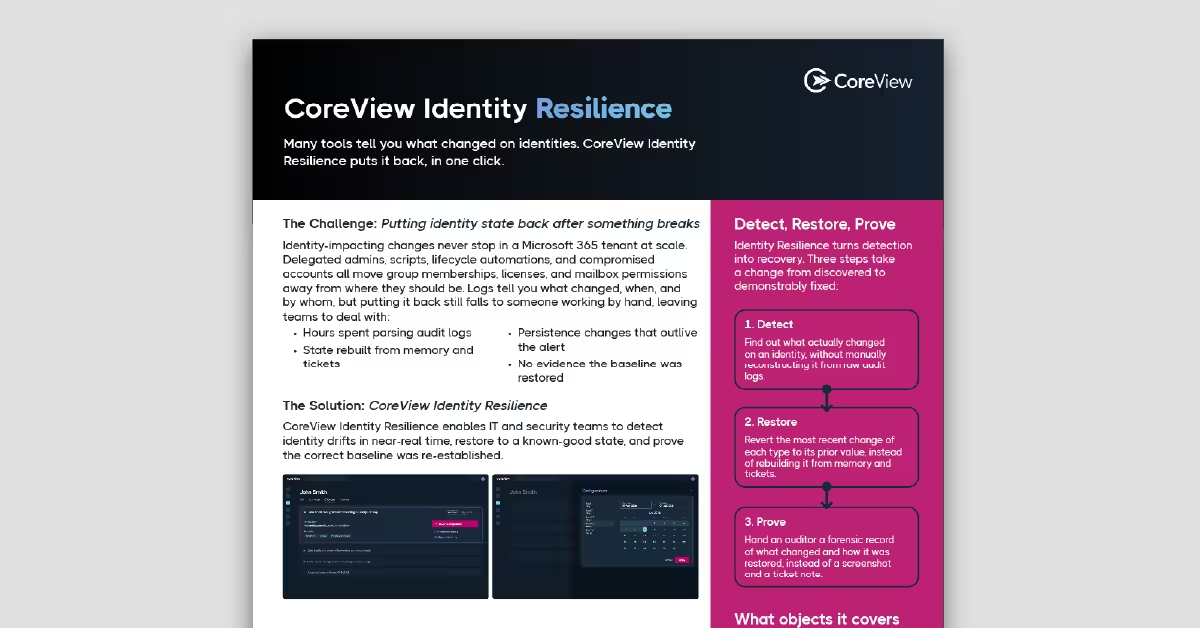
CoreView gives you Microsoft 365 Tenant Resilience: visibility, control, and recovery.
It has the ability to tell you what change has been made at a predefined interval and across some 8000 configuration details – details monitored, enforced, and backed up across key workloads. You can see the delta and if required you can put rules in place for an automated approval cycle. It provides you with:
Attach every drift finding to a baseline control, a before/after delta, an owner, and a remediation lane (auto-remediate, ticket-and-approve, or monitor-only).
Because critical controls are distributed across Entra ID, Intune, Exchange, Teams, SharePoint/OneDrive, Purview, and Defender, and evidence often requires cross-portal correlation.
It should show current state against an approved baseline, document exceptions with ownership and review dates, and provide defensible change history for high-risk settings.
Use approval workflows and policy enforcement for high-impact settings so risky changes require review before they land in production.
Because remediation and enforcement stall if teams can’t confidently roll back changes. Recovery capability turns drift governance into operational resilience.