
AI admins move faster than your governance. Without least privilege, a single over‑privileged agent can turn one bad prompt into tenant‑wide damage.
In this article:
AI in Microsoft 365 is arriving faster than most organizations can govern it. According to our 2026 State of AI in Microsoft 365 report, 70% of C‑Suites are encouraging AI use and 33% are pushing hard for rapid adoption, yet 53% of admin teams say AI is being deployed faster than they can put safeguards in place. As Copilot, Microsoft Agent 365, and third‑party assistants fan out across tenants, least privilege and strong guardrails are the only realistic way to keep AI‑driven change safe and explainable.
Our recent 2026 State of AI in Microsoft 365 report found that a majority of C‑Suites are encouraging the use of AI (70%), of whom 33% are putting strong pressure on teams to adopt it quickly. Yet 53% of admin teams say AI is being pushed on them faster than they can govern it.

Copilot, Agents365, and a growing wave of third‑party assistants are all arriving at once, and they all want access. If we don’t get least privilege right for AI now, we’ll repeat the same mistakes we made with human admin access, just on a much bigger scale.
AI is more dangerous than human access because it can change permissions, security posture, or access at scale and at speed, so a single ungoverned action can create systemic risk faster than any human ever could. While a human admin might make a mistake in one portal, an over‑privileged AI agent can repeat that mistake across the entire tenant before anyone notices.
In this article I want to offer a simple way to think about AI in M365 and explain why least privilege is the only sustainable way to keep it under control. I’ve also included some pertinent stats and quotes from our recent State of AI in Microsoft 365 report, to help illustrate the challenges admin teams are currently facing.
“Managing M365 at enterprise scale has reached a tipping point. Manual, script‑heavy processes cannot keep pace with growing complexity, security risks, and compliance demands. Domain‑specific AI for M365 offers a clear path forward… However, enthusiasm must be balanced with clear governance, structured change management, upskilling within IT teams, and buy‑in from senior stakeholders.”
Coreview 2026 State of AI in Microsoft 365 report
When we talk about “AI in Microsoft 365,” we’re not talking about a single thing. We’re dealing with at least three distinct categories of agents, each with its own risk profile.
This includes Copilot, Copilot Studio, and Microsoft Agent 365 as it rolls out. These agents are meant to help with operational tasks. They live in the content layer: they read and act on SharePoint, OneDrive, email, and Teams messages. They don’t hold admin roles, but that doesn’t make them harmless. Their impact is defined by the identities and data scopes they’re allowed to touch. At scale, the key questions for admin teams become: who is using which agent, against what data, and under which identity model?
Microsoft-native AI tools with admin privileges are where the risk increases. These are the agents that can change your environment, not just read from it. Think of Copilot for Security and other security‑focused agents. They’re designed to help administrators move faster, see more, and carry out tasks they couldn’t do as efficiently before. They’re attractive for exactly the same reasons they’re risky.
It’s easy to say, “If Microsoft built it, it must be safe.” These tools are certainly a better starting point than wiring generic GPT connectors straight into admin roles. But they still inherit a fundamental limitation of the platform: Microsoft does not make it straightforward to define “just enough” privilege. Native admin roles are broad. They span multiple workloads and blur the lines between “read,” “configure,” and “change production.”
When you put AI on top of that, the effect is multiplied. You’re now giving wide‑ranging privileges not just to a person, but to an automation layer that can act faster and more consistently – for good or bad – than any human. The convenience of AI comes with the price of intention. It's considerably easier to mess up a change with AI, since you can (even unintentionally) skip controls embedded in the UI.
Think of ChatGPT connected to your identity, files, email, or calendar. Think of tools like Cursor or Claude integrated with the tenant. Think of personal AI assistants like OpenClaw(or similar tools) that have gone viral, with people buying hardware just to run them. These agents can have access to data and, if connected poorly, potentially to admin‑level privileges as well.
In the case of OpenClaw, it was recently widely reported that the more than 135,000 OpenClaw instances were found exposed to the internet. Many of these had their control panels open due to unsafe default configurations. This is where the worst‑case scenario lives: third‑party AI with admin rights inside your tenant.
Right now, this looks very similar to early‑stage shadow IT. Anyone can consent to some of these tools. Many are free or easy to expense. IT and security often have limited visibility into who is using what and what those agents can see and do. The result is “shadow AI”: a growing set of agents operating outside your governance process but deeply integrated with your data and identity.
If you want a mental image, think of an AI assistant tasked with removing identity security risks that ends up deleting all the users. This is similar to an infamous AI in Marvel movies, designed to “protect humanity” that concludes the only way to do so is to remove humans altogether (see: Avengers: Age of Ultron). That might sound dramatic, but the principle is real: if an agent has both the authority and a badly‑phrased prompt, it can cause serious damage quickly.
“The biggest impact on AI risk in M365 will be the level of access it has. Microsoft’s native capabilities for setting precise permissions and enabling least privilege are very weak. This causes big issues already… but will be exacerbated by AI administrators.”
Coreview 2026 State of AI in Microsoft 365 report
Across all three bucketscategories of AI, the same three issues keep appearing.
There is no central place where an administrator can say, “Here are all the AI agents in our environment; here are the identities they use; here are the permissions and data scopes they hold.” For Copilot and a few Microsoft‑native tools, the visibility problem is still manageable. The moment you add third‑party tools and custom agents, the picture becomes much harder to understand. You’re trying to manage AI sprawl without a proper inventory.
Most of these tools still operate with a human in the loop: they don’t run entirely on their own; they come back to the user and say, “I’m going to do this – do I have the rights to do it?” That’s a better pattern than fully autonomous action, but from an admin’s point of view it is not enough. We still need to answer basic questions:
Today there is no consistent, cross‑agent auditing layer that brings together Microsoft‑native collaboration AI, Microsoft‑native admin AI, and third‑party or shadow AI. Without that, you are guessing after an incident.
This is probably the hardest of the three to deal with. Basic design questions are still hard to answer in a consistent way. Is the agent acting as a user and inheriting that person’s access, or does it have a dedicated identity with its own scoped permissions? Can we give it a narrow, function‑specific role instead of a broad admin role? Can we easily see, review, and remove excessive permissions for agents in the same way we’re starting to do for human admins?
There are promising patterns. Microsoft Agent 365, for example, runs under dedicated agent identities, which makes it possible to delegate SharePoint and admin roles with greater granularity to specific agents. That’s closer to how we should think about AI identity in general: each agent with its own account, its own limited scope, and a clearly defined purpose. But this isn’t widespread yet, and the tooling is still early. Until least privilege becomes the default way we think about AI identity and access, risk will quietly accumulate.
Microsoft Agent 365 runs under dedicated agent identities, which makes it possible to delegate SharePoint and admin roles with greater granularity to specific agents. That’s closer to how we should think about AI identity in general: each agent with its own account, its own limited scope, and a clearly defined purpose.
This is an area that deserves a more technical treatment: how to translate least‑privilege practices we apply to people into concrete AI policies, including identity models, scoping patterns, and operational guardrails.
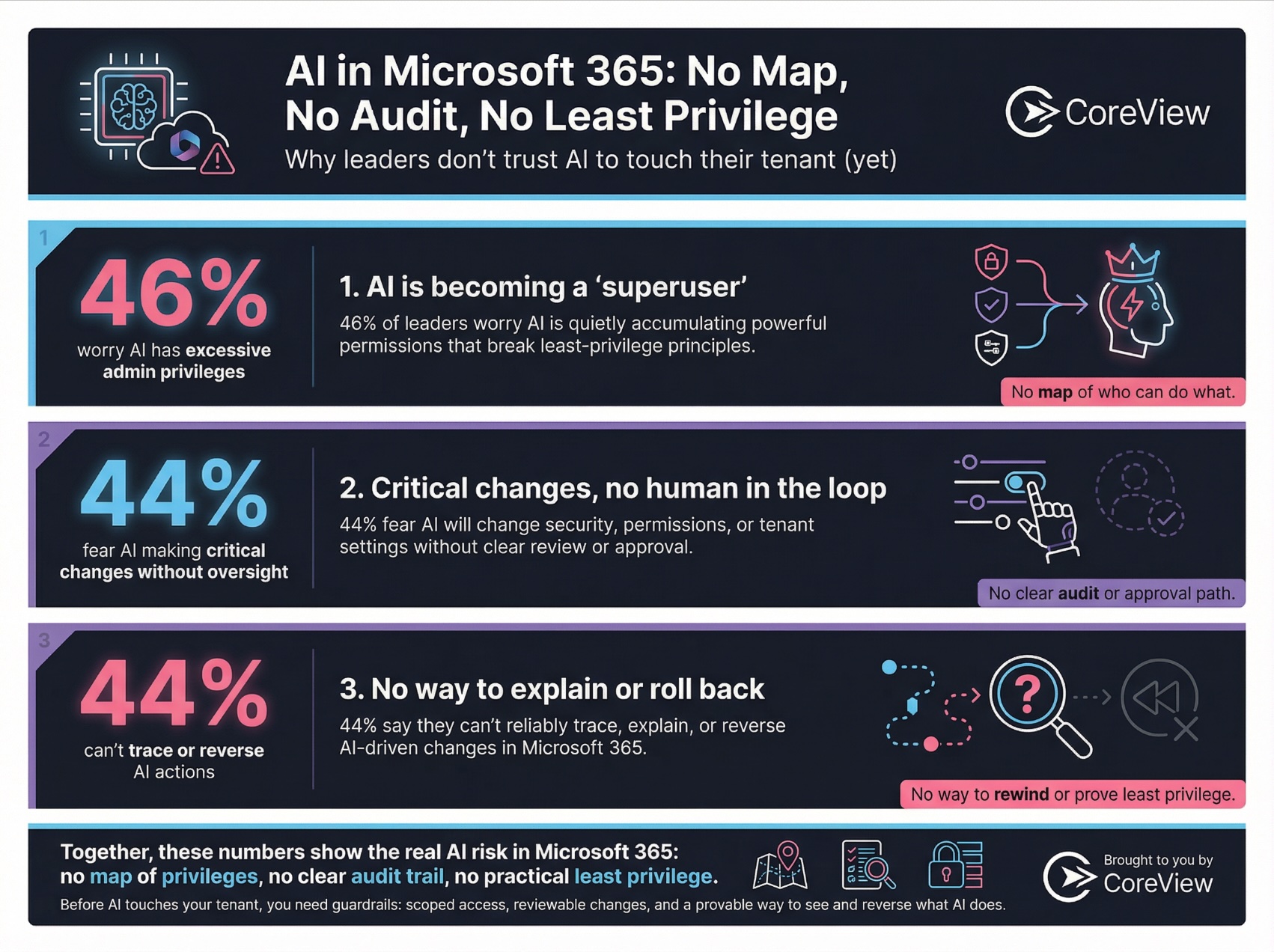
“Shadow AI” captures how many administrators feel today: they know AI is being used; they know someone, somewhere, has connected new tools; but they have no simple way to assess the real situation.
We’ve lived through this before with shadow IT. Business units adopted tools outside official channels, usage spread informally, and security and compliance arrived late.
An assistant that “optimizes” a workflow by bulk‑modifying the wrong data or misconfiguring a key setting can create hours or days of follow‑on impact. At that point, it’s too late to start designing your least‑privilege model for AI.
Even if we stay within the boundaries of this article, we can already see the outline of a useful governance framework for AI in Microsoft 365.
First, it needs to inventory and classify AI agents. Organizations need a catalog that distinguishes between native and third‑party tools, between data‑only and admin‑capable agents, and that documents each agent’s identity model and intended purpose.
Second, it has to enable meaningful auditing of agent activity across all three buckets. For any significant action, you should be able to answer who triggered it, what the agent did, where it did it, and under which permissions. Without that, both everyday assurance and incident response are weakened.
Third, it must make it possible to assess and reduce excessive privileges. That means identifying agents with overly broad roles, surfacing inactive agents that still hold powerful access, and aligning each agent’s rights with a specific function. The idea of “inactive but powerful” agents is particularly concerning: that’s the AI equivalent of a dormant admin account waiting to be abused.
Finally, the framework has to monitor for drift and sprawl over time. New AI tools will appear, privileges will creep, and agents will begin touching new classes of sensitive data. Additionally, we will soon need to look at AI agent lifecycles, which will differ from the traditional approach. This is where organization will need to develop proper ways to test AI evaluations. Governance can’t be a one‑off project; it has to be continuous.
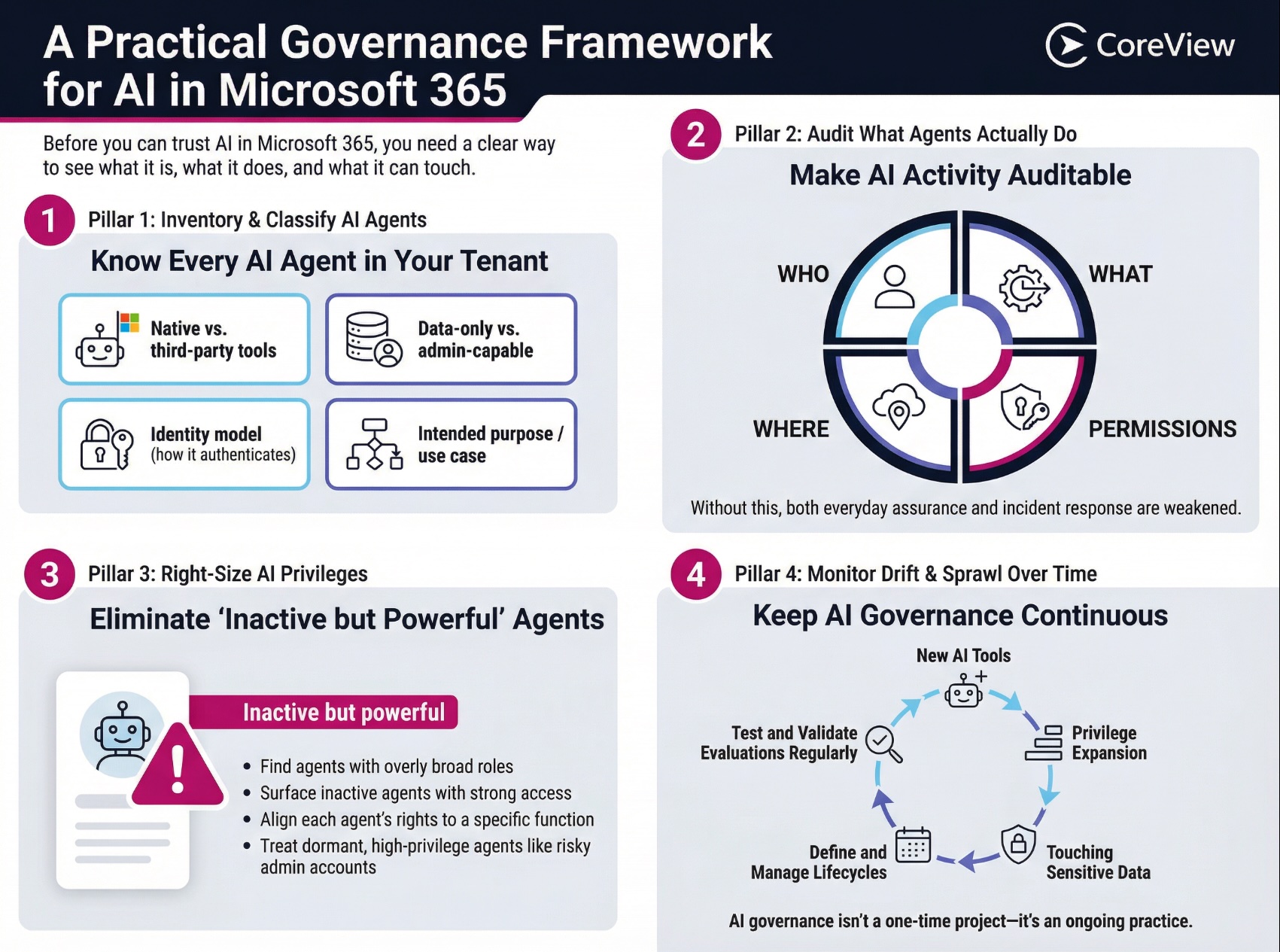
Right now, many organizations are at step zero. They know AI is entering their tenant from multiple directions, but they still treat it as a single, abstract topic. In reality, it already breaks down into at least three catgories, each with its own shades of risk. The big challenge with AI is the combination of speed and autonomy. Once an agent has access to tenant content, or worse, admin privileges, its ability to create damage – even unintentionally – is much higher than anything IT teams have seen before.
As highlighted within our State of AI report, there are a few approaches that you can take right now when trying to constrain the level of access an AI admin would have in your tenant. The options are presented below and scored based on their ability to enable a true “least privilege” approach for AI.
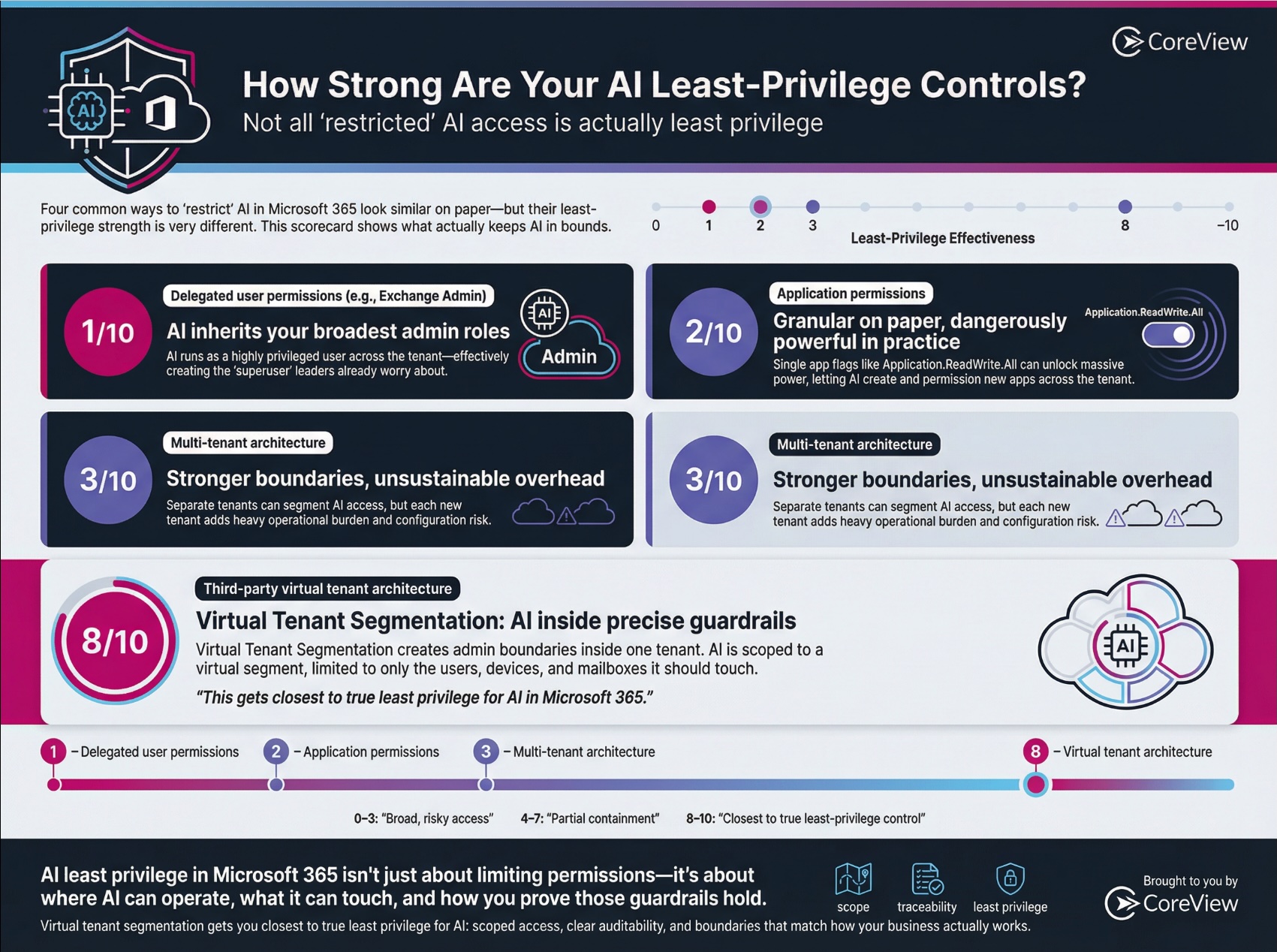
If you’re responsible for M365, the key message is straightforward: AI is not just another application. It’s a new type of actor, with access and speed that demand a least‑privilege mindset from the beginning. The sooner we treat AI agents like powerful, semi‑autonomous admins – and govern them accordingly – the safer our M365 environments will be.