FREE TOOL

Entra App Security Scanner

Find the apps in your Microsoft Entra tenant that attackers go after, and see which ones to fix first.
Entra ID graphic
What's in it for me?

Every app in your tenant, ranked by risk, in one read-only report with a grade.

App registrations and enterprise apps can jeopardize your tenant

Since the Midnight Blizzard attack on Microsoft in January 2024, attackers target apps, not just users. An app with permissions such as Mail.Read or Directory.ReadWrite.All is not stopped by user MFA, and its secret keeps working after the person who created it has left. Third-party apps add consent phishing: one click from a user can give an outside app access to your data. Most tenants have never reviewed their apps from end to end.
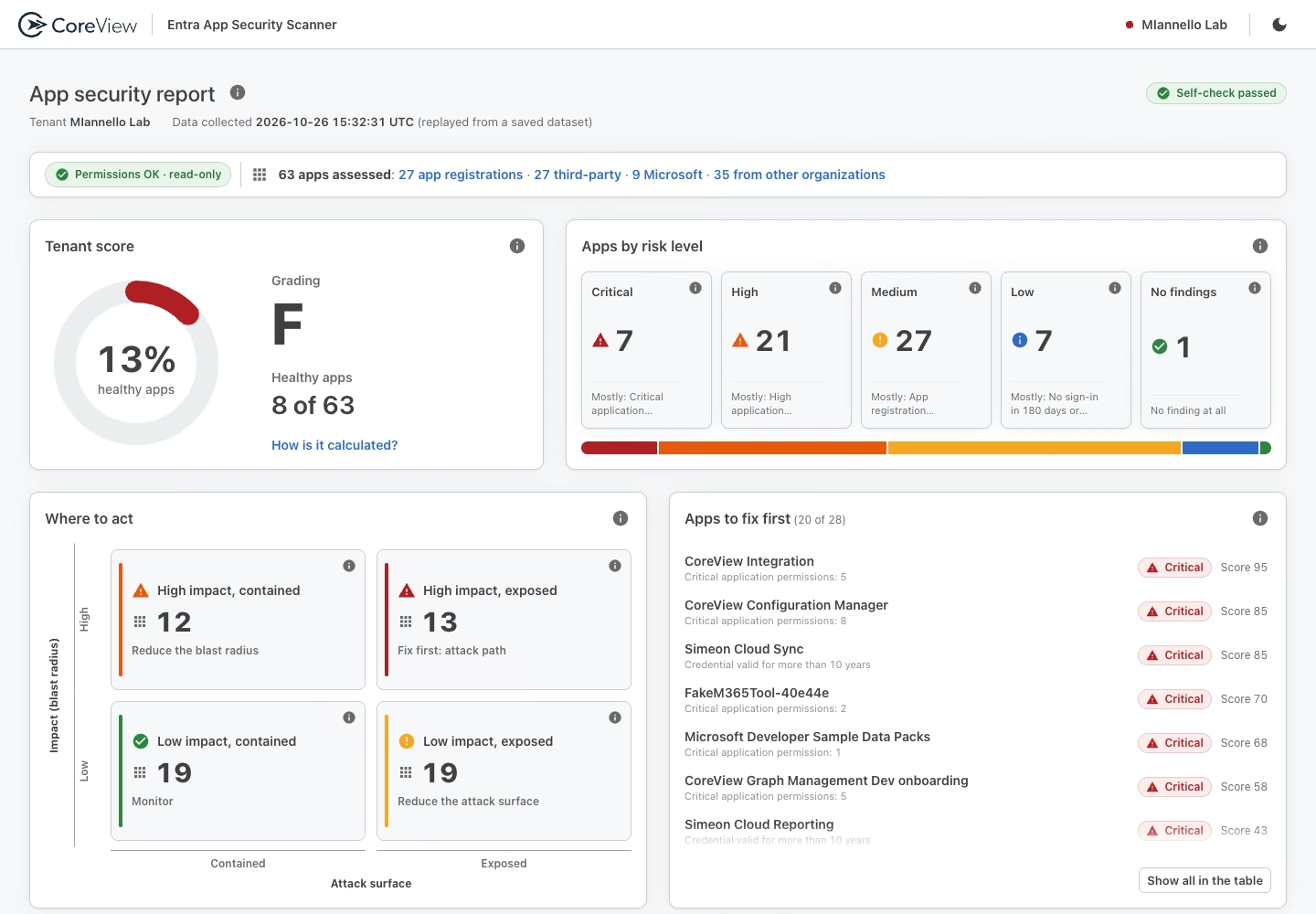
Entra App Security Scanner report

Secure Microsoft 365, from the inside out

With the Entra App Security Scanner you see every app that can reach your data, how risky it is and what to fix first. In one report you get:

Checkmark
Every app in one place: app registrations, third-party apps consented in your tenant, and Microsoft apps that hold permissions, roles or credentials.
Checkmark
A risk level for every app, based on permissions, secrets and certificates, owners, redirect URIs, Entra roles and sign-in activity.
Checkmark
Where to act first: apps ranked by impact and exposure, each with the reason and how to fix it.
Checkmark
A grade for your tenant on the CoreView scale, from A+ to F.
Checkmark
Safe to run: read-only, secret values are never read, and the results stay on your machine.

How does the Entra App Security Scanner work?

One PowerShell script, EntraAppSecurityScanner.ps1, for Windows PowerShell 5.1 or PowerShell 7. It checks its prerequisites first and tells you exactly what to fix if something is missing. You sign in in the browser with a Global Reader account, it reads your apps through Microsoft Graph, and at the end it opens the report in your browser. It also writes CSV, JSON and Excel files you can filter or send to your SIEM.

How to use

  • Install the one module it needs: Install-Module Microsoft.Graph.Authentication -Scope CurrentUser
  • Run .\EntraAppSecurityScanner.ps1 and sign in.
  • Permissions: Application.Read.All required, Directory.Read.All recommended, AuditLog.Read.All optional. An administrator consents once.
  • Options: -InactiveDays (default 180), -ExcludeEnterpriseApps, -SkipExcel, -TenantId. The old names -ExcessiveIntervalInDays and -SkipExcelOutput still work.

How apps and your tenant are graded

Each app gets the risk level of its worst finding:

  • Critical: permissions that can take over the tenant (for example RoleManagement.ReadWrite.Directory), a secret valid for more than 10 years, an admin role such as Global Administrator held by an app.
  • High: access to every mailbox or file in the tenant (for example Mail.Read, Files.Read.All), a wildcard redirect URI, a privileged app that has not signed in for months.
  • Medium: an app with no owner, a plain http redirect URI, client secrets valid beyond 180 days.
  • Low: minor hygiene points.

Your tenant grade is the share of healthy apps, meaning apps with no Critical, High or Medium finding, graded on the CoreView scale from A+ to F (F is below 60%).

Frequently asked questions

Does it change anything in my tenant?

No. It only reads data from Microsoft Graph. It never reads secret values and does not store your sign-in.

Does my data leave my machine?

No. The results are written to a local folder, and the report opens in your browser without contacting any website.

What do I need to run it?

Windows PowerShell 5.1 or PowerShell 7, the Microsoft.Graph.Authentication module, and a Global Reader account. An administrator consents to the permissions once.

Why is my grade lower than I expected?

The grade counts healthy apps. One Medium finding, such as an app without an owner, is enough for an app to need attention. Each finding in the report explains why it matters and how to fix it.

What does it not do?

It shows the state of your apps today. It does not fix them, track changes over time, or tell which permissions an app actually uses. CoreView Entra app governance does.