SharePoint security that never stops working

CoreView Control for SharePoint delivers file-level access control, automated remediation, and audit-ready compliance, down to every file and folder in your tenant.

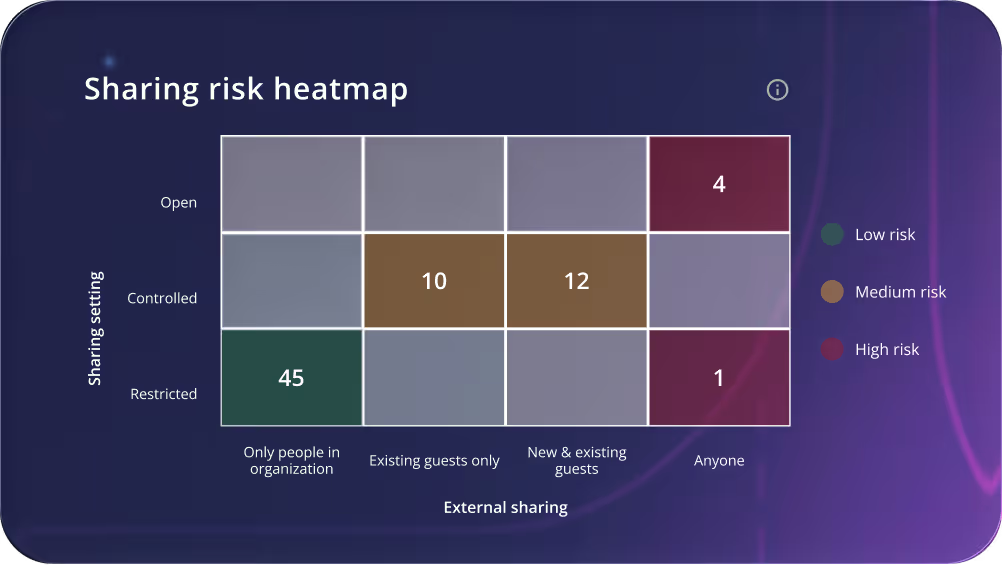
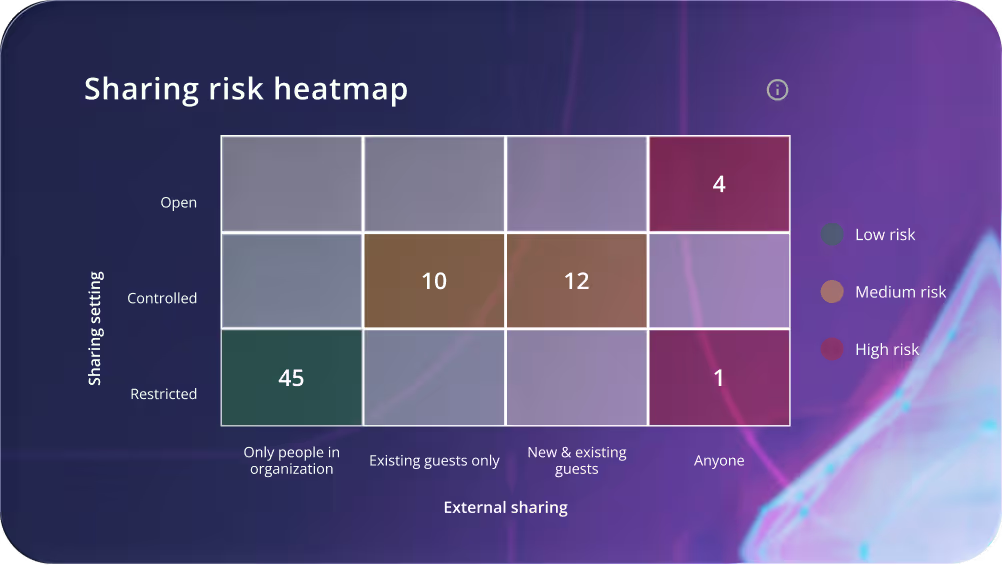
A 4 by 3 grid showing an example of a sharing risk heat map in CoreView Control for SharePointA 4 by 3 grid showing an example of a sharing risk heat map in CoreView Control for SharePoint

Stop SharePoint oversharing before it becomes a breach.

Microsoft 365 secures SharePoint at the site level. CoreView goes further — down to every file, folder, and user. Know exactly who's responsible for every sharing risk, assign owners and trigger access reviews without pulling IT into every ticket, and stop risk from returning the moment someone clicks ‘Share.’

Only CoreView gives you the per-user visibility, delegated remediation, and executive dashboard to prove your posture is actually improving.

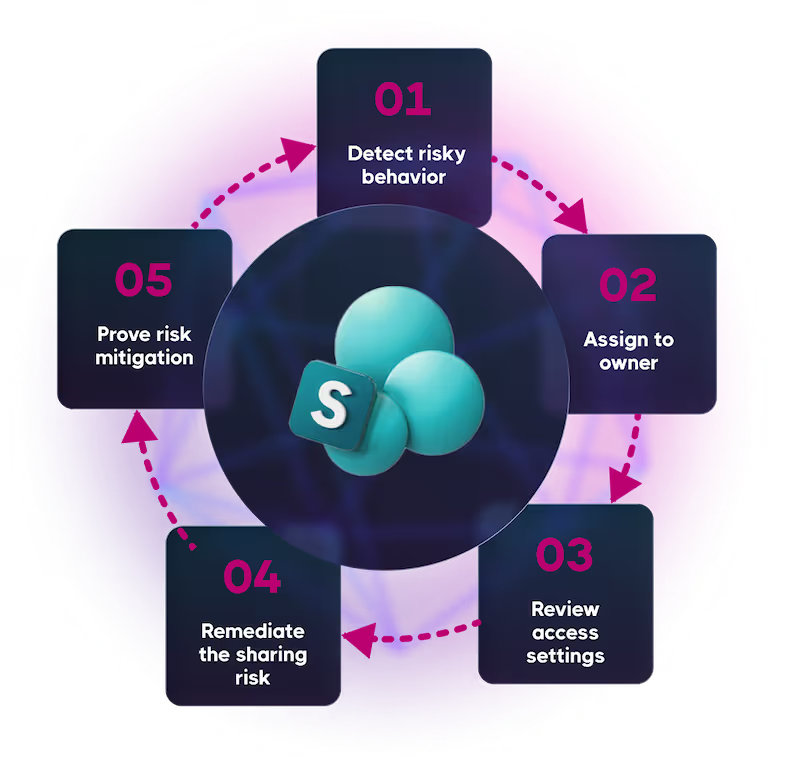
Graphic showing the 5 steps to prevent and protect from SharePoint oversharing
Circle

See every risk.
Act on it immediately

The CoreView Control for SharePoint dashboard gives you a live view of your SharePoint exposure: oversharing risks, storage waste, and the KPIs to act on them. Drill into any folder or file, in seconds.

Explore CoreView
Control for SharePoint

Instantly identify and remediate risk
Accelerate audits and simplify compliance
Reclaim storage and reduce costs
Delegate management and remediation

“CoreView Control for SharePoint gives us at-a-glance data that previously required significant time and effort to collect and analyze.”

– Neil Fleck, Manager of Email Security and Cloud Services, Middleby
State of Iowa logo

“CoreView’s new Control for SharePoint puts everything in one place, making data easier to track and access.”

–  Tina Boutin, Microsoft 365 Architect, Goodwill Northern New England

Find risk. Fix it fast.

Every sharing risk, ranked and ready to act on.

Every time someone clicks Share in Microsoft 365, your risk perimeter quietly grows.

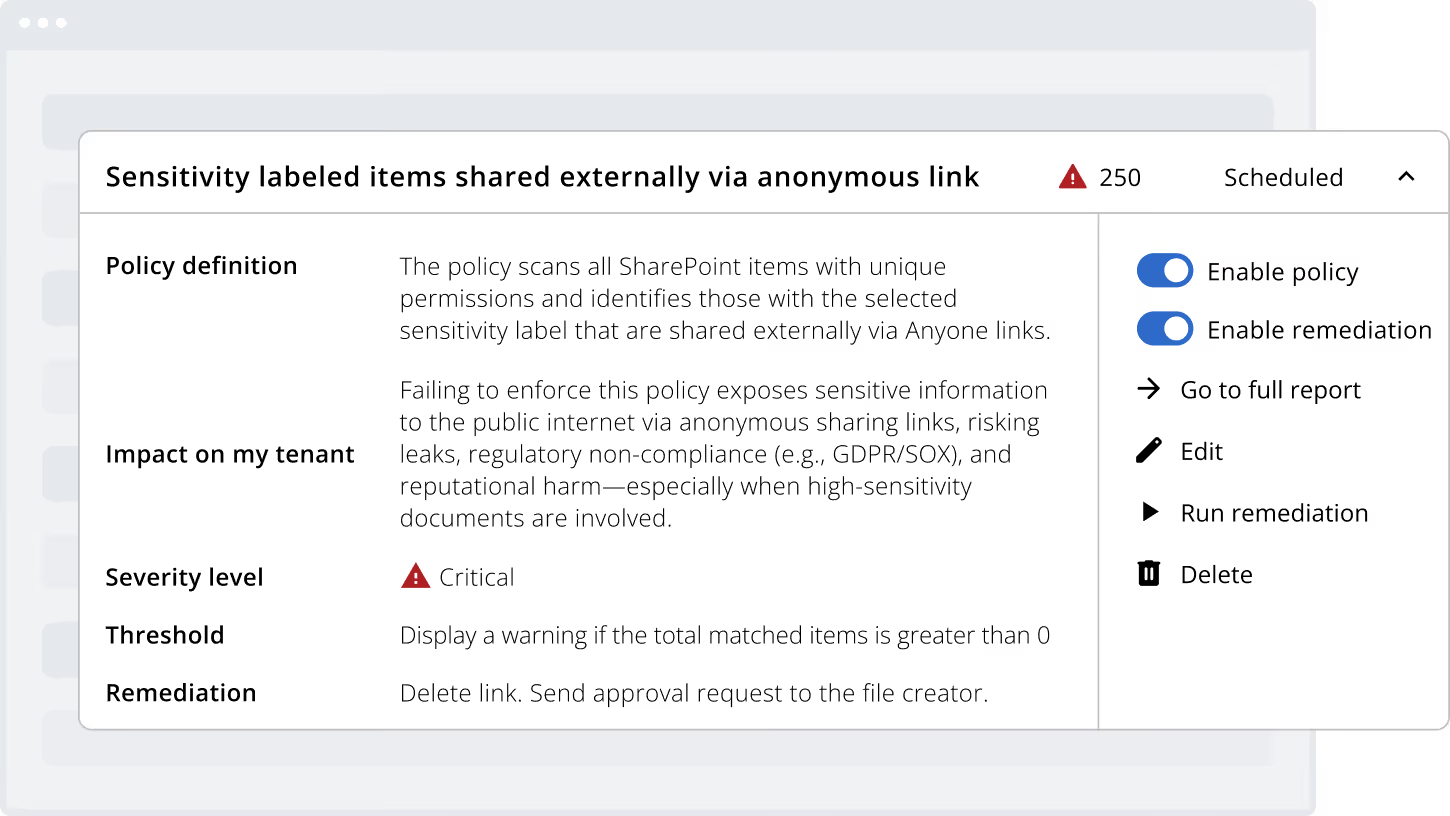
CoreView Control for SharePoint continuously monitors every file, folder, and sharing link across your entire tenant, ranking risks so your team always knows exactly where to look and what to fix first.

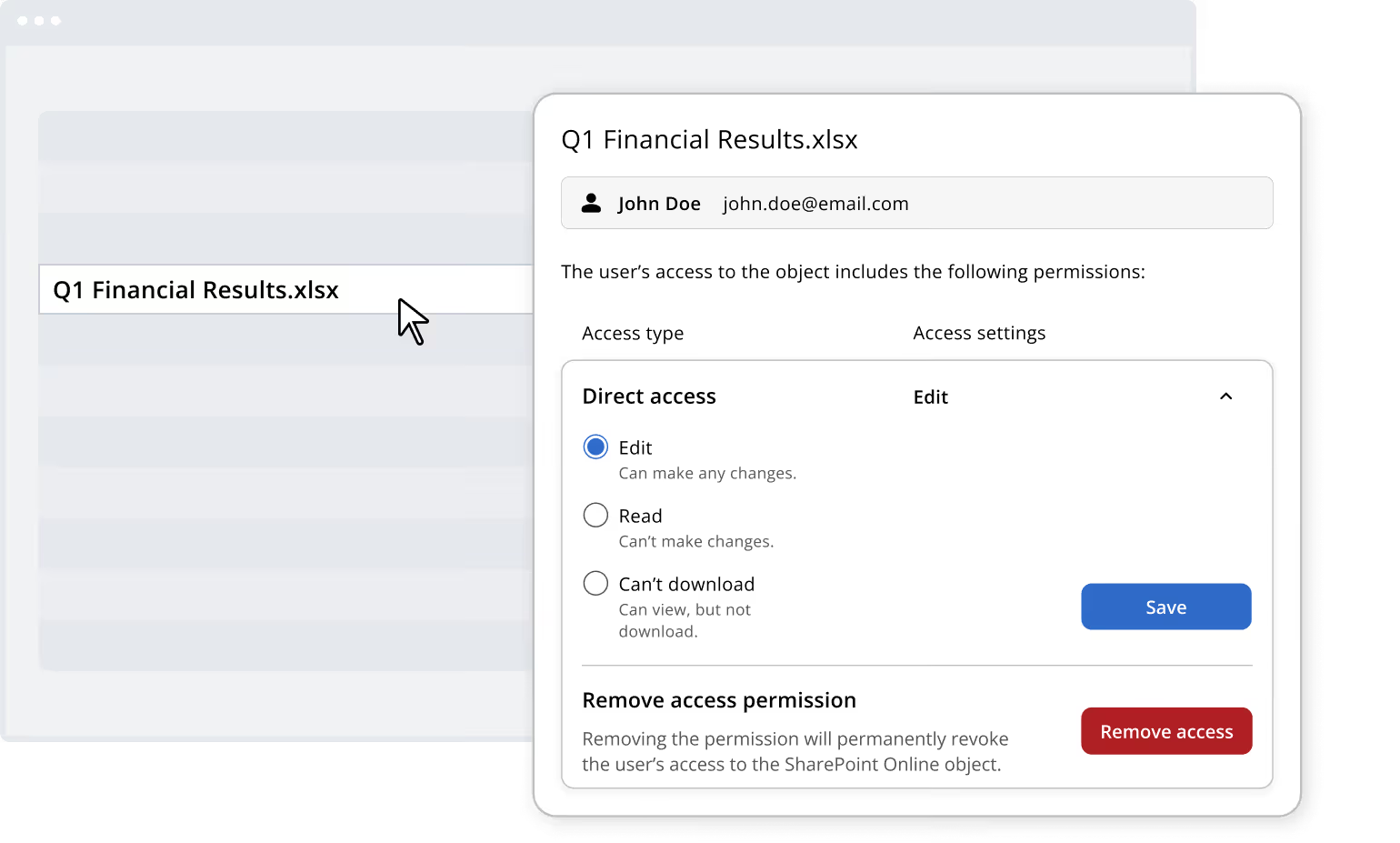
Screenshot depicting how you can use CoreView Control for SharePoint to find and fix file sharing issues to reduce risk

Audit-ready in minutes, not days.

Prove who has access to what at the file level.

Auditors don't want summaries, they want file-level proof.

CoreView Control for SharePoint automatically generates permission reports for any site, filtered by risk level, with every access decision and remediation action tracked and timestamped.

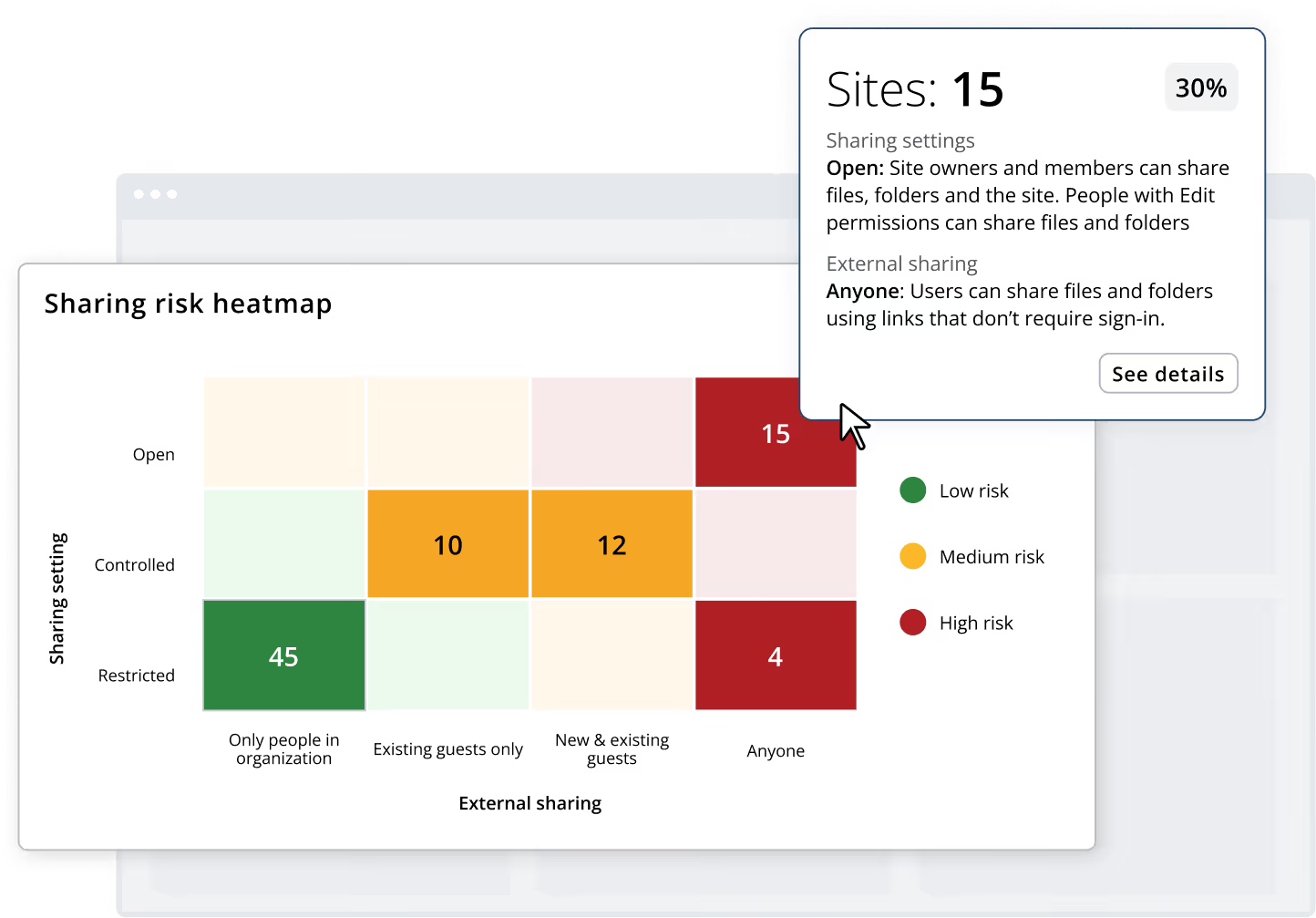
Screenshot depicting how you can use CoreView Control for SharePoint to see a sharing risk heatmap of your current SharePoint settings

Cut storage costs and reclaim wasted space.

Find what's eating your storage budget.

SharePoint storage costs grow quietly, until they don't.

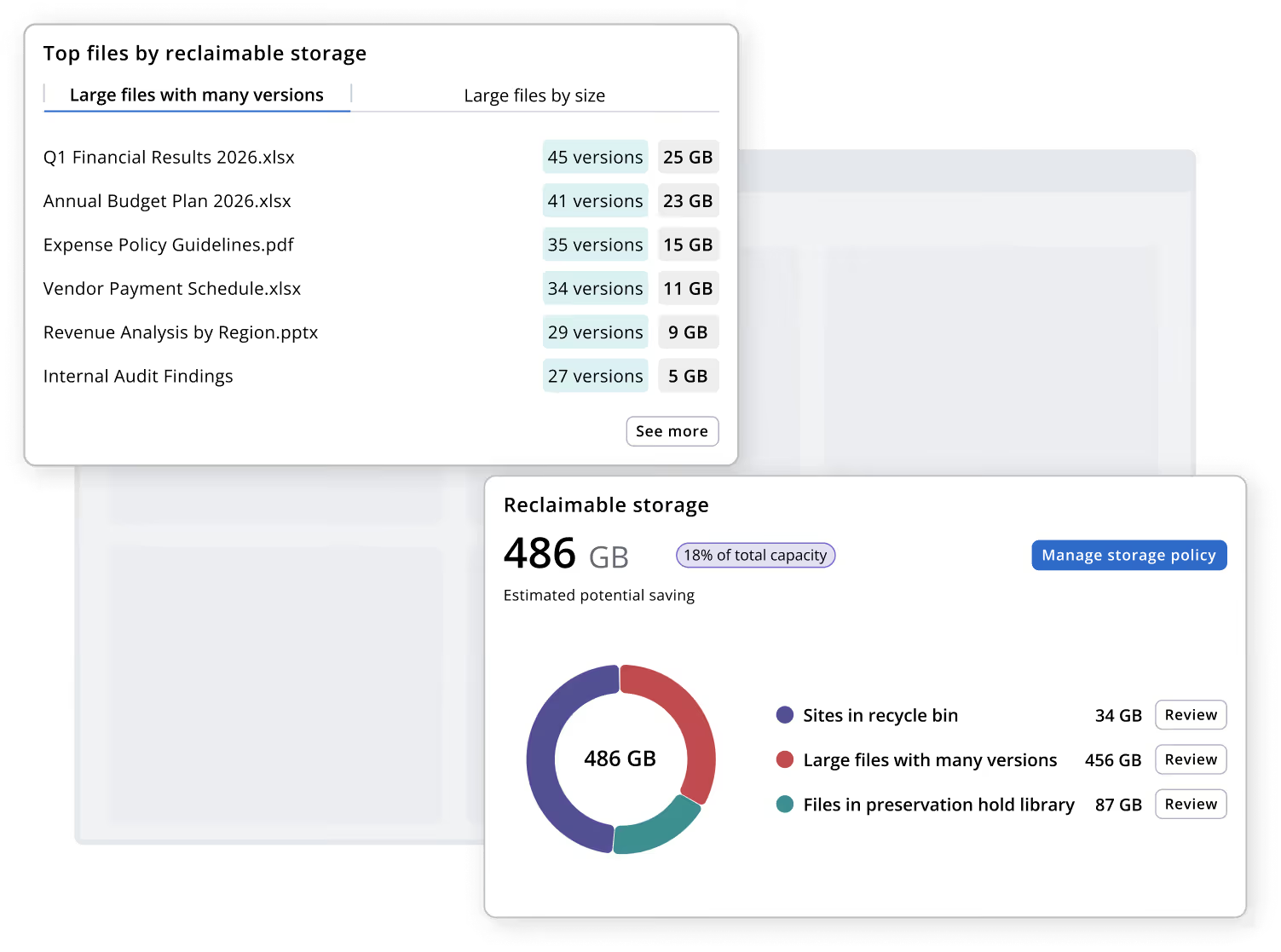
CoreView Control for SharePoint surfaces the files and bloated version histories consuming the most space, so you can remediate immediately and reduce storage waste with greater precision and control.

Screenshot depicting how you can use CoreView Control for SharePoint to see current storage in order to help you  reduce storage costs and reduce capacity

Put site owners in charge. Stay in control.

Give site owners the tools to manage their own risk

Delegating SharePoint access control only works if site owners can actually see what needs fixing.

CoreView Control for SharePoint gives each owner a per-site view of their permissions and automates the detection and remediation of access issues to support continuous compliance.

Screenshot depicting how you can use CoreView Control for SharePoint to put site owners in control and manage their risk on a per site basis

Frequently asked questions

FAQ icon depicting a question mark inside a speech bubble

Does CoreView Control for SharePoint replace Microsoft SharePoint Advanced Management (SAM), or work alongside it?

It works alongside it. SAM governs at the site level. That's where Microsoft stops by design. CoreView Control for SharePoint picks up where SAM leaves off, at the file and folder level. You keep whatever native controls you have; CoreView adds the layer Microsoft explicitly doesn't cover.
FAQ icon depicting a question mark inside a speech bubble

How does CoreView access my SharePoint environment? What permissions does it require?

CoreView uses a least-privilege consent model, meaning it requests only the permissions required to surface item-level data. It does not require broad, tenant-wide site ownership or admin-level consent across every site collection. Your security team can review the full consent scope before deployment.
FAQ icon depicting a question mark inside a speech bubble

How long does deployment take, and when do I start seeing results?

CoreView is fully SaaS-delivered. There’s no sync engine, on-premise components, or separate tooling to set up. Most customers see their first risk-ranked permissions report within hours of connecting. There's no days-long synchronization process. You don't need to wait for a full tenant crawl before you can start acting on findings.
FAQ icon depicting a question mark inside a speech bubble

We're not deploying Microsoft Copilot yet. Is CoreView Control for SharePoint still relevant to us?

Yes. The oversharing risk exists in SharePoint regardless of Copilot. Every non-inherited file permission is a potential exposure point today. Copilot gives you a business deadline to fix it; it doesn't create the problem. Organizations that govern permissions before AI deployment move faster and avoid post-launch remediation.
FAQ icon depicting a question mark inside a speech bubble

What type of organizations is CoreView Control for SharePoint built for?

CoreView Control for SharePoint is built for enterprise M365 tenants, typically 1,000+ users with meaningful SharePoint adoption, external collaboration, and compliance requirements.  

It’s best-suited for industries (e.g., financial services, healthcare, higher education, state and local governance, and manufacturing) where compliance mandates require demonstrable access controls at the file level, not just the site level.
FAQ icon depicting a question mark inside a speech bubble

We already manage SharePoint with PowerShell scripts. Why do we need this?

PowerShell can extract data. It cannot govern it. Scripts produce point-in-time snapshots with no audit trail, no access review workflow, and no policy automation to prevent permissions from drifting again. CoreView Control for SharePoint turns that one-time data pull into a repeatable governance program, with the exportable audit evidence that compliance teams actually need.
FAQ icon depicting a question mark inside a speech bubble

Does CoreView remediate permissions directly, or does it just surface findings for someone else to act on?

CoreView remediates within the product. From any finding (e.g., a risky sharing link, a direct access grant, a non-inherited permission) your team can execute remediation actions directly without leaving the platform. Every action is logged and timestamped. You're not handed a report and left to coordinate the fix elsewhere.
FAQ icon depicting a question mark inside a speech bubble

Can different admins be scoped to see only their assigned SharePoint sites?

Yes. Each admin or site owner sees only what they're responsible for — their sites, their permissions, their risk signals — without tenant-wide access. Central IT keeps full oversight through the executive dashboard. Governance scales across hundreds of sites without scaling the central team.
FAQ icon depicting a question mark inside a speech bubble

Will CoreView Control for SharePoint alert on new permission changes, or do I have to pull reports manually?

CoreView continuously monitors permissions and storage across the tenant. It's not a point-in-time scan you schedule. When something changes, your team knows. You're not dependent on remembering to run a report.
Show more

See CoreView Control for SharePoint in action

Schedule a 15-minute call with our team.
Get a demo