The State of AI in Microsoft 365 Today
AI is about to operate inside environments most IT teams admit they don’t fully control.


In our 2026 research of 500 Director+ IT and Security leaders at 1,000+ employee organizations, we found a clear pattern: The maturity of your Microsoft 365 tenant will determine whether AI reduces workload or multiplies risk.
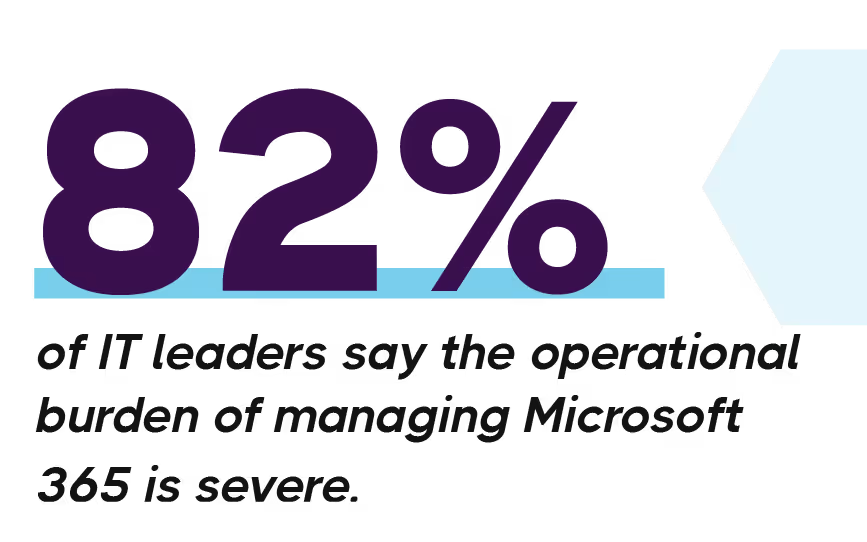
Most Microsoft 365 environments are incredibly complex. 82% of leaders report that it’s a severe burden to manage. That’s because new tools have been added over time. Security policies have evolved. Teams have grown. Scripts that solved urgent problems stuck around longer than planned.
Now AI is entering those environments.
For many IT leaders, that’s creating a mix of optimism and unease. The efficiency gains are attractive. The idea of automation touching identity, security, and compliance systems raises understandable caution.
Our 2026 research with 500 IT and security leaders explores how organizations are navigating that balance and why the condition of your tenant matters more than the capabilities of the AI itself.
It touches identity, security, compliance, collaboration, and device management. That scope has grown steadily, and so has the workload on IT teams.
82% of leaders say managing Microsoft 365 now carries a severe operational burden. Nearly half reported a misconfiguration last year that led to a security or compliance issue. 43% said reporting delays complicated audits or slowed their response.
Most teams still rely heavily on manual processes and scripts. That can work, but they require constant attention. Ultimately, AI is arriving at a moment when many teams are already stretched. Manual processes and scripts simply aren’t keeping pace.
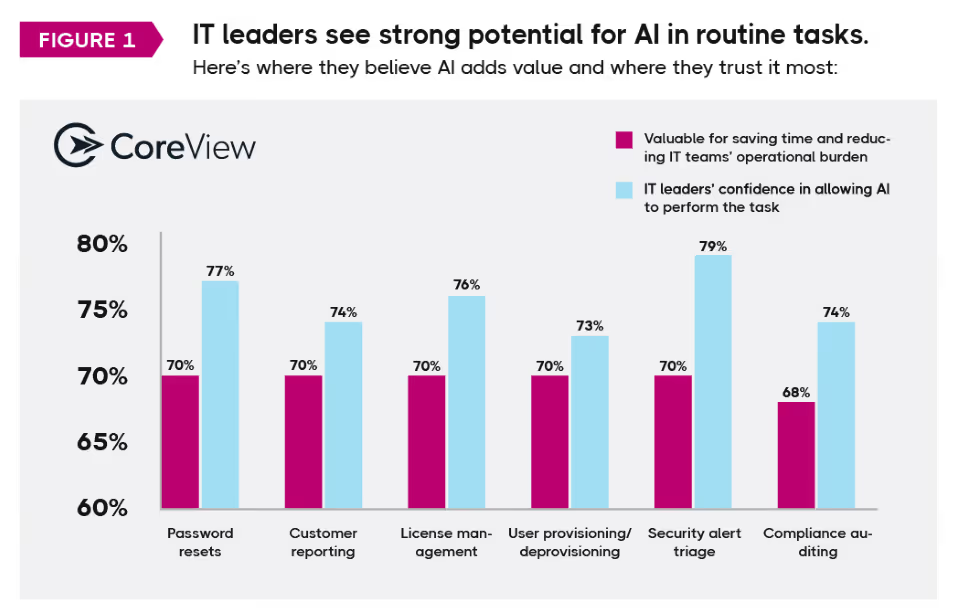
Around 70% of IT leaders see value in areas like provisioning users, generating reports, managing licenses, and triaging alerts. These tasks consume time but don’t always require deep expertise.
Automation can ease that load.
But early experience is shaping expectations. More than half of organizations have already rolled back an AI-driven action after it introduced risk. In many cases, the issue was access levels, visibility, or unexpected side effects rather than the AI capability itself.
In Microsoft 365, identity, access, compliance, and device controls are tightly interconnected. When AI operates with broad administrative access, speed increases but your attack surface expands.
Leaders consistently point to three concerns: visibility, access levels, and accountability, focusing on three practical questions:
More than half of IT leaders (53%) say AI initiatives are advancing faster than governance structures can support.
There’s also a human side that leadership teams sometimes underestimate. Over half of IT leaders report job-security anxiety among IT staff since AI entered the conversation. Nearly half have seen morale dip. At the same time, executive pressure to adopt AI continues to rise.
This creates a delicate balance. Move too slowly and organizations risk falling behind operationally. Move too quickly without guardrails and confidence drops.
Organizations that pair governance with upskilling and clear communication tend to avoid that stall point.
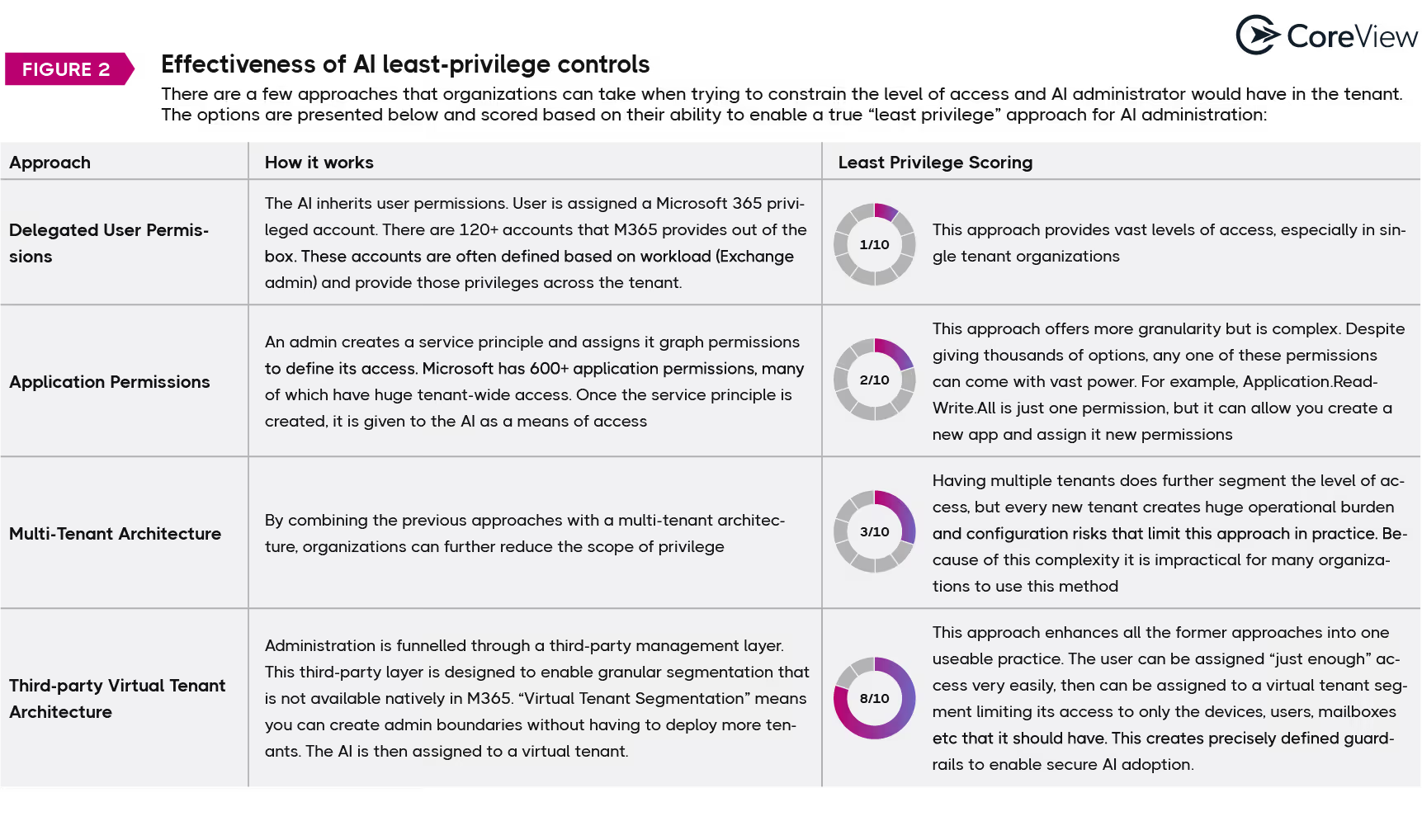
AI adoption accelerates where least privilege, approval workflows, and traceability are designed before automation expands.
Where AI is granted broad standing administrative access, rollout slows or, worst case, reverses.
Organizations are experimenting with different ways to grant AI administrative access. Some provide broader permissions than intended. Others allow tighter boundaries and better oversight. Those architectural choices shape how comfortable security teams feel expanding AI use.
Teams seeing steady progress usually start by setting clear guardrails. They define approval workflows, ensure actions are traceable, and begin with contained use cases like reporting automation, MFA enforcement checks, or license cleanup. Early wins build confidence before expanding further.
At the same time, the administrator role is shifting. Many leaders expect less time spent navigating portals and more focus on oversight, governance, and aligning technology with business priorities.
AI doesn’t remove the need for expertise. It’s raising the bar on where that expertise is applied.
The question isn’t whether it will operate inside your Microsoft 365 tenant. It’s how much access it will have and how visible those actions will be.
For many organizations, those decisions are being made now, often under executive pressure to accelerate AI adoption.
The organizations seeing real efficiency gains aren’t simply adopting AI faster. They’re designing access boundaries, oversight models, and rollback controls before expanding automation.
The full 2026 State of AI in Microsoft 365 report explores these trends in much more depth, including:
If AI will operate inside identity, access, or compliance systems in your tenant this year, the architecture decisions you make in the next 6–12 months will define your risk exposure for years.
What's inside: