Microsoft 365 security is a black box. Here's what 279 leaders found inside.
279 enterprise IT and security leaders on identity, configuration, data, and AI risk inside Microsoft 365, and where confidence outruns control.

Enterprise confidence in Microsoft 365 security has pulled away from the controls that would actually justify it. Organizations have adopted Microsoft product across the board: Teams, SharePoint, Entra ID, and now Microsoft Copilot.
Yet, the basics for identities, tenant configuration, and data protection are not enforced consistently. That’s true even amongst organizations that call themselves mature.
Here are the seven findings from the report that map to these gaps.
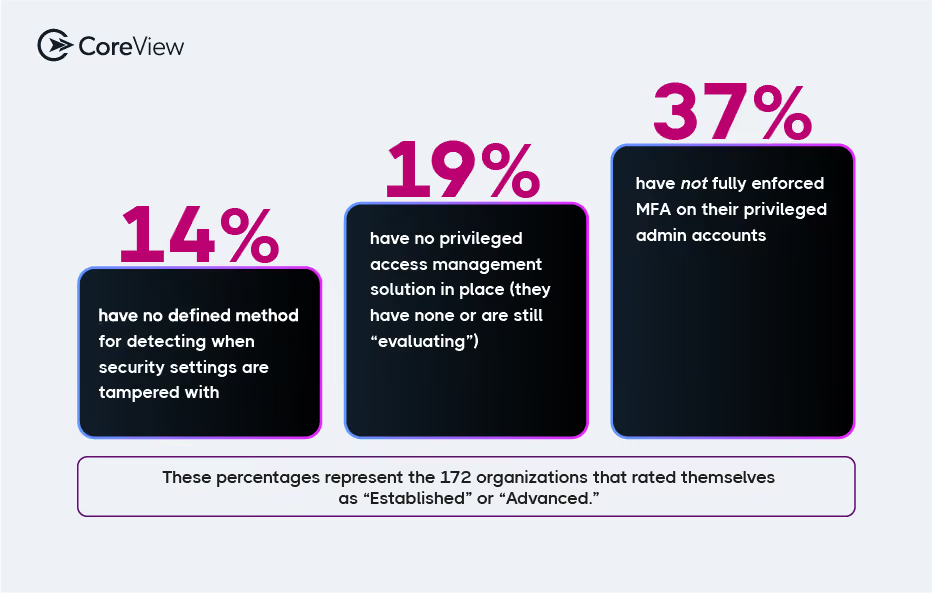
62% rate their Microsoft 365 security as “Established” or “Advanced.” When we looked deeper, 54% of that confident majority were missing one of three basic controls: MFA enforced on admin accounts, a privileged access management solution, and/or a defined way to detect Microsoft 365 configuration tampering.
That gap has a cost, and it tends to come due at the worst possible moment. An organization that calls itself Advanced but has not enforced admin MFA, deployed PAM, or set up tamper detection usually learns about the hole during an incident. That’s, of course, when it is most expensive to close.
The bigger risk is that the label spreads. Once leadership believes the basics are covered, no one wants to pay for the work to actually handle them. Self-rated maturity does track with self-reported detection speed. Same-day incident detection climbs from 11% at the Initial stage to 49% at Advanced. But calling yourself advanced isn’t the same thing as actually having your identity and configuration fundamentals locked down.
Full MFA enforcement sits at 62% for standard Microsoft 365 users but only 55% for admin accounts. Nearly one in five organizations enforces MFA more weakly on its most powerful accounts than on rank-and-file staff.
Consider for a moment what one of those accounts can actually do once it's taken. An Exchange Administrator can silently exfiltrate or manipulate executive email. An Application Administrator can grant OAuth permissions to a rogue app and establish token-based persistence that bypasses MFA and Conditional Access entirely. A Privileged Role Administrator can assign itself Global Admin privileges. Why wouldn’t you want to protect these accounts?
The reason is tooling. When asked what blocks least privilege, leaders pointed to administrative overhead (40%) and the difficulty of building custom Entra roles (38%), far more than a lack of interest (16%).

In reality, Microsoft's native Entra role management makes least privilege expensive to operate. So, the accounts that warrant the most protection get it last.
Adoption of Entra Privileged Identity Management (PIM) and third-party PAM is climbing fast: roughly 73% now have some form of privileged access management, up from 50% a year ago. The tooling is here. But enforcement on the accounts that matter most hasn’t caught up yet.
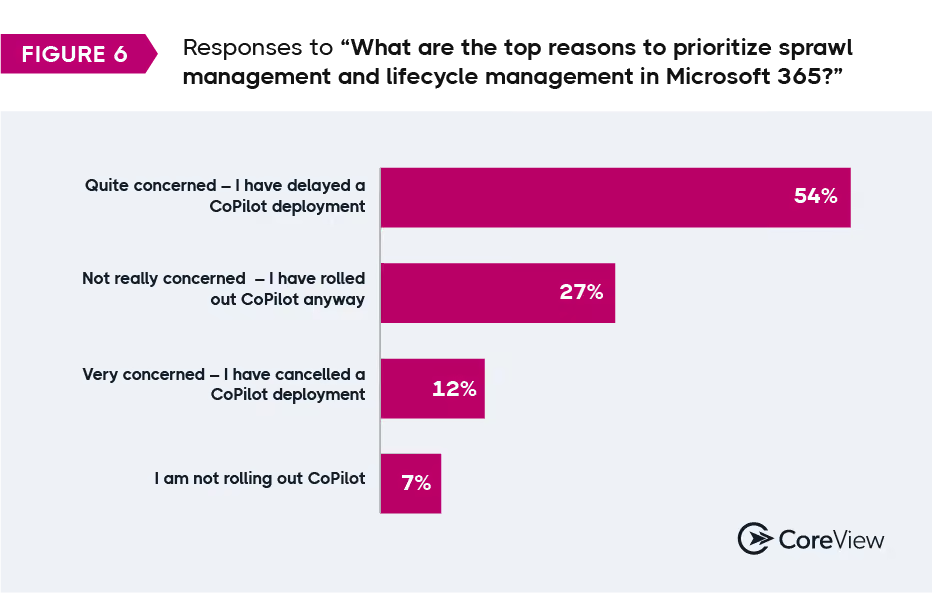
66% have delayed or cancelled a Microsoft 365 Copilot deployment, and 73% are concerned AI is already surfacing confidential information inside their organization. This fear is specific to SharePoint.
Point Copilot at a Microsoft 365 tenant with loose SharePoint permissions, and it will surface whatever was never locked down, to whoever thinks to ask.
This example brings this risk to life:
Imagine an employee is worried about layoffs. They ask Copilot if it knows who will be laid off next quarter. Copilot searches through the Chief of HR’s files (which were never locked down) and sees the list. They share that file with their friends who are on the list.

None of this is new. Those files were exposed before anyone installed Copilot. What Copilot changes is how easily your ordinary employee can find them. That’s why Copilot is driving organizations to audit Microsoft 365 permissions and data, a cleanup that should’ve happened years ago.
The caution around adopting Copilot is certainly rational. In fact, it scales with seniority: the closer a leader sits to the boardroom, the more likely they are to have paused Copilot.
The caution around adopting Copilot is certainly rational. In fact, it scales with seniority: the closer a leader sits to the boardroom, the more likely they are to have paused Copilot.
The report shows exactly how Copilot caution scales with seniority, and the 2x gap in SharePoint concern between organizations that paused and those that proceeded.
Think of your tenant configuration as a glass and your data as the water in it. Spill the water, and you “refill” it from the backup. Break the glass, and it does not matter how much water you have. There’s nothing left to hold it. Most organizations have backed up the water. They typically assume someone else was protecting the glass.

In fact, only 17% of organizations back up their Microsoft 365 configurations themselves. 37% wrongly believe Microsoft does it, but Microsoft's shared-responsibility model puts configuration backup on the customer.
Another third of those organizations assume their data-backup vendor covers it. In actuality, most of those data-backup products (you guessed it) capture data. They don’t back up the full Microsoft 365 tenant configuration (e.g., conditional access policies, security settings, and the rest of what defines how the tenant behaves).
Put those groups together and roughly 70% are trusting a configuration safety net that does not exist.
Confirming who actually owns Microsoft 365 configuration recovery is a five-minute question you should probably ask your team today.
In 2024, Microsoft logged 176,000 configuration-tampering instances in a single month (Digital Defense Report 2024). According to our 2026 data, 65% of organizations see attackers probing their Microsoft 365 tenant at least weekly. And yet, despite the stats from Microsoft (and Sophos), 38% still detect configuration tampering through manual review, and 17% have no defined method at all.
Microsoft 365 has more than 10,000 configuration settings across Entra, Defender, Intune, Purview, and Exchange. Manual review does not scale to that surface. Change control is the one area moving fast: 47% now maintain Dev/Test/Production tenant separation, up from 36%. Still, about 30% change production Microsoft 365 configurations directly and then rely on manual review to catch what breaks.
One team came to us in the middle of an investigation. They suspected someone had reached their CIO's OneDrive without authorization, and they were trying to confirm whether it had happened and what else had changed.
Detection tooling was not the problem. Their answers were spread across 18 admin portals in a hybrid environment, so tracing who changed what, and when, was the real bottleneck. They were reviewing by hand because the surface was too difficult to review any other way.
It’s clear that Microsoft 365 configurations are under attack. Teams should respond by tightening change control. And yet, teams are still policing the configurations with processes that break at scale.

The report has the full tamper-detection and change-control breakdown with year-over-year movement.
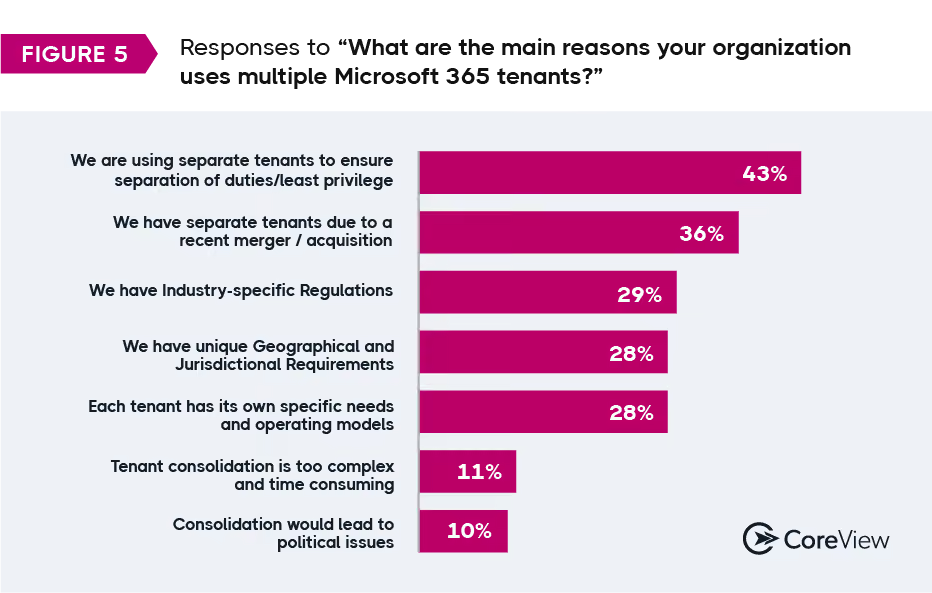
Microsoft 365 sprawl shows up in three places. Then they compound. Tenants first: 83% of organizations run more than one Microsoft 365 tenant, and 14% now manage more than 50. Most of that is deliberate, driven by separation of duties, mergers, and regional or regulatory lines.
Then there’s the harder kind of sprawl to see. Inside those tenants, Entra apps pile up: 22% of organizations have more than 1,000 Entra apps holding permissions. 14% can't say how many they have. Every app is a potential identity-based access path. And an app you can't count is an app you can't govern. Having a lean Global Admin count hides this completely. An organization can hold admin roles to five people and still carry hundreds of Entra apps with read-write directory access (some reachable from outside the organization).
Access is the third. The control that's supposed to contain all of this is the access review, and 63% say reviews are too time-consuming to run regularly. So the tenants multiply, the apps multiply, and the one process meant to keep them in check is the process teams skip first.
A Microsoft 365 admin came to us after a SharePoint incident: visitor access had exposed sensitive activity data to people who should never have seen it. They were not looking for another dashboard. They wanted to understand how the exposure happened, which permissions allowed it, and how to keep the next misconfiguration from opening the same door. That question, how did this get shared, is the one most organizations can't answer quickly. It's also the exact question Copilot forces the moment you turn it on.
Ask about SharePoint sharing exposure and most organizations file it under "moderate, manageable." On confidential data leaking through anonymous sharing links, only 13% are extremely concerned, and 24% very concerned. The most common answer, 31%, is just "moderately concerned." External and guest sharing lands the same way: 41% call the exposure "moderate risk," 23% "high," and 9% "critical." Real risk, widely acknowledged, rarely treated as urgent.
The organizations most worried about anonymous links are overwhelmingly the same ones delaying Microsoft Copilot. The Copilot hesitation in Finding 3 sits directly on top of this SharePoint backlog.
The full 2026 CoreView State of Microsoft 365 Security Report gives you the details behind each of the findings above, plus the parts you can take into a board room or a budget conversation.
What's inside: