AI applications and agents introduce new governance challenges in Microsoft 365, while many established principles still apply. Learn how to adapt your existing M365 configuration baseline to account for AI and support compliance with the EU AI Act.
In this article
In this blog post, I explain what an M365 configuration baseline needs to cover to support AI governance and the EU AI Act. I outline a repeatable methodology for identifying AI applications and agents, assessing their permissions and access, classifying risk, assigning ownership, and defining an approved configuration. I also explain how to maintain that baseline as the Microsoft 365 environment changes, and which aspects of AI governance need to be handled through wider governance and legal processes.
Most Microsoft 365 configuration baselines have been designed around people and applications. AI agents add another type of actor to the mix.
Agents can operate on behalf of users or through their own identities. They can access organizational data and, depending on their permissions, make changes across the tenant.
That doesn’t mean organizations need to replace their existing M365 configuration baseline entirely, but they do need to extend it to account for how AI applications and agents operate.
At a minimum, the baseline should cover:
Data access deserves particular attention because AI can make information that was already technically accessible much easier to discover and use. If those permissions are too broad, the baseline needs to address the underlying access problem rather than only adding AI-specific controls.
As my colleague Vasil Michev, a CoreView Microsoft 365 and Azure Subject Matter Expert, explains: “Copilot can surface information a user already has access to, even if they didn’t know it was there. If access to that data hasn’t been properly restricted, adding AI-specific controls won’t fix the underlying permissions problem.”
SharePoint is a good example. Sites, libraries, and individual items may have accumulated broad or outdated access long before Copilot was introduced. Organizations therefore need to fix inappropriate SharePoint permissions rather than relying on AI-specific controls to compensate for excessive access. They also need to audit SharePoint item-level permissions for AI governance to identify unique permissions and exceptions that broader access reviews may miss.
Ultimately, the baseline should give the organization a consistent foundation for governing AI across Microsoft 365 as new applications, agents, and use cases are introduced over time.
Once you know what the baseline needs to cover, I recommend working through seven steps to extend it for AI governance.
Start by identifying the AI already operating in your Microsoft 365 environment.
Include Microsoft-native tools such as Copilot and Copilot Studio agents, as well as third-party AI applications, connectors, app consents, and agent identities with access to the tenant. That visibility is particularly important for managing least privilege and shadow AI in Microsoft 365, where tools may have been connected without going through the same governance process as approved applications.
Where unapproved tools are present, admins also need a process to audit and quarantine shadow AI apps rather than simply recording them in the inventory.
For each application or agent, establish what it does, how it accesses Microsoft 365, what permissions and consents it holds, and which data it can reach.
Your assessment should cover:
This information should give you the context you need to decide whether the application or agent has the right level of access for its intended purpose.
Not every AI tool needs the same controls. The level of control and oversight you apply should reflect the risk each application or agent creates.
To assess that risk, I always begin by asking two questions:
The first question tells you about security risk. An agent with write access, administrative permissions, or tenant-wide consent deserves more scrutiny than one with limited read access.
The second question helps establish regulatory risk. A productivity tool presents a different level of risk from an AI system involved in recruitment, employee performance, or another use case that may fall within the EU AI Act’s high-risk categories.
The graphic below shows how each question contributes to the overall risk assessment:
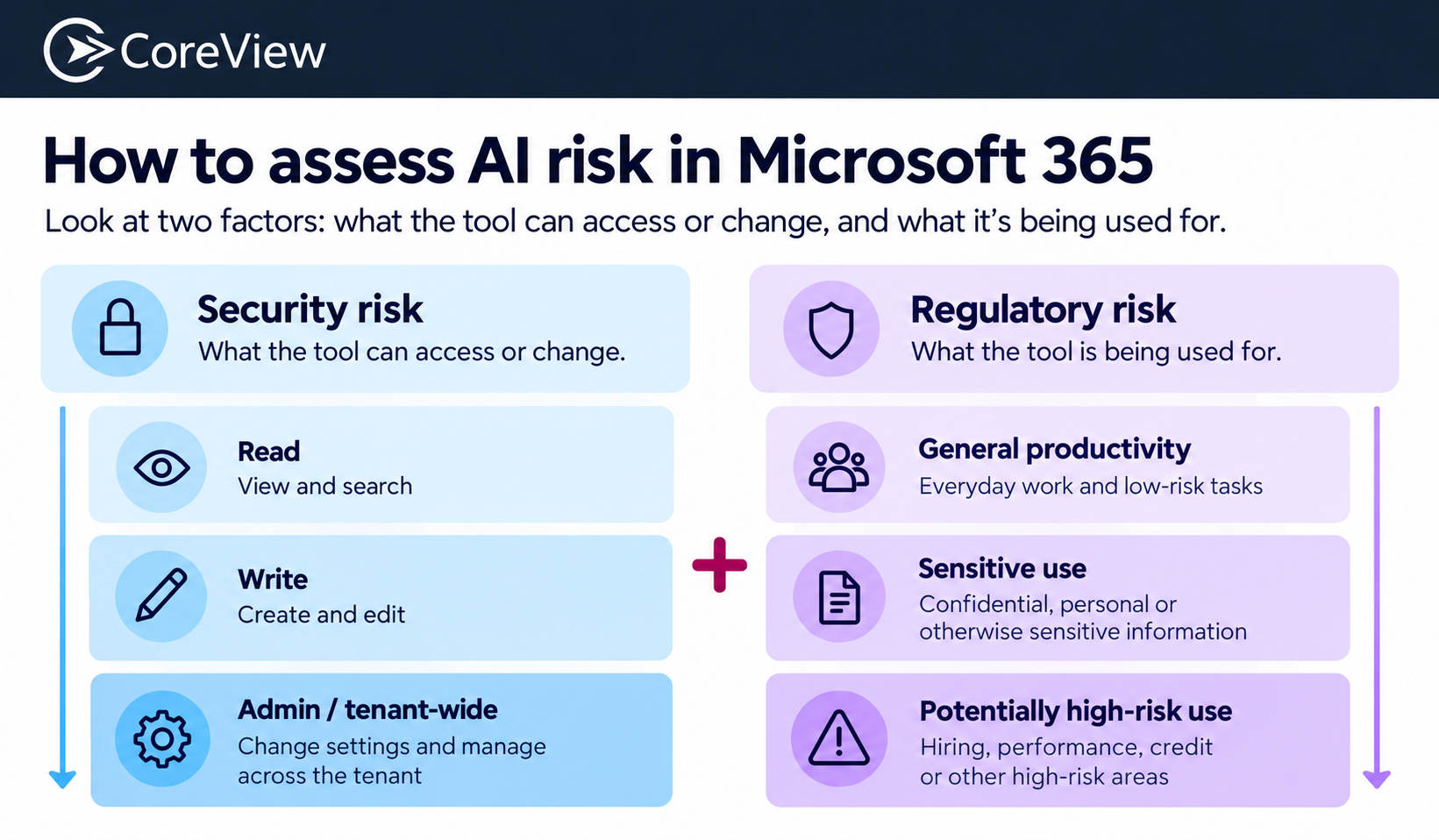
I recommend that admins consider both factors when deciding how much access and autonomy to allow each AI application or agent and which controls to apply.
I also use a simple rule when increasing an agent’s autonomy: only allow it to make changes you know you’ll be able to undo.
Give every AI application or agent a named owner who understands its purpose and remains accountable for its continued use.
That owner should be responsible for confirming that the agent is still needed, its permissions remain appropriate, and changes to its purpose trigger another review.
If an agent has no clear owner, that should be a reason to question whether it should remain active.
The next step is to translate your governance decisions into an approved technical state: your known-good or “golden” baseline.
Depending on your environment, this could include Conditional Access, least privilege permissions, application consent policies, restrictions on who can build or publish agents, DLP policies, sensitivity labels, retention policies, and audit logging. Multi-tenant organizations also need to consider how to standardize AI governance across multiple Microsoft 365 tenants while accounting for legitimate differences between environments.
As Vasil cautions, Microsoft’s default settings won’t always match an organization’s risk appetite: “Microsoft has to choose defaults that work for broad adoption. That doesn’t necessarily mean those defaults will be right for a highly regulated or security-sensitive organization.”
Defining an AI governance baseline follows a similar principle to a Zero Trust approach in Microsoft 365: access should be deliberately defined and limited according to need. It shouldn’t be assumed to be appropriate by default.
Make sure the controls in your proposed baseline are actually available under your Microsoft 365 licensing.
Licensing can affect access to security, compliance, agent governance, and automation capabilities. Availability in the admin portal also doesn’t necessarily mean a control can be managed programmatically at scale.
Where a preferred control isn’t available, document the gap and decide whether you need an alternative control, additional licensing, or another process to manage the risk.
Finally, record the approved baseline so there is a clear reference point for what the Microsoft 365 environment should look like.
That record should make it possible to compare the live tenant with the approved state and answer questions such as:
This is also where evidence becomes important. Microsoft 365 audit logs, including Office 365 audit logs, can help establish what activity took place, while a documented audit trail of Microsoft 365 changes for EU AI Act evidence can show how deviations were identified, reviewed, and resolved.
That turns the baseline from a static document into a reference point you can actively monitor and maintain.
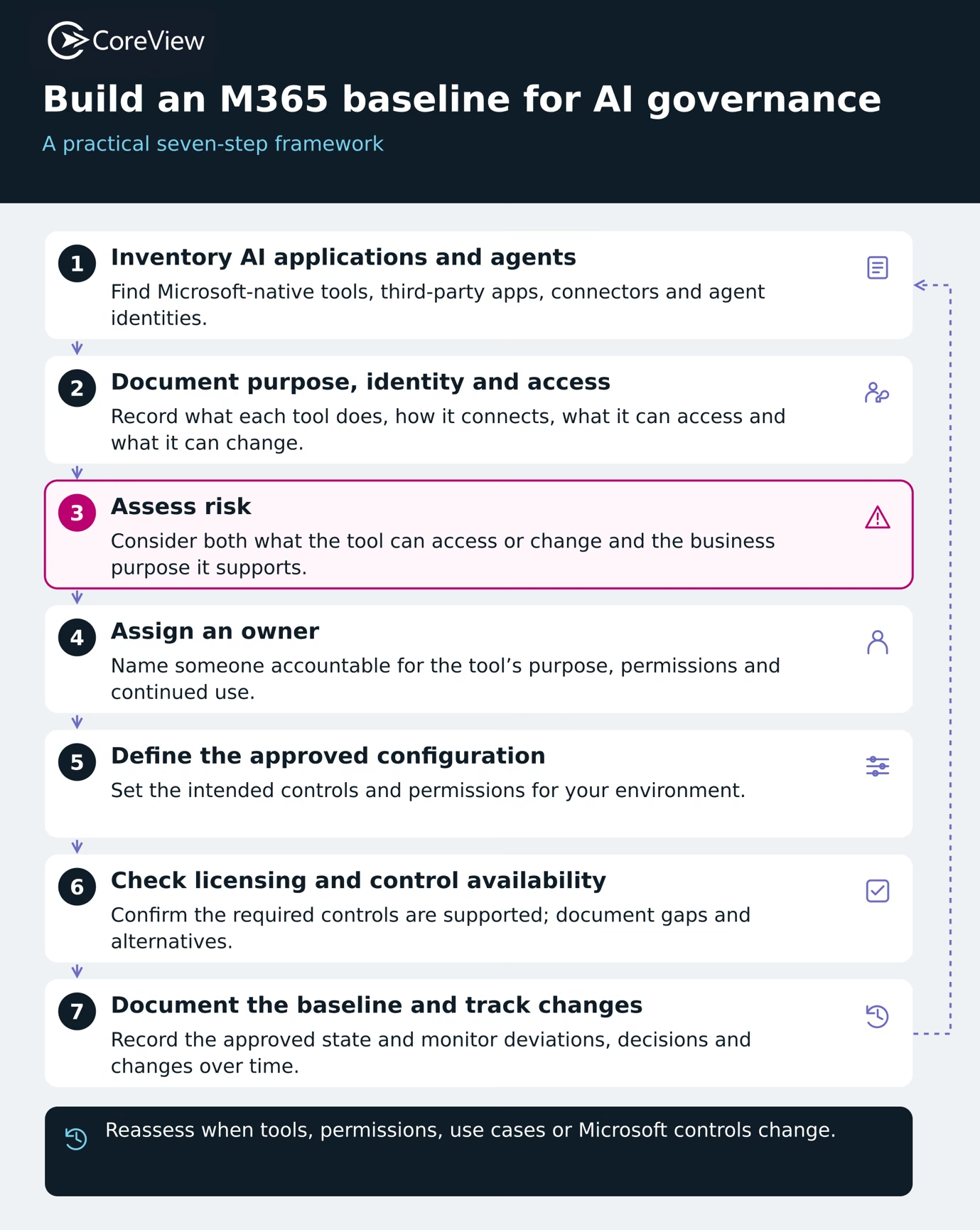
Establishing the right configuration baseline is only part of the challenge. Admins also need to monitor the Microsoft 365 environment on an ongoing basis to keep it aligned with the approved state. Why? Because the environment will keep changing.
Over time, employees might create new agents, admins may expand permissions, organizations may connect third-party applications, and Microsoft could introduce or update controls.
Any of these changes can cause the live M365 environment to drift away from the organization’s approved baseline. Admins therefore need a clear process for identifying deviations and deciding whether to remediate them or approve them as exceptions.
As Vasil explains: “You define what the configuration should look like, monitor for deviations, and when something drifts from that baseline, you either remediate it automatically or review and approve the change.”
Maintaining the baseline should therefore be an ongoing cycle, and not an annual review exercise. Admins need to monitor the environment, identify changes or deviations, assess their impact, remediate or approve them, and update the relevant records or baseline when necessary.
To maintain effective oversight of your M365 environment and keep it aligned with the approved baseline, I recommend monitoring five key areas:
It’s also important to keep a record of approved exceptions. If a configuration moves away from the baseline for a legitimate reason, document why, who approved it, and whether the approved baseline itself now needs to change.
Maintaining the baseline therefore means continuously comparing the live environment with the approved state and responding deliberately when the organization’s AI use, risk profile, or Microsoft 365 environment changes.
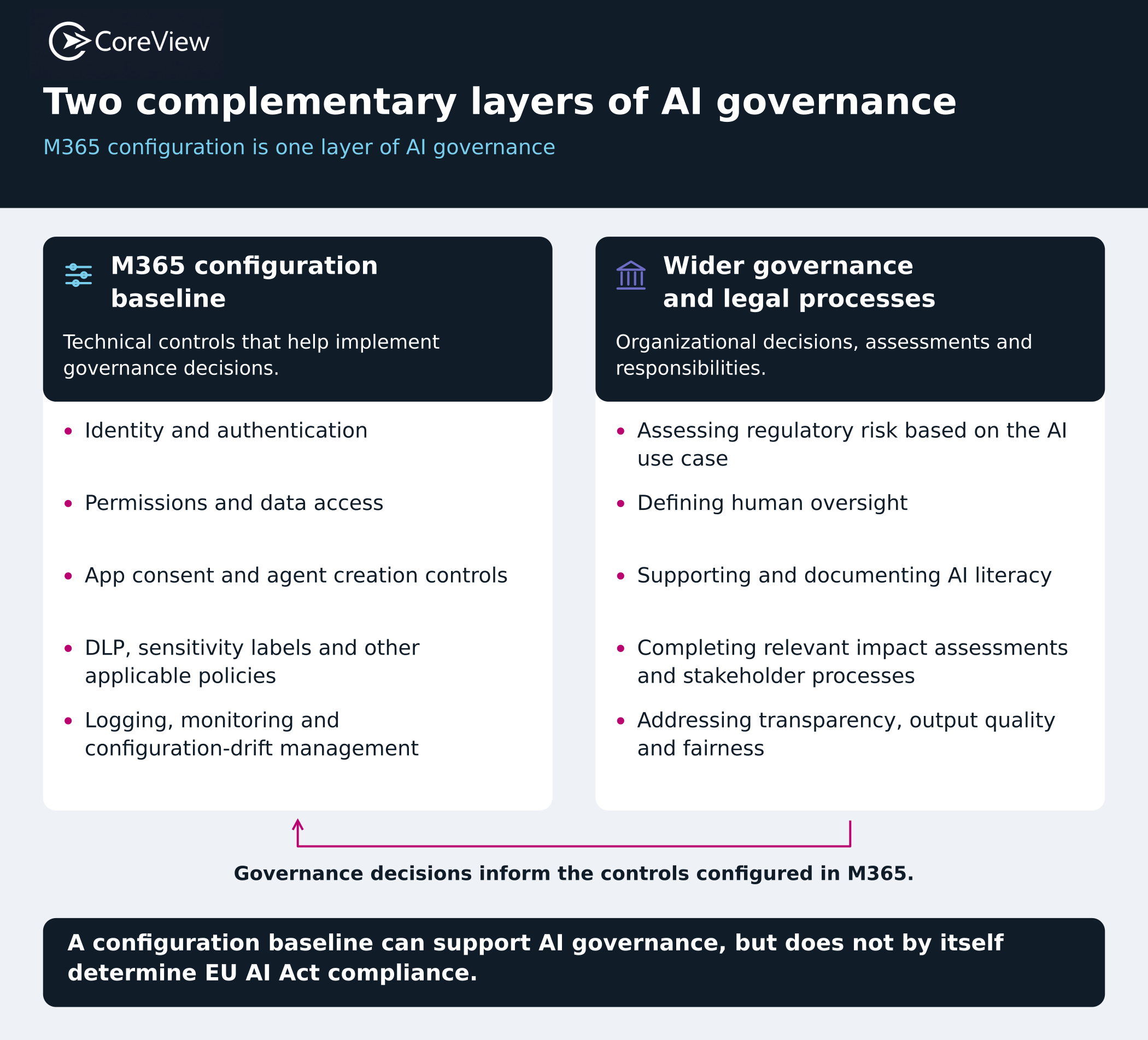
While an organization’s M365 configuration baseline can enforce important technical decisions, it does not determine whether the organization is compliant with the EU AI Act.
Organizations require separate processes to address the wider legal and governance requirements, including:
However, organizations still need to implement relevant governance decisions through Microsoft 365 controls. If governance requirements limit an agent to a defined set of data, for example, admins should reflect that restriction in the configuration baseline through the appropriate permissions and controls.
As AI use across an M365 environment evolves, it becomes harder to maintain the configuration baseline manually. Admins need to keep track of new agents, changing permissions, configuration drift, and exceptions without repeatedly rebuilding the picture from various portals and spreadsheets.
CoreView can help by giving teams centralized visibility into their M365 environment, making it easier for them to:
This visibility gives admins a more practical way to maintain the configuration baseline as AI use across Microsoft 365 changes, without relying on manual checks across multiple portals and spreadsheets. It also makes it easier to keep approved configurations consistent, identify drift quickly, and maintain a reliable record of changes over time.
The EU AI Act sets different requirements depending on how an organization uses AI and how much risk is associated with that use. Microsoft 365 admins therefore need to understand which AI applications and agents are in use in their organization’s M365 environment. They also need to know which AI tools they can access or change, who owns them, and whether any of the organization’s AI use cases carry additional regulatory obligations.
No, the EU AI Act does not prescribe a fixed set of Microsoft 365 settings.
The Act regulates how companies use AI, so the Microsoft 365 controls each organization needs will vary according to the AI tools it uses, the access and capabilities of those tools, and the risks associated with their use.
This means there is no universal “EU AI Act configuration” that every Microsoft 365 environment should apply.
An M365 security baseline is a defined set of security configurations that establishes how the Microsoft 365 environment should be configured and protected. It typically covers areas such as authentication, access control, administrative privileges, and secure configuration.
An AI governance baseline builds on that foundation by accounting for AI applications and agents as additional actors in the tenant.
Organizations should review their M365 configuration baseline for AI governance more than once a year. In addition to reviewing it regularly, admins should reassess the baseline when meaningful changes occur in the Microsoft 365 environment. That might include the addition of new AI applications or agents, changes to permissions or purpose, the introduction of new third-party connections, or updates to Microsoft controls or defaults.