Microsoft 365 configuration changes can weaken security, disrupt users, and move your tenant away from its approved state. I wrote this guide to explain how to spot meaningful changes, respond effectively, and recover quickly when something goes wrong.
Microsoft 365 configurations underpin security, access, collaboration, and day-to-day operations, but many organizations still rely on logs and manual checks to monitor them. As tenants grow, it becomes harder to identify meaningful changes, understand their impact, and restore approved settings when something goes wrong. To monitor Microsoft 365 configurations effectively, organizations must compare their live state against a trusted baseline, route alerts to the right owners, and maintain a reliable path to recovery. This article explains how to build an effective configuration monitoring model, from baselines and logging to targeted alerting, drift detection, and rollback.
Many enterprises assume they are monitoring Microsoft 365 configurations because the data exists somewhere in Microsoft. In practice, most are not doing meaningful configuration monitoring at all. The logs may be there, and some of that data may even be flowing into a SIEM, but there’s often no process to identify the changes that matter, prioritize them, and get them in front of the right people quickly enough to prevent impact.
That gap matters because not all configuration changes are equal. Some are routine. Some are risky. Some can lock users out, weaken controls, or quietly move the tenant away from its approved state without anyone noticing until much later.
A recent example makes the point clearly. In one customer environment, a change to an active Conditional Access policy locked every user out of the tenant. The issue was identified and rolled back through Configuration Manager before Microsoft had even acknowledged the support case. Without a prior synced state and a clear path to rollback, the customer would likely have been left trawling through logs, trying to work out not just that something had changed, but exactly what it had been before and what it needed to be restored to.
Organizations approach configuration monitoring at different levels of maturity. Smaller environments can get by with lighter processes for a while. Enterprise environments cannot. The larger and more distributed the tenant becomes, the more important it is to move from passive visibility to active monitoring with clear ownership, useful alerts, and tested recovery.
At the entry level, organizations rely mostly on Microsoft-native visibility. That usually means checking audit logs, watching Microsoft Secure Score, and manually reviewing a small number of settings. Microsoft’s own guidance is useful for this foundational layer.
This level of awareness is better than having no visibility at all, but it doesn’t amount to operational monitoring in any meaningful sense. It tells you that data exists. It doesn’t give you a practical model for identifying drift and responding to it.
The next step is to define approved state and compare live configuration against it. A common way to do that is through Microsoft 365 DSC, which supports drift-oriented checks using configuration-as-code methods.
This can work well in environments with strong scripting skills and time to maintain the logic. It becomes harder when monitoring needs to support multiple operational teams, each with different scopes and responsibilities.
At enterprise level, configuration monitoring needs to do more than show that drift exists. It needs to support a working operating model.
A mature enterprise monitoring model brings together the core capabilities teams need to detect, assess, and respond to configuration drift. These capabilities include:
In the rest of this article, I’ll explain how to put these capabilities in place. I’ll also share my recommended best practices for building a resilient monitoring model.
Putting Microsoft 365 configuration monitoring into practice requires a clear, repeatable approach. To build an effective process, I recommend following four important steps.
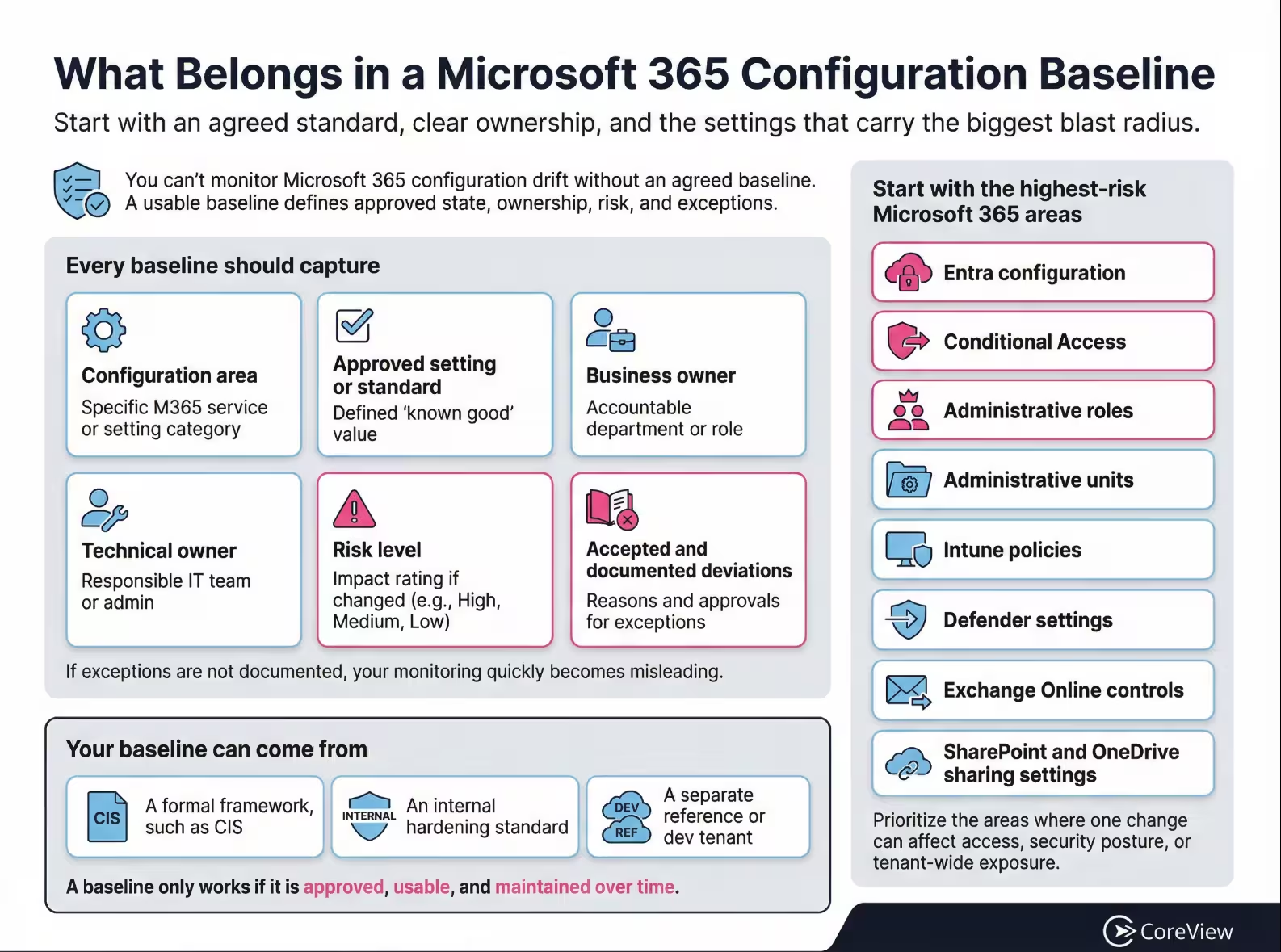
You can’t monitor drift unless you have an agreed point of reference. That baseline might come from a formal framework, an internal hardening standard, or a separate reference tenant that reflects approved state.
In my experience, many organizations start with the CIS baseline. That gives them a structured way to compare their current configuration against a recognized standard and identify where they are aligned, where they are exposed, and where they have made deliberate tradeoffs. In some environments, especially more mature ones, a separate dev or reference tenant serves as the baseline instead, with production continually compared against that approved model.
Whatever model you use, the baseline has to be usable. That means it should cover the highest-risk configuration areas first and include a clear way to manage exceptions.
Exceptions are often legitimate, but they become risky when they are easy to add and hard to remove. A temporary allowance for a named location or access scenario may be harmless on its own, but at scale, dozens or hundreds of one-off exceptions can make the policy stack difficult to understand, review, and monitor with confidence.
Equally, not every recommendation will make sense for every organization. Security always involves tradeoffs with usability, and a monitoring program that can’t account for accepted deviations will quickly become misleading.
Your baseline should capture:
I recommend starting with the areas where change has the biggest blast radius. These areas often include:
Once the baseline is set, the next question is how you are going to compare live state against it.
One route is to build around native tooling and configuration-as-code. Microsoft 365 DSC is the obvious example here. It is useful, credible, and can detect drift when implemented well.
The challenge is that enterprise monitoring is not just a technical comparison exercise. It’s also an operational one. The output has to be understandable, maintainable, and useful across teams. That becomes harder as the tenant grows and the number of monitored objects climbs. In larger environments, the number of configuration objects can run into the tens, if not hundreds, of thousands.
The other route is to use a dedicated monitoring platform that captures configuration state, compares it over time, and supports the alerting and recovery workflow around it. In my experience, that tends to be a better fit when the problem is enterprise-scale visibility and response as well as drift.
Logging is essential, but it’s only the starting point for effective configuration monitoring.
Your monitoring model should capture:
Microsoft’s monitoring guidance supports that foundational telemetry layer.
The problem is that logs alone don’t usually provide an operational answer. In most enterprise environments, the relevant data is buried inside very large audit streams. Teams might know a change happened, but not have a clean way to understand the prior value, the current value, the urgency, or the owner.
That lack of actionable context is often where organizations get stuck. They have evidence, but not monitoring. They have data, but not prioritization.
A practical logging setup should therefore do more than collect events. It should make configuration changes visible in a way that supports review, investigation, and recovery.
A strong logging setup should give teams enough coverage and context to investigate important configuration changes effectively.
To make logging a useful foundation for configuration monitoring rather than relying on raw audit data alone, my advice is to confirm that you have:
Alerting is the point where many monitoring efforts fail. Either there’s nothing in place at all, or the alerting is so broad that people stop paying attention.
Effective alerting starts with a simple principle: teams should be alerted to the changes that fall within their span of control, not to every change across the tenant.
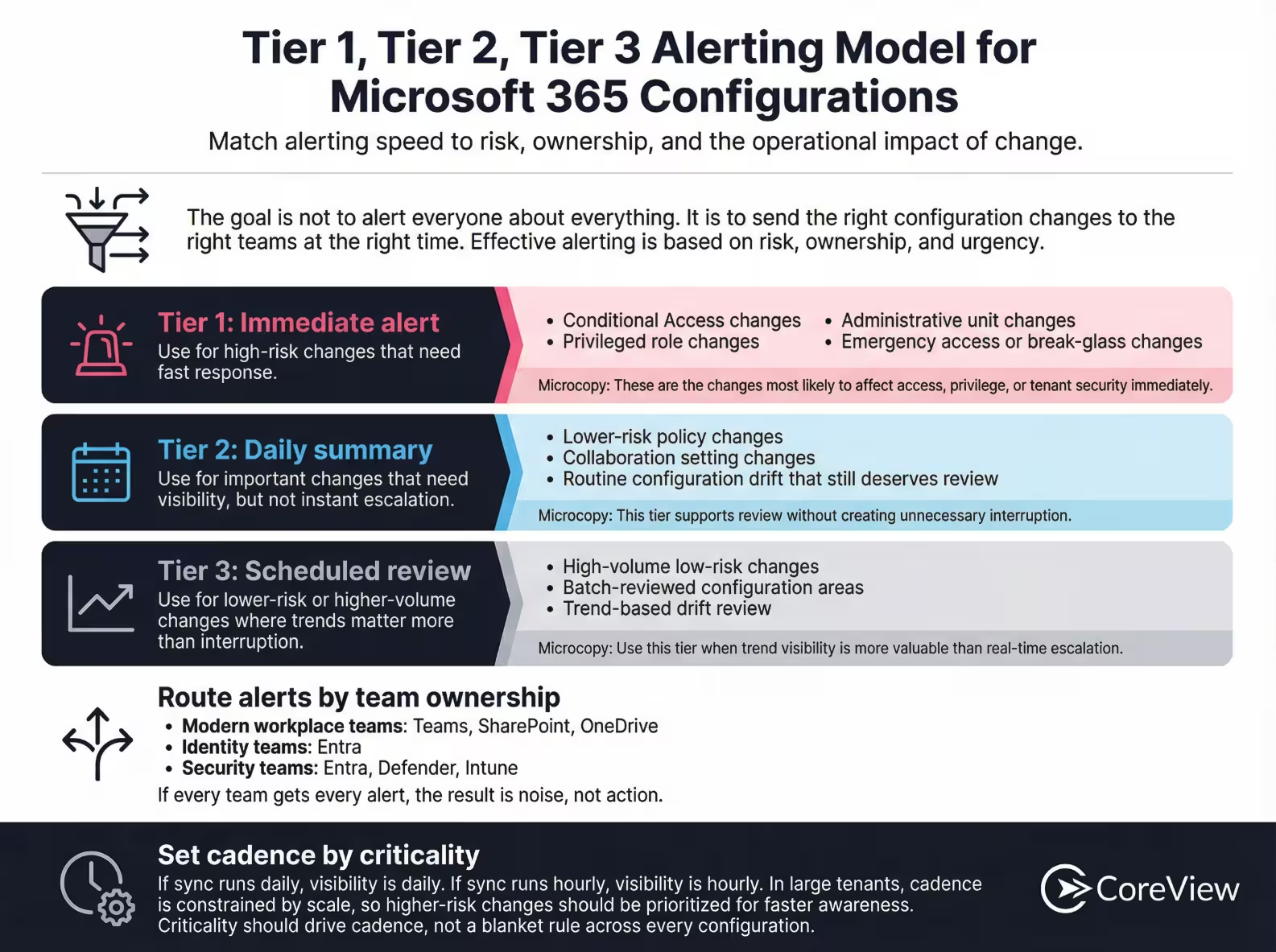
As the organization grows, this targeted approach to alerting becomes even more important. A modern workplace team may only care about Teams, SharePoint, and OneDrive changes. Identity teams care about Entra. Security teams care about Entra, Defender, and Intune. If all of them receive every configuration change, the result is noise, not action.
Conditional Access provides another good example of why targeted alerting matters in real environments. Without the context of who owns a policy change and whether it was part of an approved exception process, teams will end up with a growing stack of legitimate but poorly tracked exceptions that make the overall policy set harder to interpret and trust.
With all this in mind, I recommend dividing alerts into three distinct tiers.
Use immediate alerting for high-risk changes such as:
Use summaries for changes that matter, but don’t need instant escalation.
This type of activity might include:
Reserve scheduled review for lower-risk or higher-volume areas where trend visibility is more useful than immediate interruption.
Frequency also needs to match risk. If your sync runs daily, you will only know about the change daily. If it runs hourly, you will know hourly. But frequency is constrained by scale. In large tenants, the sync itself takes time, because the system has to read and compare a significant number of objects.
My advice is to set your monitoring cadence according to criticality rather than applying a single blanket frequency across everything.
Once your core monitoring process is in place, a few practical measures can make it more effective and easier to maintain.
Here are the best practices I recommend for strengthening Microsoft 365 resilience and responding more confidently when configurations drift from their approved state.
My recommendation is to secure the safety net first. Before you try to create the perfect alerting model, make sure you can roll back a damaging change if one lands tomorrow.
In my experience, that’s often the main reason why organizations deploy a third-party configuration monitoring tool. From the first sync, they gain some peace of mind that an accidental or malicious change won’t become a prolonged outage.
Once recovery is possible, move into baseline comparison and hardening. That is where frameworks such as CIS become practically useful, because they help teams measure where the tenant stands and what should be brought into line.
Monitoring against a baseline only works if your reporting reflects the tenant you have intentionally approved, not a theoretical ideal. If a recommended setting doesn’t fit your organization, my advice is to document the deviation and review it again when standards change.
Alert fatigue is not a side issue. It is one of the main reasons monitoring programs fail in practice. If the alerting model is too broad, people will stop trusting it.
Sending enriched configuration data into a SIEM can be very useful, especially for wider investigation and correlation. But it doesn’t replace baseline-aware monitoring. A SIEM can help connect signals. It does not, by itself, solve the problem of knowing what approved state should be and how far the tenant has drifted from it.
A rollback feature is only useful if people know how to use it under pressure. In my experience, teams should rehearse that process using low-impact configurations. That way, they can avoid the undesirable scenario of trying to remember the procedure for the first time during a live incident.
Conditional Access exceptions are not automatically a sign of weak governance. In many organizations, they are unavoidable. However, they come with an operational cost: exceptions are far harder to retire cleanly than they are to create.
Over time, exception-heavy policy stacks become difficult to understand in context. Once teams are dealing with dozens or hundreds of one-off changes, it becomes much harder to tell which policies are part of the intended design and which are leftover accommodations that should have been removed.
As a result, exception handling needs ownership, approval, and a clear path to timely cleanup.
Third-party tools can help, but they do not all solve the same problem. Some are built for engineering teams that want to manage configuration as code. Some are designed for security teams that need to collect audit events and correlate them with activity from other systems. Others focus more directly on Microsoft 365 configuration state: what changed, whether it still matches the approved baseline, who needs to review it, and whether the previous setting can be restored.
That distinction matters. A tool that is excellent for log collection may still leave your team manually working out whether a configuration change was expected, risky, or worth reversing. Likewise, a script-based approach may work well for a small central team, but become harder to manage when several teams own different parts of the tenant.
When you compare options, focus on how the tool will fit into daily operations. Can the right team see the right change quickly? Can they understand the previous and current values without digging through raw logs? Can exceptions be documented and reviewed? Can the platform support recovery if a change causes an outage or weakens a control?
Those practical questions are usually more useful than comparing feature lists in isolation. The best fit is the tool that helps your organization move from passive visibility to a repeatable monitoring and response process.
These tools help teams define approved state and detect drift through scripted or declarative methods.
In my experience, configuration-as-code tools are typically best suited to:
These tools help aggregate logs, correlate signals, and support investigations across systems.
SIEM and security monitoring tools are typically best suited to:
Their limitation is that they are usually event-led rather than baseline-led.
These platforms focus directly on:
Usually, dedicated Microsoft 365 configuration monitoring platforms are best suited to:
When assessing your options, I recommend asking the following questions:
With native-only approaches, organizations often end up stitching together logs, scripts, reviews, and manual interpretation. That approach can work, but it’s difficult to sustain. The bigger the tenant, the harder it becomes to turn raw change data into usable monitoring.
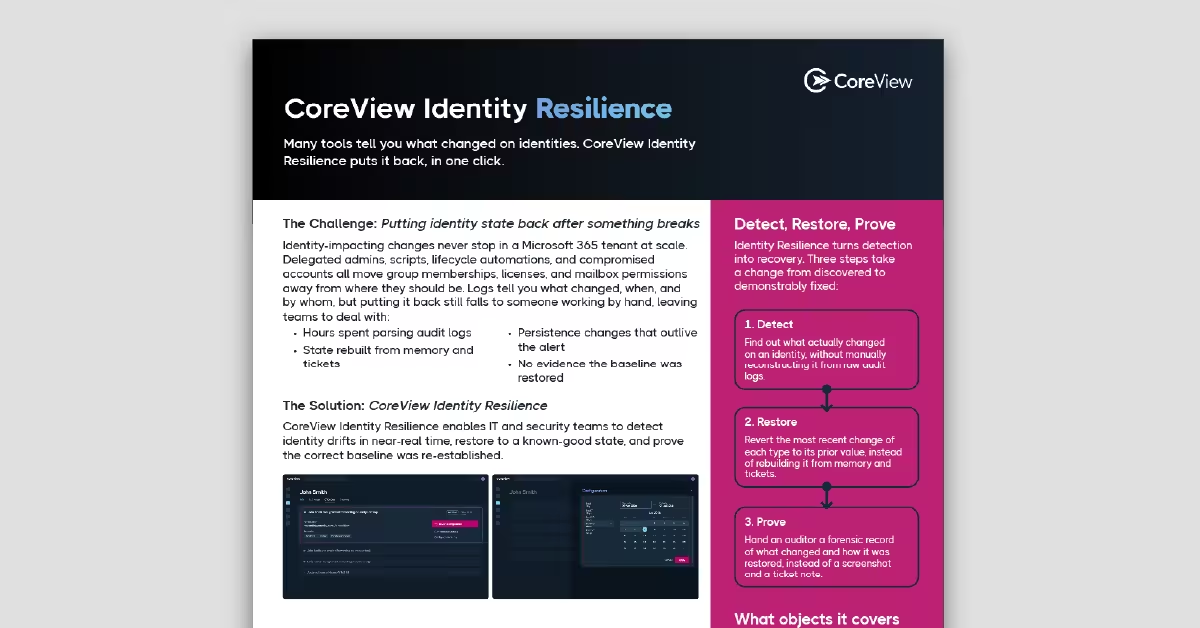
CoreView makes the operating model more manageable by giving teams a synced state to compare against, a clearer view of change over time, and a path to recovery when a change needs to be reversed.
That difference is most obvious during incidents. In the Conditional Access example I shared at the start of this article, the value was not just that change could be detected. It was that the change could be identified quickly and restored to a prior synced state without waiting on a long support process or trying to reconstruct the previous configuration manually.
CoreView is most useful when configuration monitoring becomes part of daily operations, not a periodic admin check. At that stage, teams need more than a log of what changed. They need to know whether the tenant still matches the approved baseline, which changes need attention, who owns the response, and whether the previous state can be restored if something goes wrong.
This is where CoreView fits well. It helps teams compare live Microsoft 365 settings against an approved baseline, monitor configuration drift across complex tenants, route alerts to the right owners, and keep a usable change history for investigation and audit.
CoreView is best suited to organizations that need to:
Logging records configuration events, while configuration monitoring turns that data into a process for identifying, assessing, and responding to meaningful changes. Logs may show that a change occurred and who made it, but effective monitoring also provides the previous and current values, the level of risk, the responsible owner, and a route to recovery.
Establish a Microsoft 365 configuration baseline by documenting approved settings, owners, risk levels, and accepted deviations. The baseline may be based on a recognized framework such as CIS, an internal security standard, or a reference tenant that represents the organization’s intended configuration.
Microsoft 365 audit logs are not enough to provide comprehensive configuration monitoring on their own. They can show that a change occurred and who made it, but teams may still need to determine the previous value, assess the urgency, identify the responsible owner, and establish whether the change moved the tenant away from its approved state.
High-risk changes to Conditional Access, privileged roles, administrative units, and emergency access accounts should usually trigger immediate alerts. Lower-risk or higher-volume changes may be better suited to daily summaries or scheduled reviews, depending on their potential impact and the team responsible for them.
Teams should set their monitoring cadence according to risk, checking critical configurations more frequently than lower-risk areas. They may need to check high-risk settings hourly, while reviewing less urgent changes daily or at scheduled intervals. They should also account for tenant size and the time required to sync and compare configuration objects.
To monitor drift, teams can use configuration-as-code tools, SIEM platforms, or dedicated Microsoft 365 configuration monitoring software. Configuration-as-code supports scripted baseline comparisons, SIEM tools provide wider event correlation, and dedicated platforms combine drift visibility with targeted alerting and recovery workflows.